

Forum Replies Created
-
AuthorPosts
-
Brian
MemberThank you for the information.
I was not able to see anything that looked wrong, so that does not help resolve this.
Sorry for this dragging out so long.
I have a way to determine which rewrite rules are happening on the Events.
Please download and load the Debug Bar Plugin:
Once activated visit a event that gives a 404 error and make sure you can see the admin bar.
Then Click on Debug in the Admin Bar
This will bring up a new screen and on that Click Request
It will look something like this:
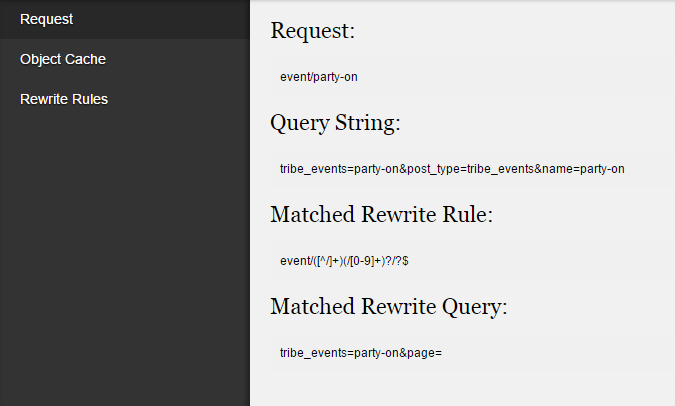
Please let me know the information that same as in the screenshot.
That should help narrow down the exact cause.
Thanks
MemberHi,
Sorry for the issues you are having.
Are you talking about the front end form or in the backend ?
Let me know and we can work to resolve this.
Thanks
MemberHi,
I can help troubleshoot this with you.
It appears that both our plugin and another is using the same class.
Can you follow our Testing for Conflicts Guide and see if that can help narrow down the conflict.
Let me know what you find out and we can go from there.
Thanks
MemberHi,
Sorry for the issues you are having.
I visited this site:
And I see this event:
Test Event
March 28 @ 6:00 pm – 10:00 pmShould it be showing another event? What is the Event List Widget Settings?
Let me know and we can go from here.
Thanks
MemberWe are working on advancing the ticketing solutions and hope to include more complex features such as variables.
Since this is marked resolved I am going to close this ticket, but if you need anything else related to this topic or another please post a new topic on the forum and we can help you out.
Thanks
MemberHi James,
The Facebook Events Plugin can only import Events into WordPress.
The Facebook API does not enable us to create events so it is not possible to create events in Facebook from WordPress.
Let me know if you have any follow up questions.
Thanks
March 19, 2015 at 8:02 am in reply to: Intermittent calendar pagination and view list issues #949358MemberHi,
Sorry for the issues you are having.
Looks like the issue maybe that you are running The Events Calendar Pro 3.8
Please update to 3.9.1 and that should resolve this issues as it will fix the javascript error breaking things.
If automatic updates are not working please check your site url in the account in the license section on this site.
You can also download the latest version from your account here as well.
Let me know if that works.
Thanks
MemberOk sounds good.
The behavior that you are experiencing with the recurring events is expected as the plugin considers them all one event with different dates. So you may have to come up with another solution to get around this.
Since this is marked resolved I am going to close this ticket, but if you need anything else related to this topic or another please post a new topic on the forum and we can help you out.
Thanks
MemberOk great, glad you were able to get the map view working.
For the events not showing it could be the geolocation data for the venue.
In the next version you will be able to add that data yourself, for now if you use the Events Rocket Plugin an unofficial plugin maintained by some of our developers:
Has an option to show you the coordinates fields in the venues.
You can use that to check if the Venues has the information or not.
MemberGreat, glad it helps, I am going to go ahead and close this ticket, but if you need help on this or something else please post a new ticket.
Thanks!
(Übersetzt mit Google Translate )
Große, froh, dass es hilft , ich werde weitermachen und schließen Sie dieses Ticket , aber wenn Sie Hilfe auf diesem oder etwas anderes brauchen, geben bitte ein neues Ticket .
Danke Shon!
March 19, 2015 at 7:52 am in reply to: Error 500 internal admin facebook import page goes down before loading #949348MemberHi,
Glad you solved one problem.
We have an issue where the Automatic Importer Timesout and it does not pick up where it left off and just tries to import the same events over and over. We have a fix to this in the next version that should be out late next month, but I do not have a exact timeline to give.
If you check the box to manually import all your events you have and then as new ones come available does the automatic importer start again?
What about changing the frequency? Does that help?
MemberThis reply is private.
March 19, 2015 at 7:46 am in reply to: Woocommerce Tickets – Set number of tickets user can buy #949341MemberHi,
Thanks for the interest in WooCommerce Tickets.
We do not have a feature in our plugin to limit ticket sales.
I have had success using this plugin to achieve that:
If you purchase WooCommerce Tickets and that does not work out you may request a refund within 30 days of purchasing.
Thanks
March 19, 2015 at 6:11 am in reply to: Bought Calendar Pro, Actually Need Woocommerce Tickets #949325MemberHi,
We are unable to transfer licenses.
Please email us at [email protected] and request a refund for Pro, please include the reason and your order number when emailing us.
We will refund that purchase and then you can purchase WooCommerce Tikets.
Thanks
MemberHi Orlando, If you would just like the Facebook Events Add On you can just purchase that.
All you need for any of our plugins to work is the free version of the events calendar found on WordPress.org
None of the commercial plugins require each other.
Thanks
-
AuthorPosts