
Home › Forums › Calendar Products › Events Calendar PRO › 404 pages of events that are not reoccuring
- This topic has 41 replies, 8 voices, and was last updated 11 years, 2 months ago by
Leah.
-
AuthorPosts
-
March 11, 2015 at 4:18 am #947515
Zoe
ParticipantHello,
On our website we updated the plugin but very soon noticed that events without a reocuuring date always 404 as the link was not being sent correctly.
I ran the stuff on here with https://theeventscalendar.com/knowledgebase/fixing-http-404-errors/ with no success as it a live website I have had to put the plug-in on a much older version. so the event are working.
The Url that fails is
http://eastgateclub.co.uk/event/mens-aegon-2-v-st-james/the ones that work are
http://eastgateclub.co.uk/event/easter-tennis-camp/2015-04-09/it seams without that date being passed through it causes.
Here is the System info:
url
    http://eastgateclub.co.uk
install keys

        events-calendar-pro =

WordPress version
    4.1.1
PHP version
    5.3.28
plugins

        Auto ThickBox Plus version 1.9 by attosoft(http://attosoft.info/en/)
        Awesome Weather Widget version 1.4.3.2 by Hal Gatewood(https://www.halgatewood.com)
        Black Studio TinyMCE Widget version 2.2.3 by Black Studio(http://www.blackstudio.it)
        Capability Manager Enhanced version 1.5.2 by Jordi Canals, Kevin Behrens(http://agapetry.net)
        Cartpauj Register Captcha version 1.0.01 by Cartpauj(http://cartpauj.icomnow.com/)
        Contact Form 7 version 4.1 by Takayuki Miyoshi(http://ideasilo.wordpress.com/)
        The Events Calendar PRO version 3.9.1 by Modern Tribe, Inc.(http://m.tri.be/20)
        Frolic version 1.3.2 by iThemes(http://ithemes.com)
        Image Widget version 4.1 by Modern Tribe, Inc.(http://m.tri.be/26)
        Kwayy HTML Sitemap version 3.1 by Kwayy Infotech(http://www.kwayyinfotech.com/)
        Really Simple CAPTCHA version 1.8.0.1 by Takayuki Miyoshi(http://ideasilo.wordpress.com/)
        s2Member Framework version 150225 by s2Member / WebSharks, Inc.(http://www.s2member.com/)
        Simple 301 Redirects version 1.06 by Scott Nellé(http://www.scottnelle.com/)
        The Events Calendar version 3.9.1 by Modern Tribe, Inc.(http://m.tri.be/1x)
        Trackable Social Share Icons version 1.3 by Name: Ecreative Internet Marketing(http://www.ecreativeim.com/)
        WordPress SEO version 1.7.3.3 by Team Yoast(https://yoast.com/)
        ZigWidgetClass version 0.7.2 by ZigPress(http://www.zigpress.com/)

network plugins
    -
mu plugins
    -
theme
    Eastgate
multisite
    -
settings

        disable_metabox_custom_fields = show
        welcome_notice = 1
        previous_ecp_versions =

        Array
        (
            [0] => 0
            [1] => 2.0.11
            [2] => 3.0.1
            [3] => 3.0.3
        )

        latest_ecp_version = 3.9.1
        displayedPressTrendsDialogue = 1
        recurring_events_are_hidden = exposed
        defaultValueReplace = 1
        defaultCountry =
        pro-schema-version = 3.5
        earliest_date = 2015-01-17 13:00:00
        latest_date = 2015-12-10 22:00:00
        viewOption = list
        last-update-message = 3.9.1
        donate-link =
        postsPerPage = 10
        liveFiltersUpdate = 1
        hideSubsequentRecurrencesDefault =
        userToggleSubsequentRecurrences =
        recurrenceMaxMonthsBefore = 24
        recurrenceMaxMonthsAfter = 24
        showComments =
        showEventsInMainLoop =
        eventsSlug = event
        singleEventSlug = event
        multiDayCutoff = 00:00
        defaultCurrencySymbol = $
        reverseCurrencyPosition =
        embedGoogleMaps = 1
        geoloc_default_geofence = 25
        geoloc_default_unit = miles
        embedGoogleMapsZoom = 10
        debugEvents =

WordPress timezone
    -
server timezone
    UTC
here the tribe events debug on a 404 page
<Tribe Events Query>

object(WP_Query)#1113 (51) {
  ["query_vars"]=>
  array(50) {
    ["attachment"]=>
    string(23) "mens-aegon-2-v-st-james"
    ["error"]=>
    string(0) ""
    ["m"]=>
    string(0) ""
    ["p"]=>
    int(0)
    ["post_parent"]=>
    string(0) ""
    ["subpost"]=>
    string(0) ""
    ["subpost_id"]=>
    string(0) ""
    ["attachment_id"]=>
    int(0)
    ["name"]=>
    string(0) ""
    ["static"]=>
    string(0) ""
    ["pagename"]=>
    string(0) ""
    ["page_id"]=>
    int(0)
    ["second"]=>
    string(0) ""
    ["minute"]=>
    string(0) ""
    ["hour"]=>
    string(0) ""
    ["day"]=>
    int(0)
    ["monthnum"]=>
    int(0)
    ["year"]=>
    int(0)
    ["w"]=>
    int(0)
    ["category_name"]=>
    string(0) ""
    ["tag"]=>
    string(0) ""
    ["cat"]=>
    string(0) ""
    ["tag_id"]=>
    string(0) ""
    ["author"]=>
    string(0) ""
    ["author_name"]=>
    string(0) ""
    ["feed"]=>
    string(0) ""
    ["tb"]=>
    string(0) ""
    ["paged"]=>
    int(0)
    ["comments_popup"]=>
    string(0) ""
    ["meta_key"]=>
    string(0) ""
    ["meta_value"]=>
    string(0) ""
    ["preview"]=>
    string(0) ""
    ["s"]=>
    string(0) ""
    ["sentence"]=>
    string(0) ""
    ["fields"]=>
    string(0) ""
    ["menu_order"]=>
    string(0) ""
    ["category__in"]=>
    array(0) {
    }
    ["category__not_in"]=>
    array(0) {
    }
    ["category__and"]=>
    array(0) {
    }
    ["post__in"]=>
    array(0) {
    }
    ["post__not_in"]=>
    array(0) {
    }
    ["tag__in"]=>
    array(0) {
    }
    ["tag__not_in"]=>
    array(0) {
    }
    ["tag__and"]=>
    array(0) {
    }
    ["tag_slug__in"]=>
    array(0) {
    }
    ["tag_slug__and"]=>
    array(0) {
    }
    ["post_parent__in"]=>
    array(0) {
    }
    ["post_parent__not_in"]=>
    array(0) {
    }
    ["author__in"]=>
    array(0) {
    }
    ["author__not_in"]=>
    array(0) {
    }
  }
  ["tax_query"]=>
  NULL
  ["meta_query"]=>
  bool(false)
  ["date_query"]=>
  bool(false)
  ["post_count"]=>
  int(0)
  ["current_post"]=>
  int(-1)
  ["in_the_loop"]=>
  bool(false)
  ["comment_count"]=>
  int(0)
  ["current_comment"]=>
  int(-1)
  ["found_posts"]=>
  int(0)
  ["max_num_pages"]=>
  int(0)
  ["max_num_comment_pages"]=>
  int(0)
  ["is_single"]=>
  bool(true)
  ["is_preview"]=>
  bool(false)
  ["is_page"]=>
  bool(false)
  ["is_archive"]=>
  bool(false)
  ["is_date"]=>
  bool(false)
  ["is_year"]=>
  bool(false)
  ["is_month"]=>
  bool(false)
  ["is_day"]=>
  bool(false)
  ["is_time"]=>
  bool(false)
  ["is_author"]=>
  bool(false)
  ["is_category"]=>
  bool(false)
  ["is_tag"]=>
  bool(false)
  ["is_tax"]=>
  bool(false)
  ["is_search"]=>
  bool(false)
  ["is_feed"]=>
  bool(false)
  ["is_comment_feed"]=>
  bool(false)
  ["is_trackback"]=>
  bool(false)
  ["is_home"]=>
  bool(false)
  ["is_404"]=>
  bool(false)
  ["is_comments_popup"]=>
  bool(false)
  ["is_paged"]=>
  bool(false)
  ["is_admin"]=>
  bool(false)
  ["is_attachment"]=>
  bool(true)
  ["is_singular"]=>
  bool(true)
  ["is_robots"]=>
  bool(false)
  ["is_posts_page"]=>
  bool(false)
  ["is_post_type_archive"]=>
  bool(false)
  ["query_vars_hash":"WP_Query":private]=>
  string(32) "4bcb91211dfb016aa56ea99efda4d14d"
  ["query_vars_changed":"WP_Query":private]=>
  bool(false)
  ["thumbnails_cached"]=>
  bool(false)
  ["stopwords":"WP_Query":private]=>
  NULL
  ["query"]=>
  array(1) {
    ["attachment"]=>
    string(23) "mens-aegon-2-v-st-james"
  }
  ["tribe_is_event"]=>
  bool(false)
  ["tribe_is_multi_posttype"]=>
  bool(false)
  ["tribe_is_event_category"]=>
  bool(false)
  ["tribe_is_event_venue"]=>
  bool(false)
  ["tribe_is_event_organizer"]=>
  bool(false)
  ["tribe_is_event_query"]=>
  bool(false)
  ["tribe_is_past"]=>
  bool(false)
}

Query Results:

array(0) {
}

is_404() =
bool(false)
</Tribe Events Query>
Changing permalinks to default did fix the problem.
Many Thanks
March 11, 2015 at 9:42 am #947648Brian
MemberHi,
Sorry for the issues you are having. I can help troubleshoot this with you.
Thanks for running through the 404 Error Guide Steps.
So the Recurring Events work, but the regular events are having an issue and downgrading the Events Calendar fixed it?
So is you site right now is working with an earlier version of the Events Calendar, correct?
Let me know and we can go from here to resolve this.
Thanks
March 11, 2015 at 9:57 am #947655ParticipantYes,
The Recurring events loaded only when the date is passed through the url like this:
http://eastgateclub.co.uk/event/easter-tennis-camp/2015-04-09/when the url does not have that date the page 404’s.
Yes we had to downgrade the plugin to an older version to fix it and that what we have on at the moment as we need the events showing.
March 11, 2015 at 12:50 pm #947702MemberWhat version is working for now then?
Also do you have any coding in your htaccess file or any custom redirects in WordPress SEO plugin or another redirect plugin?
Since you have a live site are you able to setup a clone of the site to test and resolve this issue?
Let me know.
Thanks
March 12, 2015 at 2:11 am #947829ParticipantThe version we are currently using is:
The Events calendar: 3.0.3
The events calendar: 3.0.5The reason we need to upgrade is because on the sport page we have the widget http://eastgateclub.co.uk/tennis/ if more than one event is on that day it show there no events but in the newer versions that is fixed.
The Htaccess file has the following
# BEGIN s2Member GZIP exclusions
<IfModule rewrite_module>
	RewriteEngine On
	RewriteBase /
	RewriteCond %{QUERY_STRING} (^|\?|&)s2member_file_download\=.+ [OR]
	RewriteCond %{QUERY_STRING} (^|\?|&)no-gzip\=1
	RewriteRule .* - [E=no-gzip:1]
</IfModule>
# END s2Member GZIP exclusions

# BEGIN WordPress
<IfModule mod_rewrite.c>
RewriteEngine On
RewriteBase /
RewriteRule ^index\.php$ - [L]
RewriteCond %{REQUEST_FILENAME} !-f
RewriteCond %{REQUEST_FILENAME} !-d
RewriteRule . /index.php [L]
</IfModule>

# END WordPress
We have no custom redirect on and I have disable the 301 redirect plug-in.
I have set up a dev site of east gate club and updated the plugin to the latest version and the bug has come around again.
http://bghr.epixdev1.co.uk/tennis/if you click on the “Tennis Section Open Day” event you will see the bug. but if you go to the 8th April and click on that event it works fine.
Many Thanks
March 12, 2015 at 2:15 am #947830ParticipantThis reply is private.
March 12, 2015 at 11:54 am #947957MemberOk the plugin is suppose to catch the urls without the dates and direct them correctly. That is not working in your case.
Since this is a live site are you able to have a test site where you can upgrade the plugins and then create some new recurring events and see if those work or do more tests from there?
March 13, 2015 at 8:07 am #948145ParticipantHi,
Yes we have created a test site here
http://bghr.epixdev1.co.uk/tennis/
on that site I have updated the plugins and its running on a separate database so we can test everything you send to us to resolve the problem.
We did get you access but you have deleted it from a hidden post.
I have added a new event with only one date.
http://bghr.epixdev1.co.uk/event/testevents/but it still has a 404 redirect problem.
But when I updated that date to be recurring, the redirect work correctly.
So the issue is on events that only have one date that causing the 404 issue.
let us know of any other test you need us to run.
March 16, 2015 at 7:03 am #948539MemberOk so recurring events work with dates on the url.
When you create a single event that does not work, correct?
Do you have any pages called event or events?
Also, if in the event settings you change the default slug from events to something else and then resave permalinks does that help the single event show?
Let me know and we can go from there.
Thanks
March 17, 2015 at 10:27 am #948914ParticipantOk so recurring events work with dates on the url.</strong
Yes thats correct it works with or without date on the end as it redirect correctlyWhen you create a single event that does not work, correct?
Yes thats correct they do not workDo you have any pages called event or events?
No we dont
Also, if in the event settings you change the default slug from events to something else and then resave permalinks does that help the single event show?
Done that does not make any difference still not working.March 17, 2015 at 4:05 pm #948974Andrew
ParticipantWe are having the exact same issue on our site: http://www.bankview.org/events/
March 18, 2015 at 10:30 am #949178ParticipantAny word on if this issue has been resolved?
March 18, 2015 at 10:46 am #949181MemberHi,
After talking to some people on the support team we have used a plugin in the past to help diagnose these issues.
The plugin is called: Rewrite Rules Inspector
Please load and activate that plugin.
After activating go to Tools > Rewrite Rules
Please Flush Rules, then click the Download button and share the link as a private reply for me to download. If you do not have way to share a link in a file, please create a pastebin and place it in there and share that link, it does not require an account.
That help figure out where the conflict is.
Thanks
Andrew,
Can you please follow the instructions above and create a next ticket with what you find out. We can give you our full attention and one on one support when you have your own ticket. If for some reason you are unable to do that, no worries, I can still help you out here.
Thanks
March 19, 2015 at 1:49 am #949299ParticipantThis reply is private.
March 19, 2015 at 12:24 pm #949447MemberThank you for the information.
I was not able to see anything that looked wrong, so that does not help resolve this.
Sorry for this dragging out so long.
I have a way to determine which rewrite rules are happening on the Events.
Please download and load the Debug Bar Plugin:
Once activated visit a event that gives a 404 error and make sure you can see the admin bar.
Then Click on Debug in the Admin Bar
This will bring up a new screen and on that Click Request
It will look something like this:
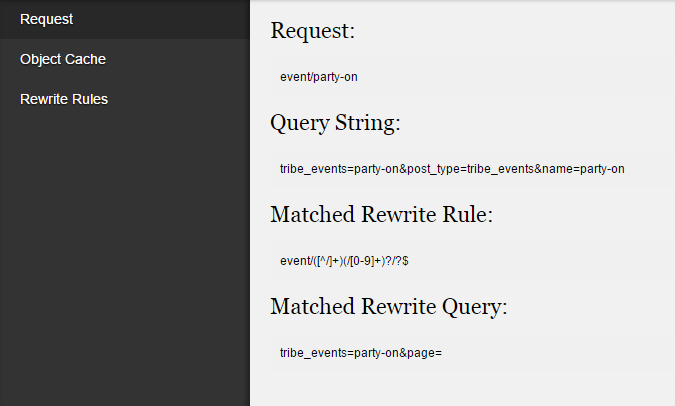
Please let me know the information that same as in the screenshot.
That should help narrow down the exact cause.
Thanks
-
AuthorPosts
- The topic ‘404 pages of events that are not reoccuring’ is closed to new replies.