

Forum Replies Created
-
AuthorPosts
-
March 17, 2016 at 2:38 pm in reply to: Community Events Update Lost me the Community Events page #1090647
Barry
MemberHi Oliver,
It may not help directly but if possible can you try updating The Events Calendar to 4.1.0.1 (just released!), flush permalinks and see if things correct themselves re the Community Events URLs?
Please don’t hesitate to let me know if that doesn’t resolve this.
March 17, 2016 at 2:34 pm in reply to: Attendees List is missing purchaser name since 4.1 update #1090644March 17, 2016 at 2:23 pm in reply to: Attendees List is missing purchaser name since 4.1 update #1090634MemberI do apologize @barback, it is indeed geared toward WooCommerce rather than EDD and I was primarily going off license information for the original poster in suggesting it (for that kind of reason, it’s best in general to create fresh support topics of your own).
Give me a few minutes though and I will see if I can create an alternative for EDD usage.
MemberHi Frank,
Thanks for getting in touch!
When exporting attendee data to either print, email or CSV is it possible to select what data is exported?
Not at this time, I’m afraid – though if you’re at home working with code you can safely modify the exporter output with some pretty straightforward snippets.
Does it allow you to export data collected by attendee that was provided using the new Attendee Information feature?
It does!
I hope that answers your questions but let me know if I can help with anything else.
MemberHi Bart,
I’m sorry we let you down but we’d love to help with this latest issue if we can.
In the first instance, can you try upgrading The Events Calendar to 4.1.0.1 (just released!), then resave permalinks, and see if the problem is resolved?
If it is still problematic, could you reply with:
- Some notes on how to locate one of these recurring events (I can’t see any on page 1 of your main events page)
- A copy of your system information, which you may prefer to share via private reply
Thanks!
MemberHi Florian,
Our apologies for the inconvenience.
Can you try updating The Events Calendar to 4.1.0.1 (just released!), flush your permalinks by visiting the Permalink Settings screen (you need not change anything, though) and see if that resolves this?
Thanks!
MemberHi edebex,
I guess it really depends on what you want to achieve. There are two basic ways to modify map view tooltips/markers (and the data used to create them):
- You can filter the marker data using the tribe_events_ajax_response hook (if you get creative, you can do a lot with this alone by adding extra text to the marker title fields etc)
- You could also override the Javascript function – tribe_ev.fn.map_add_marker – which actually builds the markers
Does that help at all? Unfortunately we cannot go in to too much depth for customizations like this one, but hopefully this at least gives you a steer in the right direction 🙂
MemberHi Paulo,
Thanks for getting in touch!
You didn’t share any system information or your domain so it’s hard for me to get a sense of what is different between our demo site and your own site.
However, what I can say is that our demo site is not much more than a moderately customized default theme and, in terms of event views, what you see there is near-identical to what you would get if you added our plugin to a site running something like Twenty Fifteen.
Enfold, I believe, ships with its own set of customizations and modifications targeting The Events Calendar so it could certainly be the case that things are significantly different in your case.
Why not try switching to a default theme (on a test or staging site perhaps) and see how things look? If you find the differences can be attributed to Enfold, it may be best to hit up their support team for further guidance.
Does that help at all?
MemberHi Rachel,
That doesn’t sound like the expected behaviour.
It’s not something I see locally or that, so far, I’ve seen other reports of. Would it be possible for you to link me to a live example? Failing that, could you take a screenshot and upload it to your site or to a service like Dropbox then share the URL in here?
Thanks!
March 17, 2016 at 1:44 pm in reply to: Import with the iCal Importer end of line characters lost for meetup #1090586MemberHi Kulwinder,
I’m not quite sure where you are seeing this problem.
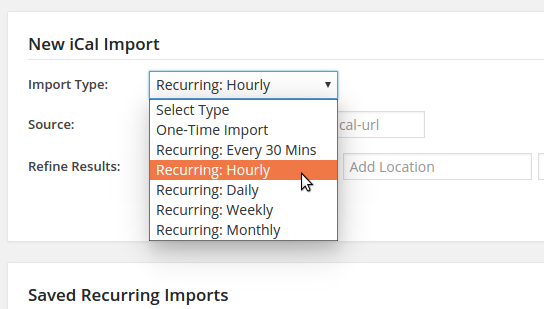
Do you mean that the dropdown in the above screenshot is malformatted in your case? Or are you seeing the problem after saving the import job?
If you can point me in the right direction that would be awesome. Also, if you wish to share a screenshot, please note that right at this time that isn’t supported directly in the forums – but you can certainly share URLs to images you have uploaded to your own website or services like Dropbox if that helps to highlight the problem.
Thanks!
March 17, 2016 at 1:38 pm in reply to: Site Migration to new hosting provider causes license to run out of installs. #1090578MemberHi Kulwinder,
I’d be happy to help you here 🙂
Please visit the license key management page and disconnect the licenses from the old domain(s). Next, return to your new installation and re-enter them if needed and save the page.
They should now work.
Does that help?
March 17, 2016 at 1:32 pm in reply to: Critical bug: WooCommerce ticket quantity input resets to zero in 4.1 #1090567MemberHi James,
Interesting problem. Can you point me to a live example? I was unable to reproduce locally – though here is what I tried:
- Activated only the latest versions of Event Tickets, Event Tickets Plus and WooCommerce
- Enabled tickets for pages
- Added a WooCommerce ticket to a new page
- I did not experience a problem whereby the quantity was reset after the selector lost focus
Am I approaching this from the wrong angle at all? Or, if not, have you been able to try out our standard troubleshooting steps?
Let me know!
MemberHi CE,
That sounds like an interesting idea and if TicketMaster offers a suitable API it could certainly be possible for us to build integration within the Event Tickets suite.
What I’d recommend is posting a feature request for this on our UserVoice page (and if there are any suitable existing requests, feel free to up-vote them) – this will ensure it gets on our radar for further assessment.
If you need help driving this forward in the near-term, you may wish to seek help from one of these development shops.
I hope that helps 🙂
March 17, 2016 at 12:26 pm in reply to: Attendees List is missing purchaser name since 4.1 update #1090514MemberApologies for any inconvenience.
https://gist.github.com/barryhughes/3be509552be340039f8f
The above snippet, which you could add to a custom plugin or else to your theme’s functions.php file if you prefer, should provide you with purchaser name and email address columns in the CSV export data.
Does that help as an interim solution?
March 17, 2016 at 12:10 pm in reply to: Activating Atendee Information Quantity Box not Working #1090495MemberHi Danny,
Once you increment the quantity selector to a value above zero the additional fields should become visible.
I do see that isn’t happening in your case, but a type error seems to be getting in the way and blocking things and I am unsure what is triggering that.
With this in mind, could you run through our standard troubleshooting steps? In your case you would want to keep the following active as a minimum, but deactivate everything else and switch to a default, unmodified theme:
- The Events Calendar
- Event Tickets
- Event Tickets Plus
- WooCommerce
Do you find things work under default conditions with nothing else running? If so and you begin reactivating other plugins/your theme, do you find that one of those components trigger the recurrence of the problem you are facing?
Also, the html I enter in the Ticket Description shows the hard code?
I don’t believe these were intended to be used for rich, HTML descriptions. However, you could setup a template override for wootickets/tickets.php and change this line:
echo $ticket->description;
To:
echo html_entity_decode( $ticket->description );
For more information on how template overrides work, please see our Themer’s Guide. If you need further assistance with this specifically I would also ask that you post a new support topic, as we do try hard to stick to one problem per topic.
Thanks!
-
AuthorPosts