

Forum Replies Created
-
AuthorPosts
-
March 21, 2016 at 7:45 am in reply to: ETickets Split Payments debits test Buyer but Receiver account gets nada. #1091764
Barry
MemberGlenn:
Can you confirm the credentials you are using:
- A) relate to a business account
- B) that you are using an NVP/SOAP application
If you are using credentials for any other type of app, such as a REST API app, they won’t work in a live environment. Here’s a summary of the steps you should follow to set up an NVP/SOAP app:
- Login to developer.paypal.com and visit Dashboard → My Apps and Credentials
- Scroll down to the NVP/SOAP API apps section
- If you don’t already have a suitable existing app listed here you need to create one
- You can apply for one by going here
- Once this is setup, please ensure you use the credentials linked with this app (and not any existing REST API or other apps)
Does that help at all? It does seem that we may have missed this in our knowledgebase articles and I will ask that this information be included there in future.
March 21, 2016 at 7:30 am in reply to: ETickets Split Payments debits test Buyer but Receiver account gets nada. #1091752MemberHi Glenn,
I’m sorry to hear that. I logged in using the credentials you shared to review the error log, and am seeing the same problem as before (for a transaction that took place on March 20):
The X-PAYPAL-APPLICATION-ID header contains an invalid value
Given that you’ve verified all the credentials are correct I’m not absolutely sure what our next move would be – so please bear with me while I discuss this with the team: I’ll do my best to get back to you later today.
MemberJust to clarify, which URL specifically is the problem here – the main events page or individual event pages (or both)?
What do you expect the URL to look like (I’m asking simply because not everyone has the same event slugs). Could you also share, by private reply, your system information?
Thanks!
March 18, 2016 at 2:48 pm in reply to: Critical bug: WooCommerce ticket quantity input resets to zero in 4.1 #1091211MemberHi Jeri,
So one trick you could employ (to avoid people seeing an unrealistically large number) is hiding the count via CSS. Example:
.woocommerce .tribe-tickets-remaining { display: none }You could follow the steps recommended in the Themer’s Guide by adding this to a new stylesheet located as follows:
wp-content/themes/YOURTHEME/tribe-events/tribe-events.css
Or alternatively you could use JetPack or some other custom CSS plugin to put it in place. Might that help?
MemberSorry I missed your last reply (re excluding the June 21 instance) while typing my own response 🙂
However, possibly my own previous reply helps to explain that angle also?
MemberHi Joy,
So it sounds like the initial problem is solved, or at least you are unable to replicate for the time being?
I’d prefer to at least know how to show just 1 and ‘click’ to how the series
I have “Recurring event instances” checked so I thought it would show only the first one… not sure on this?
So it looks and sounds like that is set up already 🙂
Things might have become slightly confused because of the way you created and then split apart that particular recurring event, so let me give you some more background on how it works.
If you “hide subsequent recurring events” as I think you have done, you will only see the first upcoming instance of a recurring event in list-like views. So say you have a set of monthly events like this:
- /event/online-course/2016-05-31/
- /event/online-course/2016-06-30/
- /event/online-course/2016-07-31/
- …
At least until May 31 passes, only the first of those – /event/online-course/2016-05-31/ – will be visible in list view. To see all events in the series, you would click through to:
/event/online-course/all/
In your case – and in the case of the “Essence Online Course” event specifically – it seems like you must at some point have used the “Edit Single” functionality to modify just one of those events, splitting it off from the chain. Therefore on page one of list view you can see links to these two events – which share the same name but are actually separate, as the URL slugs indicate:
- /event/essence-online-course/2016-05-31/
- /event/essence-online-course-2016-06-21/2016-06-21/
See how the second slug is not essence-online-course but essence-online-course-2015-06-21? That is a side effect of you having split the chain in two at some point. What you could do now, of course, is delete all but one event and recreate the pattern.
I do realize this can all be a little confusing at times, but does this help you to make sense of it?
Linked issue.. I did not get the reply thread email and when I went to ‘my support tickets’ this thread was not linked to my account. anything to fix these would be helpful
Sorry to hear it.
Sometimes the topic update emails are removed by spam or junk filters – have you looked inside the relevant folders to see if this might be the case?
You can also always find a list of topics you have started over here.
MemberExactly, removing the checkbox from a template override is a great way to do it 🙂
MemberAbsolutely.
I’ve proposed this as a new setting (via our internal issue tracker) and have noted both your and Mathew’s interest 🙂
March 18, 2016 at 8:51 am in reply to: iCal importer not importing updates to pre-existing events #1090997MemberHi James,
We actually have a setting to control this per import job.
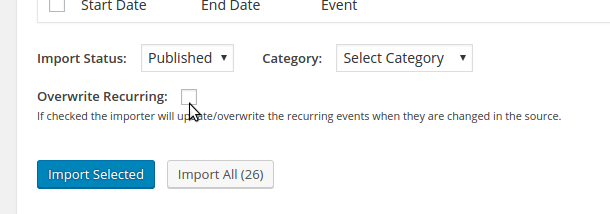
Before you save the recurring import task (or one-time import), simply check the Overwrite option and, if some of the same events were previously imported, they will be overwritten with fresh data from the source.
This exists because a number of users prefer that local changed not be overwritten during subsequent imports.
Does that help?
March 18, 2016 at 8:04 am in reply to: Attendees List is missing purchaser name since 4.1 update #1090968MemberHi Tony,
It’s very likely they’ll be re-introduced – see my previous reply 🙂
In the meantime, downgrading as you have done or applying a suitable fix as detailed above (according to whether you are using WooCommerce or Easy Digital Downloads) are both solid courses of action.
Apologies again for the disruption.
March 18, 2016 at 7:50 am in reply to: Event Ticket Links in email or confirmation page don’t work #1090949MemberHi @barback,
I can confirm the same thing:
I’ll get this loggedthis turns out to already be on our radar and we’ll do our best to post an update here once a fix is available.Thanks for your patience and our apologies for the inconvenience.
March 18, 2016 at 7:14 am in reply to: Attendees List is missing purchaser name since 4.1 update #1090926Member@barback: glad that worked for you!
Is the customer name column going to make a return in a future update?
I expect so – and to that end a bug report has of course already been logged. What I am unfortunately unable to do is commit to a timeline for that fix, but we’ll do our best to update this topic to let you know when it’s available (and it will be detailed in the changelogs and on our blog at the appropriate time).
Thanks again to you all for your patience and understanding while we work on this issue.
March 18, 2016 at 7:08 am in reply to: Critical bug: WooCommerce ticket quantity input resets to zero in 4.1 #1090923MemberThanks for your patience and understanding here, James.
I’ve linked this forum topic to the bug report on our internal tracker and – as soon as a substantive fix becomes available – we’ll do our best to post an update in here.
In the meantime, I’ll mark this as pending fix.
March 17, 2016 at 4:14 pm in reply to: Critical bug: WooCommerce ticket quantity input resets to zero in 4.1 #1090717MemberHi James,
Thanks for persevering, I see the problem now (which seems to occur when no stock limit is applied to the tickets).
As an interim solution, could you apply a stock limit (you could set it to a very high value like 100000 and, if necessary, hide the remaining stock count via CSS – let me know if you need assistance on that front).
I’ll go ahead and file a bug report for this.
March 17, 2016 at 2:45 pm in reply to: Community Events Update Lost me the Community Events page #1090656MemberAwesome, I’m very glad to hear it.
@Tom how are you doing with this issue?
-
AuthorPosts