
Home › Forums › Ticket Products › Community Tickets › ETickets Split Payments debits test Buyer but Receiver account gets nada.
- This topic has 41 replies, 4 voices, and was last updated 10 years, 3 months ago by
Geoff.
-
AuthorPosts
-
March 21, 2016 at 7:30 am #1091752
Barry
MemberHi Glenn,
I’m sorry to hear that. I logged in using the credentials you shared to review the error log, and am seeing the same problem as before (for a transaction that took place on March 20):
The X-PAYPAL-APPLICATION-ID header contains an invalid value
Given that you’ve verified all the credentials are correct I’m not absolutely sure what our next move would be – so please bear with me while I discuss this with the team: I’ll do my best to get back to you later today.
March 21, 2016 at 7:45 am #1091764MemberGlenn:
Can you confirm the credentials you are using:
- A) relate to a business account
- B) that you are using an NVP/SOAP application
If you are using credentials for any other type of app, such as a REST API app, they won’t work in a live environment. Here’s a summary of the steps you should follow to set up an NVP/SOAP app:
- Login to developer.paypal.com and visit Dashboard → My Apps and Credentials
- Scroll down to the NVP/SOAP API apps section
- If you don’t already have a suitable existing app listed here you need to create one
- You can apply for one by going here
- Once this is setup, please ensure you use the credentials linked with this app (and not any existing REST API or other apps)
Does that help at all? It does seem that we may have missed this in our knowledgebase articles and I will ask that this information be included there in future.
March 21, 2016 at 12:17 pm #1091964Douglas
ParticipantARE you KIDDING me!?
Yes, you kinda missed that part in your “knowledgebase.”
March 21, 2016 at 12:19 pm #1091965Participanta question: does PayPal IPN need to be activated or not?
March 21, 2016 at 12:52 pm #1091980MemberYes, you kinda missed that part in your “knowledgebase.”
Unfortunately so – and I can only apologize for that omission.
Regarding IPN, yes – I would recommend you activate it.
March 23, 2016 at 1:32 pm #1093113Participantok, the continuing saga of getting Modern Tribe software to do what it says it can do:
we went through the painstaking process of creating an NVS[?]/SOAP app – i cannot believe that all of that work is necessary just to create an app to get Live API credentials. I think something is not communicated, nevertheless i’m going to ask this:
as it stands, after several days, my client was “approved” for the SOAP app and they sent a “Live” App ID:
“APP-86Y659*******884G”
1 – now >>> there’s nowhere to put it in the backend. if we’re supposed to create a SOAP app, where do we instert the Live App ID? this is why I think there’s something someone has missed in all of this, and I’m inclined to ask that we get some help from a Supervisor so that I can get out of your hair once and for all.
2 – another question: is it normal that in the backend under WooC > Checkout > Tribe PayPal Adaptive Payments there is absolutely nothing there but a “Save” button???
3 – And what about the REST API checkbox under WooCommerce > API that was checked when I installed the plugin? is it supposed to be checked?
4 – you “recommend” that we enable the PayPal IPN? it’s either needed or it’s not, isn’t it? that sounds kind of vague, i’m afraid.
the more I think about it, the more I think I’d like to request some kind of Supervisor to contact us. Barry, i know you’re trying, and you asked for some help from your tech guys, but it wasn’t til then that you mentioned that we’re not to use the REST API app in developer.PayPal.com. Can you please find someone that can help us from regretting we bought this software?
March 23, 2016 at 3:47 pm #1093188MemberHi Glenn,
I absolutely agree this has been a frustrating process and your email has been passed to the head of support who I am sure will respond in due course. In the meantime, I’ll try and answer your most recent questions in turn.
we went through the painstaking process of creating an NVS[?]/SOAP app – i cannot believe that all of that work is necessary just to create an app to get Live API credentials.
I’m not sure what to say here except that this is a requirement of PayPal’s adaptive payments system, we can’t use an alternative unless they (PayPal) make one available.
It was certainly a failing on our side not to highlight this step in our knowledgebase and we have initiated corrective action on this count.
another question: is it normal that in the backend under WooC > Checkout > Tribe PayPal Adaptive Payments there is absolutely nothing there but a “Save” button???
The user interface with regards to our adaptive payments gateway could be improved upon and, in the course of handling your enquiries, that is also something that I have requested we review and revise.
For the time being, though, yes that is expected.
And what about the REST API checkbox under WooCommerce > API that was checked when I installed the plugin? is it supposed to be checked?
That’s not directly related to this set of problems: essentially, check it if you wish to take advantage of it or uncheck it if you wish to disable it. For further advice on WooCommerce’s REST API specifically I’d recommend reviewing their own documentation or even contacting their support team.
you “recommend” that we enable the PayPal IPN? it’s either needed or it’s not, isn’t it? that sounds kind of vague, i’m afraid.
Well, no, it’s not necessarily a case of it’s needed or it isn’t.
IPN allows PayPal to “talk” to your store and provide an update re the payment status. Generally this is a desirable thing because it automates the process of updating your order data – however, it’s an optional step that you don’t strictly need to enable.
For that reason it’s something I (strongly) recommend but you don’t have to if for instance it will get in the way of you as a developer implementing some other objective for your client.
the more I think about it, the more I think I’d like to request some kind of Supervisor to contact us.
Again, we’re sorry for this hasn’t been as smooth as it could have been and please rest assured that this exchange has already been drawn to the attention of the team leadership 🙂
March 23, 2016 at 4:58 pm #1093213Participantwhere in the backend do we input the Live App ID?
March 24, 2016 at 6:42 am #1093373MemberPlease enter the application ID in the PayPal Client ID field found within Events → Settings → Community:
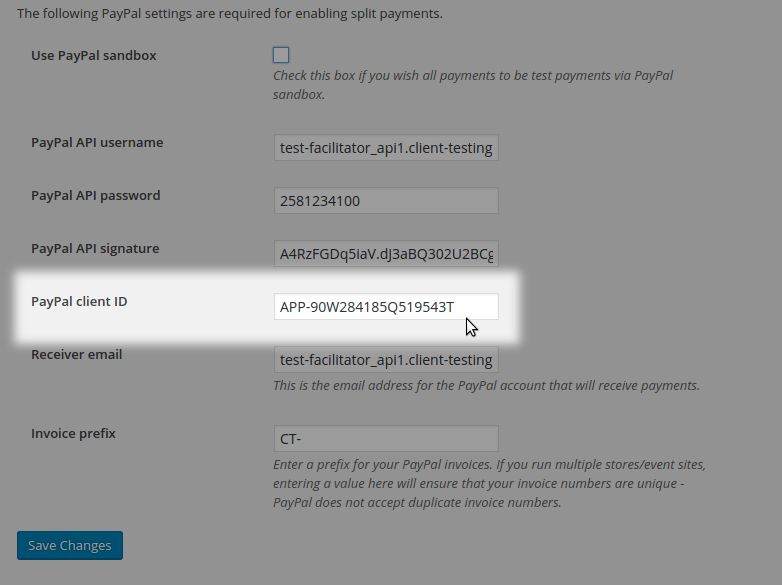
The name of the field isn’t too clear and I’ll be sure to log a bug report for that, too, so we can revise in a future update.
March 25, 2016 at 7:46 am #1093977ParticipantBarry, I sent Geoff an email yesterday requesting a full refund for the software – Doug and I have decided that it’s best for him to move on to another application. We hold no grudge. 🙂
I’d appreciate it if you could get with Geoff and see if Doug could see the refund sometime today, before the weekend…? I emailed him last evening, so I didn’t expect a response last night. Would love one today.
Again, no hard feelings, and thanks so much for your tremendous efforts in attempting to get this issue resolved. (i saw new issues cropping up after the latest update – like the Organizer field not repopulating on Event Edit, the Event Category checkboxes stopped repopulating. FYI.)
Once “bugless,” this will be a nice plugin.
Thanks again,
Glenn Nall
CC’d: Doug ZweberMarch 25, 2016 at 8:08 am #1094007MemberHi Glenn,
Sorry to hear that but I totally understand (and thanks also for the notes re organizer and category fields not repopulating). I’ll certainly check in with Geoff and whomever is on point to process refunds today and highlight this case.
Sorry it didn’t work out on this occasion.
July 7, 2016 at 12:38 pm #1136794MemberHey Glenn,
We wanted to follow-up to let you know that we were able to patch this up in Community Tickets 4.2.2. I realize you have likely already moved on to another solution but I at least wanted to give you the heads up and thank you for reporting this.
Please do be sure to check out our release notes for a full overview of what’s new in the release and feel free to let us know if you run into this or any other issues after the update.
Thanks so much for your patience while we worked on this!
Cheers,
Geoff -
AuthorPosts
- The topic ‘ETickets Split Payments debits test Buyer but Receiver account gets nada.’ is closed to new replies.