

Forum Replies Created
-
AuthorPosts
-
Barry
MemberHi Joy,
That doesn’t sound right – but I can’t seem to replicate the problem. Here’s what I tried:
- I created a recurring event beginning May 31
- I set it to recur weekly for 4 events
- On visiting /single-event/2015-05-31/ the date showed as May 31, not June 21 (which is the last date in my test series)
Does that accurately mimic your own setup, or am I missing a step? Would it be possible for you to create a test series in the future that I could look at?
Thanks!
March 17, 2016 at 11:54 am in reply to: Community Events Update Lost me the Community Events page #1090475MemberHi Tom,
I’m sorry to hear you’ve hit up against some difficulties.
Unfortunately, packaging problems in our most recent update may have resulted in Community Events deactivating itself. So, as a first step, can you:
- Visit the plugin admin screen and reactivate it if needed
- Navigate to the Permalink Settings screen (you don’t need to change anything, but this will trigger a “permalink flush”)
- Try navigating to the Community Events submission page and see if it now works
Does that help?
MemberHi Daniel,
It looks to me like you are using the basic event list widget rather than the advanced list widget that is supplied with Events Calendar PRO.
Can you confirm that Events Calendar PRO is indeed active (unfortunately, a packaging problem related to our most recent update may have resulted in it becoming deactivated) and, if you find you have to re-activate, ensure the event list widget is still in place and test again?
Does that help?
MemberHi @dcantato,
I’m not exactly sure what page that screenshot represents but I don’t believe it’s one that is generated by our own plugin (though I realize it’s a representation of roles and capabilities).
In general, setting up community contributors as subscriber level users is more than sufficient. If you ensure that anonymous submissions are disabled this will mean you have a tier of users who can submit events but do little else.
If you wish, you could model a new user role on that of the existing default subscriber role (should you prefer not to use that role for any reason).
Does that help?
March 17, 2016 at 11:35 am in reply to: Attendee Name & EMail Not Showing in Separate Columns on Attendee List #1090453MemberHi Barb,
You’re not the first customer to hit up against this recent change and we’re sorry for the inconvenience. Perhaps this would help as an interim solution:
/**

 * Adds email and name columns to the attendee export data (CSV only).

 *

 * Filters via the tribe_events_tickets_attendees_csv_items hook; intended for use

 * with the initial 4.1 release of Event Tickets only.

 *

 * @param  array $items

 * @return array

 */

function attendee_export_add_purchaser_email_name( $items ) {

	$count = 0;
foreach ( $items as &$attendee_record ) {
// Add the header columns
if ( 1 === ++$count ) {
$attendee_record[] = 'Customer Email Address';
$attendee_record[] = 'Customer Name';
}
// Populate the new column in each subsequent row
else {
// Assumes that the order ID lives in the first column
$order = wc_get_order( (int) $attendee_record[0] );
$attendee_record[] = $order->billing_email;
$attendee_record[] = $order->billing_first_name . ' ' . $order->billing_last_name;
}
}return $items;
}add_filter( 'tribe_events_tickets_attendees_csv_items', 'attendee_export_add_purchaser_email_name' );
This could be added to a custom plugin file, for example, or else to your theme’s functions.php file if you are familiar and happy with that approach.
Does that work for you (until we can make a more substantive change in a future release)?
MemberGreat question!
The form the URLs take for different views with categories applied are as per these examples:
- /events/category/parties/week/
- /events/category/dances/photo/
- /events/category/black-tie/map/
In other words, the pattern is:
{event_view_slug} / {category_archive_slug} / {category_slug} / {view_slug}
Does that help you in building out this customization?
MemberHi RB,
I’m sorry for any inconvenience this change has introduced.
Does the second part of this reply help, at least as a short term fix? Also, beyond re-introducing the customer email address as a distinct column, is there anything else specifically you are unhappy with in the same area?
We’ll certainly take your feedback on board here and make adjustments if appropriate.
Member… I do apologize, the suggested filepath was incorrect – there is no need to nest attendees-list.php within event-tickets-plus. In other words, you would set up the template override like this:
wp-content/themes/YOURTHEME/tribe-events/attendees-list.php
MemberHi Matthew,
One way to do this would be to create a completely blank template override.
The template override process is explained in general terms over here, but in this situation specifically it would involve creating a (completely empty) new file within your theme as follows:
wp-content/themes/YOURTHEME/tribe-events/event-tickets-plus/attendees-list.php
This should essentially remove the attendee list from public display everywhere.
Does that help?
MemberHi Jessica,
Sorry to hear you’re hitting some snags.
I published the event and ran a test, but the request for additional information never appeared.
Once you increment the quantity selector (ie, you select 1 or more tickets) then the meta fields should appear just below that form. Example:
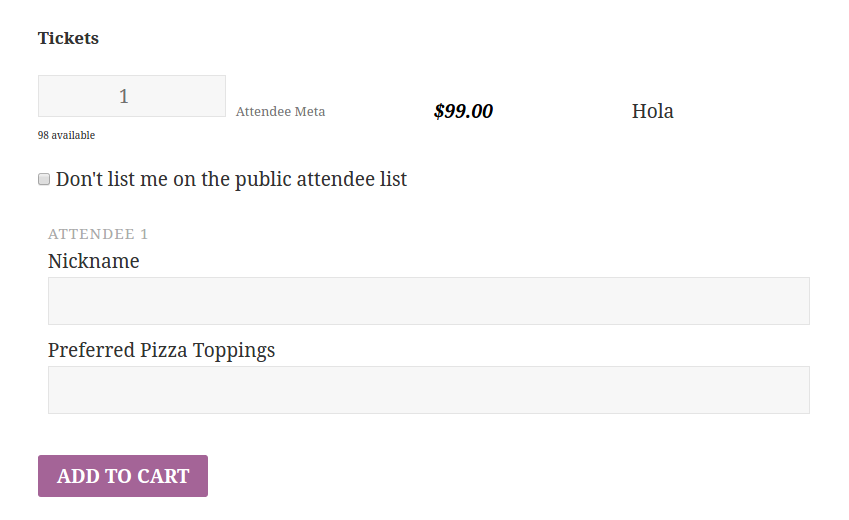
They don’t appear until the quantity is above zero, however. Does that help at all? If not, can you link me to an example of an event that his tickets (for which attendee meta fields have been configured) and perhaps also share your system information by private reply?
Now that email addresses have been moved under “Event Type” they are no longer exporting. Is there a way to correct this?
Great observation! I’m not actually sure of the background to this change but I’ll chat with the team and see if it was deliberate/something others generally didn’t require.
https://gist.github.com/barryhughes/3be509552be340039f8f
In the meantime, something like the above (which you could add to a custom plugin or even to your theme’s functions.php file if you prefer that approach) might serve as a temporary workaround … be sure to dock off the opening <?php tag if you add it to an existing PHP file.
Does that help at all?
March 17, 2016 at 8:11 am in reply to: ETickets Split Payments debits test Buyer but Receiver account gets nada. #1090283MemberNo worries, we’ll leave this open for the time being – no rush at all.
March 17, 2016 at 6:19 am in reply to: ETickets Split Payments debits test Buyer but Receiver account gets nada. #1090230MemberJust checking in here: did you have a chance to check out and possibly revise the PayPal Client ID and any other related values? Are things working for you now in terms of receiving and splitting live payments?
March 15, 2016 at 4:00 pm in reply to: ETickets Split Payments debits test Buyer but Receiver account gets nada. #1089398MemberThat’s good to hear, just a shame the experience has been a little frustrating. In any case – thanks for the fresh login. Here’s a piece of logged data that might be important:
The X-PAYPAL-APPLICATION-ID header contains an invalid value
So that maps to the Events → Settings → Community → PayPal Client ID field – can you confirm this is correct and that it (and indeed the other settings beside it) were all updated when you switched from sandbox testing to live?
March 15, 2016 at 2:41 pm in reply to: ETickets Split Payments debits test Buyer but Receiver account gets nada. #1089366MemberHi Douglas,
What does Leah mean that this has been reported as an issue to be fixed in the future?
I’m sorry if this caused some confusion, but let me explain.
Our exchange so far has highlighted a number of valid problems and so I went ahead and logged a number of action points on our internal issue tracker, some of which were geared towards improving our documentation and others at improving the plugin’s user interface.
Close to the end of each release cycle, Leah (or another team member) looks through our list of outstanding issues – including those logged during the current cycle – and drops by each related forum thread to update users like yourself. This thread is particularly long and covers a lot of ground so it may not have been clear exactly which problem Leah was referring to and, again, I’m sorry if that was confusing.
In short it can be distilled down to this: we’re taking a lot of your feedback on board and will be making some changes, but given where we are in our development cycle those changes will not be realized in our very next release.
My client has paid 300 dollars for this software and you say you’re not willing to login our backend after I’ve given you permission to to help us fix this?
It looks as though we’re still within 30 days of purchase: naturally we’d be sad to lose you, but I do feel it’s worth highlighting that you are still eligible for a refund if you prefer to take that course of action.
I would also like to be clear that I did not say we were unwilling to login to your site, only that in general we prefer not to – which is as much for your security and peace of mind as anything else. With that said, I did just attempt to login so I could observe some of your settings but was unable to do so:
- Are the username and password you provided earlier still valid?
- Can you confirm the correct URL I should use when logging in (I just want to double check this, as the regular WP login screen seems not to be accessible)?
Thanks!
March 14, 2016 at 11:24 am in reply to: ETickets Split Payments debits test Buyer but Receiver account gets nada. #1088567MemberThat’s a shame.
The log again looks somewhat dissimilar to what I’d expect, though – more in line with the log file output I’d expect from WC_Gateway_Paypal_IPN_Handler (one part of WooCommerce’s bundled PayPal gateway).
Are you absolutely positive that:
- You are viewing the correct log file? Ours ought to be named something like tribe-paypal-adaptive-payments-(unique_code).log (date)
- Have you disabled all other payment gateways, such as the PayPal gateway bundled with WooCommerce?
On that final point, please do note that the user interface found in WooCommerce → Settings → Checkout is slightly confusing as (presently) the tribe-paypal-adaptive-payments gateway will appear not to be activated. This may make you think that you need to enable/see a check mark next to the regular WooCommerce PayPal gateway, but that isn’t actually so.
-
AuthorPosts