

Forum Replies Created
-
AuthorPosts
-
March 21, 2017 at 1:41 pm in reply to: Editing stock levels / global stock on events page – 4.4.4 bug? #1257558
Barry
MemberHmm, I don’t seem to have the same experience. I returned to the same test event as I set up initially and can still edit those values.
Would I need to do anything else to see the problem? Can you provide more detailed steps or even a screencast?
I’d love to help further, but need to be able to identify and replicate the problem first of all.
March 21, 2017 at 1:38 pm in reply to: Deleting event on Google Calendar does not remove it from Events Calendar #1257555MemberHi Michael,
At this time that is correct: as above, the fact that an event is not included in a calendar feed isn’t always a reliable indicator that the event has been deleted.
You can certainly add your support for what you have requested by up-voting the following feature request, though, which seems to describe the same thing as you are seeking:
tribe.uservoice.com: automatically remove events not present in the same feed
Though it’s been marked as ‘completed’ that appears to have been in error and we’ll review that status in due course.
MemberHi Greg!
First of all, my apologies for the longer-than-usual delay in responding.
You pose a great question and it does seem we’ve failed to communicate effectively on this issue. Let me try to add some clarity:
- We currently do not provide a widget or shortcode that will let you dynamically list the past 5, 10 or however many events
- We do however provide solutions such as the [tribe_events] shortcode which accepts a date attribute – letting you force it to display events from the past
If I understand you correctly, the latter doesn’t quite fit your needs. In such a case, the only current way to resolve this would be some custom dev work (possibly building on or ‘wrapping’ one of the existing shortcodes or widgets).
There’s clearly a demand for it – ourselves included.
Absolutely — and we’d encourage you and anyone else who hasn’t already done so to up-vote the following feature request, or indeed any other requests you feel are relevant:
tribe.uservoice.com: Past Events Widget
Demand, though important, is not the only factor we take into account when prioritizing new features. That doesn’t mean we’re ignoring you, though, it’s just a result of us having limited resources and needing to make hard decisions about where and what to spend them on.
I hope that covers the current position and if you have any further questions about this please don’t hesitate to let me know 🙂
MemberHi David,
Thanks for contacting us: I definitely empathize — it can be intensely frustrating when things don’t work as expected.
Based on the information you have provided, this does not look like a problem many of our users are reporting and I’m initially unable to replicate it myself. This does rather point to the possibility of a conflict either with another plugin, or with your theme, or some combination of those.
I’ve tried disabling all of our plugins and nothing changed, and although it seemed as though changing the theme helped last time I tried, I can’t test that again any time soon
I definitely understand your reluctance to fully troubleshoot by switching to a default theme, yet that is exactly what I would recommend here.
A great way to avoid impact on live/production sites is to create a testing or staging site. This can be as simple as a fresh WordPress installation in a subdirectory (ie, example.com/test) – which is fast and easy to setup with most CPanel-based hosting environments.
Ultimately, though, you are going to have to take some steps under your own steam to determine the seat of the conflict. We’d love to help more and if our resources were unbounded, we would — but we do have a large number of customers who have paid for and are waiting on support and it is only fair that we prioritize them.
I hope that is understandable and I do wish you luck resolving this issue.
MemberHi Anders,
Great question!
This is certainly custom dev territory so there’s a limit to how far we can help, but I’d be happy to outline a possible approach.
Focusing on list view for the moment, you could create a template override for list/content.php – which basically has the following structure (simplified):
<div id="tribe-events-content" class="tribe-events-list">

    <!-- Code to display the list title, nav -->
    <!-- links and individual events, etc    -->

</div>
In your case, you might add a conditional statement wrapping up everything inside that div, something like this:
<div id="tribe-events-content" class="tribe-events-list">

    <?php if ( defined( 'DOING_AJAX' ) && DOING_AJAX ): ?>

        <!-- Code to display the list title, nav -->
        <!-- links and individual events, etc    -->

    <?php endif; ?>

</div>
The idea being, it would only render the list of events if a query was first launched via ajax (which is what happens if you change the date or add a keyword search in the search bar).
This is a pretty simplistic solution, though – it doesn’t take care of scenarios such as a user searching for events and then sharing the URL with another user – but you could certainly expand on it and refine it to cover things like that.
I hope that helps!
MemberHi Shachar,
Thanks for considering Events Calendar PRO 🙂
It’s absolutely possible to create events that recur every year. Let me address a couple of specific points you raised.
I want to know whether this operation can generate load on the server or data base of my website? Is there an action repeated every year? Or can be “fixed” event on a certain day and will last forever without any problems?
When you create a recurring event, an entry is added to the database for every date that it will take place on. That could result in a lot of database entries being generated so, in order to support events which recur ‘forever’, we default to not generating anything that is more than 2 years in the future (and we also default to cleaning up events once they are 2 years in the past).
In your case, as you have a specific interest in using yearly events, you may wish to extend this range beyond a 2-year window and that is easy to do via our settings page: sensible use of these settings will help to mitigate any excess load issues.
This thing scares me because if for example another five years of creating recurring calendar events – my server simply collapse! I do not want to.
With suitable hosting resources and careful use of both our settings and facilities such as caching, you should find that The Events Calendar and Events Calendar PRO scale nicely.
I hope that answers your questions, but let me know if I can clarify anything for you.
March 21, 2017 at 4:38 am in reply to: Editing stock levels / global stock on events page – 4.4.4 bug? #1257190MemberHi Gabba,
I’m sorry to hear you’ve hit up against some difficulties while using global stock.
With that said, though I’m aware of at least one other active bug relating to global stock, I’m not completely sure what you’re describing, here.
Based on your description, here’s what I tried:
- I created a new event using global stock (set to 100 units)
- I then created three tickets for that event:
- The first was set to use global stock
- The second was set to use global stock but with sales capped at 25 units
- The last was set to have its own independent stock of 50 units
- I was successfully able to edit both the cap for the second ticket and the independent stock level of the third ticket, which was what I expected
It sounds like you are not having the same experience, though, or else I’m not following your description. Could you provide any further detail I might need and perhaps distil the problem down to a set of steps I can use to replicate?
Thanks!
MemberYou’re welcome 🙂
MemberHappy to hear it — thanks for confirming 🙂
MemberHi @hotspot01,
You should indeed be able to find an option in the Settings → General admin screen.
Let me be clear, though, that this is a general WordPress settings screen and not one of our own settings screens. Here’s a screenshot:
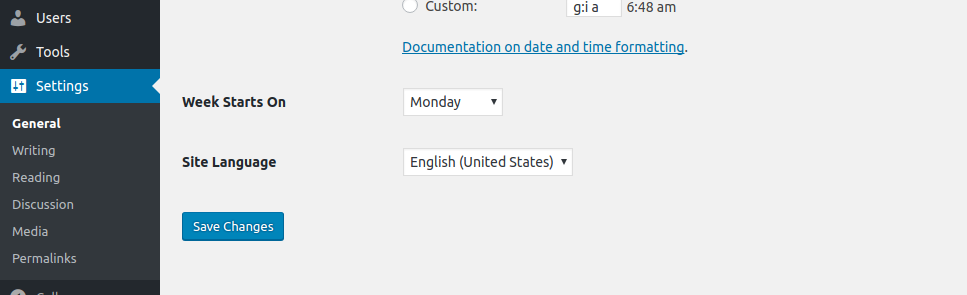
If you are definitely not seeing this, can you confirm that you are logged in as an administrator?
Thanks!
MemberHi Michelle,
I’m sorry to hear you’ve hit up against some difficulties.
Although I was able to obtain your system information it seems that – for some reason – data about your currently installed plugins is missing. To start with, can you share that information or at the minimum let me know if you are using Event Ticket Plus with WooCommerce, Easy Digital Downloads or indeed a different ecommerce platform?
I’m also curious to learn if you are using our global stock facilities (if you are unsure, it’s probably safe to answer ‘no’).
Additionally, can you confirm if this or a similar problem happens for all events? For example, if you create a new test event and add some tickets do you hit pretty much the same thing?
Last but not least, it would be well worth running through our standard troubleshooting steps (doing so on a test or staging site should be fine, if you have one) as plugin and theme conflicts can often cause strange issues like this one.
Thanks — and let me know how you get on 🙂
MemberGood morning, Uwe 🙂
There does appear to be something of a glitch here. As a possible workaround, can you try the following steps:
- Deactivate Advanced Post Manager
- Return to the Events Admin List
- Use the Screen Options pulldown and ensure “SEO Title” is checked (and apply the change)
- Reactivate Advanced Post Manager
- Does the column show now?
Let me know if that works for you!
MemberNot a bother at all and my apologies for the delay in responding.
any thoughts on why all but one of my events are returning no attendee data with that function provided?
I’m not 100% clear if it is just one event that is ‘acting up’ or, as you indicated in an earlier post, only one event is providing the expected results.
It’s certainly difficult to troubleshoot from afar; but I wonder if you are able to identify anything the problematic events have in common. Were they created with an earlier release, for instance, or do they use ticket providers other than WooCommerce?
(I do want to note that, at this stage, the amount of further support we can provide is likely to be pretty limited.)
MemberDo you have a test site or staging environment available, or can you create one? This can be as simple as a fresh installation of WordPress in a sub-directory (such as example.com/testwp).
If you do – or can create one – it would be great to start with nothing except The Events Calendar, Filter Bar and some test data and see if you can replicate the same issue there, before adding any other plugins or a non-default theme.
Can you give that a go and let me know the result? If you do find there is a problem at that early stage, it would be really useful if you could link me to the test site so I can investigate (again, don’t add any further plugins or non-default themes at this stage).
On the other hand, should there be no issue, please proceed with incrementally adding the other plugins you have on your live site and, ultimately, your theme – checking at each stage to see if the same problem has surfaced.
This is of course pretty close to the steps you’ve already undertaken – but in cases like this where we aren’t seeing other reports of similar problems and where we can’t ourselves replicate, it often helps us to further isolate conflicts or identify any configuration issues that might be at the source of the problem.
Thanks for your continued patience and support 🙂
MemberBut I think it would be a good feature or have a howto guide to do this.
It would be very useful to just have the category filter in the top bar.Absolutely.
I think this existing feature request comes close to covering what you want and you are welcome to up-vote it or add any additional comments you think might be helpful.
We’re always on the look out for ways to improve our products and your feedback is, of course, very welcome 🙂
-
AuthorPosts