

Forum Replies Created
-
AuthorPosts
-
Barry
MemberThat must be frustrating.
On the basis that – if I am understanding correctly – this specific problem is not the result of anything on our end, I’m going to mark this ticket as resolved.
If I’ve misunderstood, just let me know. Similarly if anything else crops up, please don’t hesitate to create a new support topic and one of the team will be only too happy to assist.
Thanks again!
MemberOf course! I’m sorry for not connecting the dots.
In that case, the problem is fundamentally the same as adding venue information. Venues and event start/end dates are, of course, things The Events Calendar provides.
If you need those it is well worth installing The Events Calendar to get them (you don’t necessarily have to link to or expose the main calendar view if you don’t want to) as regular WordPress pages by themselves come with none of that information.
Again, this is something you might propose as a feature request — alternatively it would be possible to utilize custom post meta fields or something similar, but it would certainly take an amount of custom dev work to link those up with the ticket emails.
I hope that makes sense and do let me know if you have further questions on this.
MemberThis reply is private.
MemberThis reply is private.
MemberPerhaps a helper function along these lines (adjust as needed, according to what you consider an active ticket to be) would help?
function count_active_attendees( $event_id ) {
	$active = 0;
	$attendees = Tribe__Tickets__Tickets::get_event_attendees( $event_id );

	foreach ( $attendees as $attendee ) {
		$order = wc_get_order( $attendee[ 'order_id' ] );

		// Skip if not linked to a WooCommerce order (alternatively, if RSVPs or another
		// ticketing provider is active, we could perform additional tests as needed)
		if ( ! $order ) {
			continue;
		}

		$status = $order->get_status();

		// Skip refunded and cancelled orders
		if ( $status === 'refunded' || $status === 'cancelled' ) {
			continue;
		}

		$active++;
	}

	return $active;
}
March 16, 2017 at 11:56 am in reply to: Extra spaces in list view between text and ‘Continue reading’ #1255429MemberGreat!
I’ll leave this open just a little longer in case it becomes apparent in your discussion with AddThis that some further feedback is needed from us.
Otherwise, should anything else crop up, please don’t hesitate to let us know by opening a new support topic and one of the team will be only too happy to assist 🙂
MemberOK, great 🙂
Regarding the date, I saw this article (https://theeventscalendar.com/knowledgebase/adding-the-event-date-to-ticket-emails/).. however it seems to add it to the receipt, not the ticket e-mail. Is there a way to add it to the ticket email instead?
The date should already be present in the ticket emails (“May 20” in the example below):
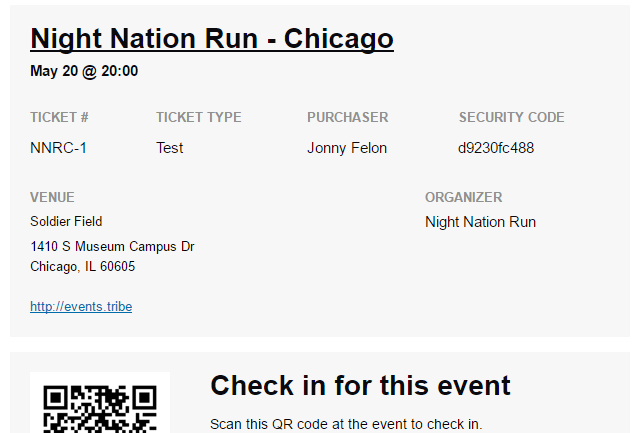
Can you clarify if you want to move it, make it more prominent or something else? If I’m misunderstanding the question please don’t hesitate to let me know!
MemberGlad to hear it!
That being the case I’ll go ahead and close this topic.
Our apologies for the issues to date: hopefully things will be less problematic going forward. Of course, if further problems arise please don’t hesitate to create a new support topic and one of the team will be only too happy to assist 🙂
MemberFantastic 🙂
I’ll go ahead and close this topic. Incidentally, if your experience with our The Events Calendar-based products generally has been positive, we’d love to hear from you over here!
Thanks again!
MemberThanks for doing that, Gabriel. It looks like Cliff is now helping you here and so I’ll close this topic.
MemberGreat to hear 🙂
MemberOur apologies for the further delays on this one: we’re still working on this and of course will aim to post a further, more substantive announcement as soon as we can.
MemberGreat to hear!
MemberThat definitely clarifies things and is a valid point. Unfortunately, we haven’t designed the system that way and – currently – all I can suggest is conveying the venue information within the page content.
Adding functionality to deal with this sort of scenario (where adding and utilizing The Events Calendar is not desired) is something we’d consider, but equally we’d like to develop a sense of just how much support there might be for such an enhancement. On which basis, please do feel free to either propose a new feature or up-vote any suitable existing features that might cover what you have described:
UserVoice — post suggestions for new features here!
Let me know if you have questions on that, otherwise we can move on to your second question 🙂
March 15, 2017 at 5:30 pm in reply to: HIding unnamed/blank venues & organizers from choices #1254825MemberFantastic 🙂
-
AuthorPosts