
Home › Forums › Ticket Products › Event Tickets Plus › Adding Venue and Date to ticket email
- This topic has 9 replies, 2 voices, and was last updated 9 years, 6 months ago by
Maryse.
-
AuthorPosts
-
March 14, 2017 at 4:41 pm #1254136
Maryse
ParticipantHello,
I’m currently only using Event Ticket Plus, without the calendar plugin and I’ve opted for RSVP instead of WooCommerce for now because I was having trouble with the cart.
With that setup, is there a way to add the venue to the ticket email? I saw information about how to add venues here (https://theeventscalendar.com/knowledgebase/venue-and-organizer-pages/), but I don’t see that option of adding events and organizers, so I’m guessing it’s only available to those who have the events calendar plugin. Is there another way to add it?
Regarding the date, I saw this article (https://theeventscalendar.com/knowledgebase/adding-the-event-date-to-ticket-emails/).. however it seems to add it to the receipt, not the ticket e-mail. Is there a way to add it to the ticket email instead?
Thanks so much!
March 15, 2017 at 2:41 pm #1254752Barry
MemberHi Maryse,
Thanks for posting!
Let’s deal with your question about adding venues, first of all (and then we can move onto adding the date to ticket emails).
For users who also have The Events Calendar, there is a venue post type and that contains various bits of information about the venue – the name, a description, the address and so on. In your case, where you don’t have The Events Calendar, I presume you’re storing venue data in some different way.
What’s tricky from our perspective, though, is guiding you when we don’t know how you’re handling that sort of things (please also understand that for customization tasks, particularly if some development work is required, the degree of support we can offer tends to be rather limited).
Thanks!
March 15, 2017 at 3:46 pm #1254778ParticipantHi Barry,
Thanks for your reply. Ok, well I simply have a regular WordPress page describing an event : name of the event, date, venue, panelists, photos, etc. I added a ticket to that page so that people can RSVP to the event described on that page. But when I create a ticket, I’m not asked to enter a venue or the date for that ticket. I would have thought I could add that information to each ticket I add to a page so that it appears in the ticket people receive by mail. Is there a way to do that? Let me know if this is not clear and if you need more information.
Thanks!
March 15, 2017 at 5:34 pm #1254827MemberThat definitely clarifies things and is a valid point. Unfortunately, we haven’t designed the system that way and – currently – all I can suggest is conveying the venue information within the page content.
Adding functionality to deal with this sort of scenario (where adding and utilizing The Events Calendar is not desired) is something we’d consider, but equally we’d like to develop a sense of just how much support there might be for such an enhancement. On which basis, please do feel free to either propose a new feature or up-vote any suitable existing features that might cover what you have described:
UserVoice — post suggestions for new features here!
Let me know if you have questions on that, otherwise we can move on to your second question 🙂
March 15, 2017 at 6:09 pm #1254844ParticipantNo, I have no other question on that. So yes, we can move on to my second question 🙂
Thanks!
March 16, 2017 at 11:53 am #1255428MemberOK, great 🙂
Regarding the date, I saw this article (https://theeventscalendar.com/knowledgebase/adding-the-event-date-to-ticket-emails/).. however it seems to add it to the receipt, not the ticket e-mail. Is there a way to add it to the ticket email instead?
The date should already be present in the ticket emails (“May 20” in the example below):
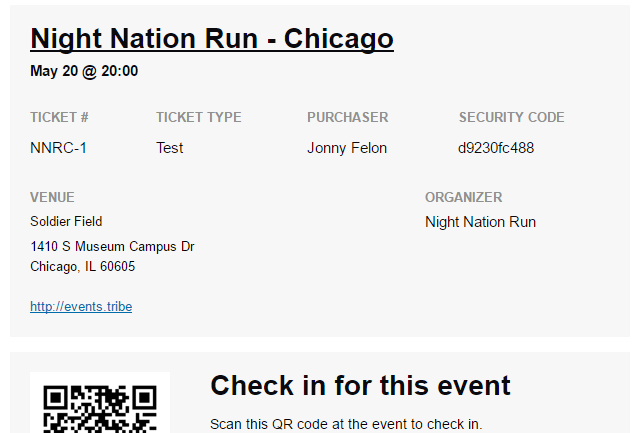
Can you clarify if you want to move it, make it more prominent or something else? If I’m misunderstanding the question please don’t hesitate to let me know!
March 16, 2017 at 1:58 pm #1255541ParticipantThis reply is private.
March 20, 2017 at 10:46 am #1256797MemberOf course! I’m sorry for not connecting the dots.
In that case, the problem is fundamentally the same as adding venue information. Venues and event start/end dates are, of course, things The Events Calendar provides.
If you need those it is well worth installing The Events Calendar to get them (you don’t necessarily have to link to or expose the main calendar view if you don’t want to) as regular WordPress pages by themselves come with none of that information.
Again, this is something you might propose as a feature request — alternatively it would be possible to utilize custom post meta fields or something similar, but it would certainly take an amount of custom dev work to link those up with the ticket emails.
I hope that makes sense and do let me know if you have further questions on this.
April 11, 2017 at 9:35 am #1268329Support Droid
KeymasterHey there! This thread has been pretty quiet for the last three weeks, so we’re going to go ahead and close it to avoid confusion with other topics. If you’re still looking for help with this, please do open a new thread, reference this one and we’d be more than happy to continue the conversation over there.
Thanks so much!
The Events Calendar Support Team -
AuthorPosts
- The topic ‘Adding Venue and Date to ticket email’ is closed to new replies.