

Forum Replies Created
-
AuthorPosts
-
Andras
KeymasterHmmm… I might have found your issue.
The search button is not visible. The search doesn’t start by itself when you enter a phrase in the field, you need to either press the search button (which is hidden) or hit the Enter key.
To make the search button visible, add this following snippet to your theme’s (preferably child theme’s) style.css file:
#tribe-bar-form .tribe-bar-submit input[type="submit"] {

display: block !important;

}
Let me know if this helps.Cheers,
AndrasKeymasterHello V.A.
Thanks for sharing the details and the screenshot.
I’m afraid that at the moment searching for organizers does not work through the search field. But I see you have Filterbar, that is what I would recommend for that.
I have tested it on your site and when I searched for a word which was part of some event titles (‘curiosa’, ‘antie’, ‘e-eeuwse’ and some more) then it gave me the proper results every time.
Do you maybe have something already filtered that would hide all the results you are looking for?
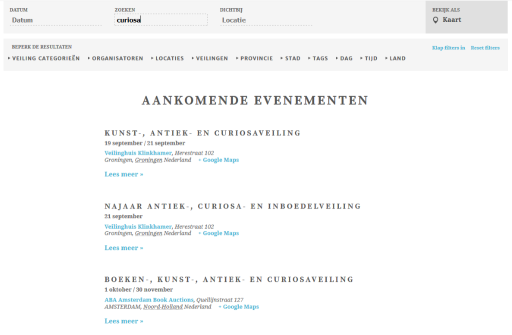
What browser are you using? Could you test it in a different one?
What is the word that you are searching for?
Andras
KeymasterHey there,
Sure thing. If you want to experiment with it, then head into the wp-content\plugins\the-events-calendar\src\Tribe\iCal.php file and look up the generate_ical_feed() method (line 211). There you will need to rework the time and timezone-related code.
I hope this helps you get started.
And I believe our technical docs might come in handy as well:
https://theeventscalendar.com/functionsLet me know if you need anything else.
Cheers,
AndrasKeymasterHello Radka,
Thanks for sharing that screenshot with me. I’m sorry, I have to laugh, I managed to reproduce it and I find it totally funny!!! 🙂
I will submit this issue to our development team to check it out. (Maybe they will have a laugh too. 🙂 )
Meanwhile, if I understand, you want to run that event every Monday and Wednesday until Christmas or so. I find your setup a bit complicated for that, so give this one a try:

I saw your exclusion for Nov 24, but that is a Thursday, so if you want recurrences on Monday and Wednesday, than you don’t need to add Nov 24 as an exclusion.
Let me know if this helps or if you have any other questions.
Cheers,
AndrasKeymasterThis reply is private.
KeymasterIn this file wp-content/themes/Avada/style.css
there is this declaration:
.tribe-events-adv-list-widget *:nth-child(2) .tribe-mini-calendar-event {
padding-top: 0;
}I don’t quite know why Avada does that.
Either you can remove that declaration from that file, or better, overwrite it in the child theme style.css file like this:
.tribe-events-adv-list-widget *:nth-child(2) .tribe-mini-calendar-event {

padding-top: 20px !important;

}
I hope this helps. Let me know.Cheers,
AndrasKeymasterThis reply is private.
KeymasterHi Wendy,
You should be able to download Events Calendar Pro from your account at theevenscalendar.com. Here is a direct link to your download page:
https://theeventscalendar.com/my-account/downloads/Once you downloaded the plugin to your hard drive go to your WordPress Dashboard > Plugins > Add new > Upload Plugin, then select the file you just downloaded and hit the Install Now button.
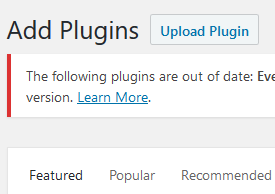
Let me know if this helps.
Cheers,
AndrasKeymasterHello V.A.,
Thanks for reaching out and I’m sorry you are having an issue. I’m happy to help you solve it.
Could you please describe in detail what is wrong with the search?
On which page is this issue happening?
What steps are you taking?
What is the result you get?
What is the result you expect to get?
I’ll be waiting for the answer and we’ll take it from there.
Cheers,
AndrasKeymasterHi Radka,
Big thanks for going Pro and welcome to the forums!
I’m really sorry you are having that problem, let’s try to fix that for you.
Could you please share with me a screenshot of the settings of that recurring event? I’m especially interested in how the timing and the recurrence is set up.
If I look at the ski conditioning event, it looks like that recurrence is set up for November 7, Monday, so it shows correctly on the calendar.
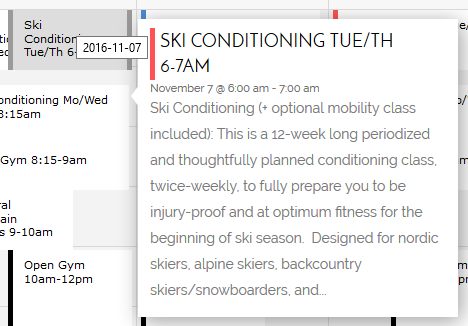
Give it a check and also send me the screenshot, we’ll figure this out. 🙂
Cheers,
AndrasKeymasterHello Oliver,
I hear you. Can you share the links to some of the threads where this issue is brought up.
Also, in order to be able to help you, please share with me your system information in a private reply.
https://theeventscalendar.com/knowledgebase/sharing-sys-info/I’m afraid that without it I won’t be able to help you much.
Thanks and cheers,
AndrasPS: Wenn du möchtest, ich kanns probieren dir auf Deutsch zu helfen, wenn dass einfacher für dich ist. Lass mir wissen.
KeymasterHi Alessandro,
Unfortunately it is not possible to easily do it with CSS, as the whole date & start time in the widget is handled together as one object. Only part of it cannot be hidden with CSS.
It might be possible to customize the plugin in a way that on some pages it looks like this, on some other pages it looks like that. However we are limited in doing that kind of customization work within the scope of support, I’m sorry. I can share with you this list of developers, who could help you out and who are not affiliated with us. They might be able to help you out with this.
https://theeventscalendar.com/knowledgebase/find-a-customizer/
Cheers,
AndrasKeymasterHi Seana,
I’m happy I could help you get this far and you’re very welcome.
Since this is marked resolved I am going to close this ticket, but if you need anything else related to this topic or another please open a new topic on the forum and we’ll help you out.
Cheers,
AndrasPS: If you like our plugin, we would be happy to receive a review in the wordpress.org repository. Thanks!
https://wordpress.org/support/view/plugin-reviews/the-events-calendarPS2: We’d be also grateful if you would give us feedback on your satisfaction with support. Just click on one of the classy looking emojis below. 🙂 If you can spare a few words, that’s even better. Doublethanks!
KeymasterHello Will,
Thanks for reaching out with your question. For the moment, as far as I know, only one organizer is included in the metadata. I’m quite sure that with some coding it would be possible to add more organizers to the metadata as well, however we are quite limited in supporting customizations.
I can try to point you in the direction to start, but that is about as much as we can do in this case.
If you would like to hire a developer to help you out, here’s a list of well known names in the community who could help you out and who are not affiliated with us.
https://theeventscalendar.com/knowledgebase/find-a-customizer/
Let me know if this answers your question or if there’s anything else I can help you with.
Cheers,
AndrasKeymasterGrüss dich Oliver,
Thanks for reaching out and I’m really sorry you are experiencing this issue. Let me help you solve this.
To be able to help you could you share your system information with me in a private reply? Here’s our handy guide for that:
https://theeventscalendar.com/knowledgebase/sharing-sys-info/Also make sure that your plugins, theme and WordPress is updated to the latest versions.
Try to test also if the issue still comes up when you switch to a default theme like twentysixteen, and switch off all the plugins except for the needed ones (The Events Calendar, Event Tickets, Event Tickets Plus, WooCommerce).
Thanks! I’ll be waiting for the results.
Freundliche Grüsse
Andras -
AuthorPosts