
Home › Forums › Calendar Products › Events Calendar PRO › Search functionality on my site is not working
- This topic has 6 replies, 4 voices, and was last updated 10 years ago by
V.A..
-
AuthorPosts
-
September 20, 2016 at 2:49 am #1166297
V.A.
ParticipantPlease help me the search functionality on my site is not working for my event calendar.
I have to solve this. I do not know anything of programming so please help me with code if their needs to be coding.September 20, 2016 at 1:03 pm #1166613Andras
KeymasterHello V.A.,
Thanks for reaching out and I’m sorry you are having an issue. I’m happy to help you solve it.
Could you please describe in detail what is wrong with the search?
On which page is this issue happening?
What steps are you taking?
What is the result you get?
What is the result you expect to get?
I’ll be waiting for the answer and we’ll take it from there.
Cheers,
AndrasSeptember 21, 2016 at 1:56 am #1166830ParticipantHi Andras,
The search takes please on this page:
http://www.veilingagenda.nl/veilingen/see screenshot.
When I put a word in that is in the title of a event or organisator the search won,t work.
September 21, 2016 at 2:39 pm #1167145KeymasterHello V.A.
Thanks for sharing the details and the screenshot.
I’m afraid that at the moment searching for organizers does not work through the search field. But I see you have Filterbar, that is what I would recommend for that.
I have tested it on your site and when I searched for a word which was part of some event titles (‘curiosa’, ‘antie’, ‘e-eeuwse’ and some more) then it gave me the proper results every time.
Do you maybe have something already filtered that would hide all the results you are looking for?
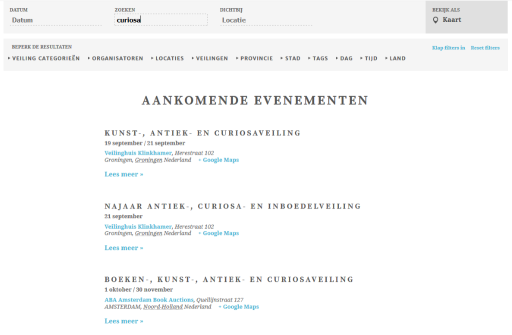
What browser are you using? Could you test it in a different one?
What is the word that you are searching for?
Andras
September 21, 2016 at 2:45 pm #1167148KeymasterHmmm… I might have found your issue.
The search button is not visible. The search doesn’t start by itself when you enter a phrase in the field, you need to either press the search button (which is hidden) or hit the Enter key.
To make the search button visible, add this following snippet to your theme’s (preferably child theme’s) style.css file:
#tribe-bar-form .tribe-bar-submit input[type="submit"] {

display: block !important;

}
Let me know if this helps.Cheers,
AndrasOctober 13, 2016 at 9:35 am #1176034Support Droid
KeymasterHey there! This thread has been pretty quiet for the last three weeks, so we’re going to go ahead and close it to avoid confusion with other topics. If you’re still looking for help with this, please do open a new thread, reference this one and we’d be more than happy to continue the conversation over there.
Thanks so much!
The Events Calendar Support Team -
AuthorPosts
- The topic ‘Search functionality on my site is not working’ is closed to new replies.