
Home › Forums › Calendar Products › Community Events › File Doesn't Exist?
- This topic has 9 replies, 3 voices, and was last updated 10 years, 1 month ago by
Seana.
-
AuthorPosts
-
September 15, 2016 at 11:06 pm #1164975
Seana
ParticipantI’m a new user and have just updated to Pro and have got the Community Events add-on.
When guests try to add an event they often get this message ‘File Doesn’t Exist?’ The event will usually be there waiting to be approved however no photos come through.
I can add events fine when I am logged into my own site.
Occasionally a user can add an event with no problem at all.
(Might that be if they are logged into Worpress on their own site?)
Can you help please as I’m keen for the Events Calendar to work smoothly.
My Events calendar shows at:
http://www.hellosydneykids.com.au/eventsSo the add page is: http://www.hellosydneykids.com.au/events/community/add
Next question – when do you think you might have a payment option for Community Events as I’d love to have that functionality in the future.
Thank you.
Seana
-
This topic was modified 10 years, 1 month ago by
September 16, 2016 at 1:40 am #1165000Andras
KeymasterHello Seana,
Thanks for going Pro and welcome to the forums. Let me help you with your questions.
In order to be fully able to support you, could you please share your system information with me in a private reply? Here is a guide on how you can do that:
https://theeventscalendar.com/knowledgebase/sharing-sys-info/I see you had a problem updating your community events plugin. To be able to update it from a file you will need to delete the old version of the plugin. Just go to plugins, deactivate the old Community Events plugin, then choose delete. Afterwards you will be able to upload the new version. Your data is safe, it will be preserved.
Please also make sure that all your other plugins and your WordPress installation is up to date. You can download the most recent version of our premium plugins from your account at theeventscalendar.com:
https://theeventscalendar.com/my-account/downloads/Once you are done with the updates please check if you are still getting the “file not found” issue. And we’ll take it from there.
Thanks and cheers,
AndrasPS: as for the payment option for community events, I’ll find that out for you and will let you know asap.
September 16, 2016 at 1:45 am #1165003KeymasterPosting the image here so we have it in one thread:
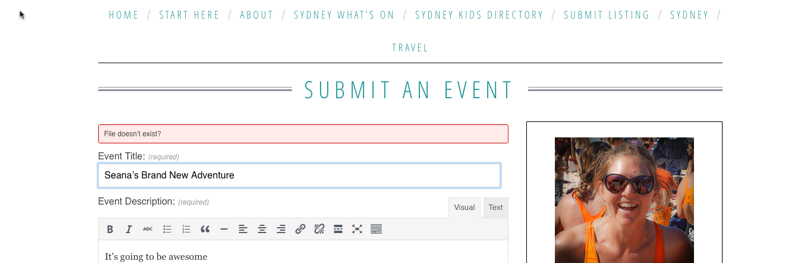 September 18, 2016 at 7:32 pm #1165706Participant
This reply is private.
September 19, 2016 at 2:22 am #1165753KeymasterThis reply is private.
September 19, 2016 at 11:38 pm #1166264ParticipantOK thank you, will do that.
September 20, 2016 at 12:43 am #1166277KeymasterGreat, I’ll be waiting for the results and we’ll continue from there if needed.
Have a great day!
Andras
September 20, 2016 at 4:04 am #1166316ParticipantTook away all plugins and it works, so now I am adding them back one or two at a time. Many thanks for your pateince and help.
Seana
September 20, 2016 at 12:34 pm #1166601KeymasterHi Seana,
I’m happy I could help you get this far and you’re very welcome.
Since this is marked resolved I am going to close this ticket, but if you need anything else related to this topic or another please open a new topic on the forum and we’ll help you out.
Cheers,
AndrasPS: If you like our plugin, we would be happy to receive a review in the wordpress.org repository. Thanks!
https://wordpress.org/support/view/plugin-reviews/the-events-calendarPS2: We’d be also grateful if you would give us feedback on your satisfaction with support. Just click on one of the classy looking emojis below. 🙂 If you can spare a few words, that’s even better. Doublethanks!
-
This topic was modified 10 years, 1 month ago by
-
AuthorPosts
- The topic ‘File Doesn't Exist?’ is closed to new replies.