Forum Replies Created
-
AuthorPosts
-
August 19, 2018 at 2:49 am in reply to: Participant information from events calendar to CRM/mailhandling program #1600703
Andras
KeymasterHi Bas,
Thanks for reaching out!
There is no built-in automatic way to get the attendee information out to 3rd-party systems. You can either do a CSV export on the attendee list page or yes, you might be able to use webhooks and develop your own solution for this.
Hope this helps.
Cheers,
AndrasAugust 19, 2018 at 2:40 am in reply to: Change where the link from the submission form is displayed #1600701KeymasterHi planatstudio,
Thanks for reaching out!
Could you share with me a mockup or some screenshots so I see what exactly you would like to achieve? How it looks like now and how you would like it to look?
Thanks,
AndrasAugust 19, 2018 at 2:12 am in reply to: Calendar Icon now missing in the Events List widget #1600693KeymasterThanks Christine!
If you need anything else related to this topic or another please create a new ticket and we’ll be happy to help.
Cheers,
AndrasPS: We’d be grateful if you would give us feedback on your satisfaction with support. Just click on one of the classy looking emojis below. 🙂 If you can spare a few words, that’s even better. Thanks!
PS2: If you like our plugins, and you didn’t yet do so 🙂 we would also be happy to receive a review in the wordpress.org repository. Much appreciated!
https://wordpress.org/support/view/plugin-reviews/the-events-calendar/
https://wordpress.org/support/view/plugin-reviews/event-tickets/KeymasterHi Uwe,
To make sure that I recreate the same event and rules could you send me a screenshot of the rules from the back-end?
Danke!
A.
KeymasterHi Nick,
Thanks or the extra info.
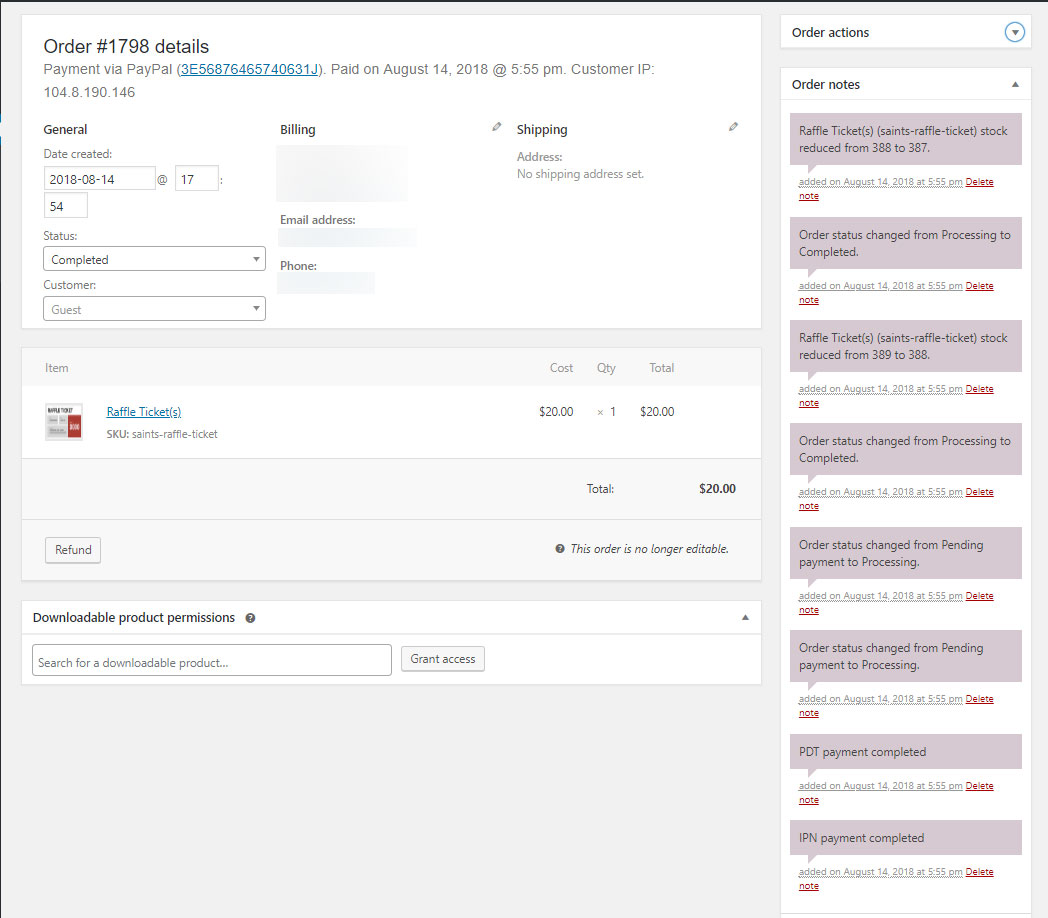
On submitting more tickets than purchased, this could be a cause:
“It only seems to occur when IPN and PDT payment notifications are received simultaneously.”
Screenshot: https://theeventscalendar.com/content/uploads/2018/08/9fa06d3925b4cbf8.jpg
Do you see anything similar in your orders?
A.
KeymasterHi Justin,
I will run it by the dev and will get back to you. I ask for a bit of patience.
Have a great weekend!
Andras
August 18, 2018 at 12:03 am in reply to: Calendar Icon now missing in the Events List widget #1600368KeymasterHi Christine,
I see you are using Avada, which might handle featured events differently, or there is a setting for them in Avada, or you might have some custom code in place.
By default the featured events look different vs non-featured one. With the twentysixteen theme it would look like this: https://cloudup.com/cyDjnwhl8FH
I hope this explains. 🙂
Would you like some more assistance with this, or can we close is as resolved?
Happy weekend,
AndrasAugust 17, 2018 at 11:52 pm in reply to: Payment Captured But Status Not Changed to Completed #1600366KeymasterYou’re very welcome, Cody!
Since this is marked resolved I am going to close this ticket, but if you need anything else related to this topic or another please create a new ticket and we’ll be happy to help you out.
Cheers,
AndrasPS: We’d be grateful if you would give us feedback on your satisfaction with support. Just click on one of the classy looking emojis below. 🙂 If you can spare a few words, that’s even better. Thanks!
PS2: If you like our plugins, and you didn’t yet do so 🙂 we would also be happy to receive a review in the wordpress.org repository. Much appreciated!
https://wordpress.org/support/view/plugin-reviews/the-events-calendar/
https://wordpress.org/support/view/plugin-reviews/event-tickets/August 16, 2018 at 1:04 pm in reply to: Duplicate tickets generated for orders (more tickets issued than paid for) #1599363KeymasterHello Mark,
Thanks for reporting this! We have seen reports of similar behavior but your insight of IPN and PDT might take us a step further. I already added your note to the bugticket.
Could you also please share your system information with us?
Also if you could share a full database dump, that might be useful for us in investigating the issue.
Thanks,
AndrasKeymasterHi Ruth,
Thanks for reaching out!
I’m sorry to hear about this issue with the attendee list.
We had similar reports earlier, which was solved with one of the last maintenance releases, but it looks like there is more to this.
Please try the following workaround for the issue. Copy the below snippet into your (child) theme’s functions.php file:
[code language=”php”]
add_filter( ‘tribe_tickets_attendees_admin_expire’, ‘custom_tickets_attendees_expire’ );
add_filter( ‘tribe_tickets_attendees_expire’, ‘custom_tickets_attendees_expire’ );
function custom_tickets_attendees_expire () {
return 0;
}
[/code]Let me know if this does the trick.
Thanks and cheers,
AndrasKeymasterHi Jay,
Thanks for reaching out! Sorry to hear about the import issues.
Can you share with me the source URL you are trying to import from? I would like to run some tests on my side.
Under Events > Settings > Licenses tab do you see a green success message under the EA license key? Could you provide a screenshot?
Also, please send me a screenshot of your Event Aggregator System Status which is under Events > Help and looks something like this: https://cloudup.com/c_AbQU9nKmr
Thanks and cheers,
AndrasKeymasterHi Quinten,
Thanks for reaching out!
For the time being there is only one API code available per site, so everybody has to use the same. There is no option for separate APIs per user.
If you think that is something you would like as a feature I encourage you to visit our User Voice Page and either upvote an existing request or make a new request there.
Let me know if you have any further questions.
Cheers,
AndrasKeymasterHi Gordon,
Thanks for reaching out! I’d be happy to help you with this.
I will need a couple of things to be able to start.
Please share with me your system information in a private reply.
Please give me a detailed description of what you would like to achieve and on which view. E.x.
“When tickets for an event are sold out, then on the list view I want it to say ‘No more spaces’.”
The more details you can share the better picture I will have of what you need. Also if you have some screenshots or mockups, that would be helpful as well.
Cheers,
AndrasKeymasterHi Klemen,
Thanks for getting in touch with us!
That means that our ticketing plugins (Event Tickets and Event Tickets Plus) do not have a built-in functionality that will let you download and / or print tickets by default.
However, we have developed an extension that is available for free that helps you do that. You can find it here:
I hope this answers your question.
Let me know if I can be of further assistance.
Cheers,
AndrasAugust 16, 2018 at 9:29 am in reply to: Payment Captured But Status Not Changed to Completed #1599064KeymasterHello Cody,
Thanks for reaching out to us!
I’m sorry to hear about this issue with the payment status.
Do I understand correctly that this only happened on occasion and not with every order? Does this happen regularly?
If this is only a one-off case then you can manually set the order status on the WooCommerce order page to completed and click ‘update’. The order will be completed and depending on your setting the client will likely get the ‘order completed’ email and another email with the tickets.
Please note though that payment processing and handling is done outside of our plugins. It’s in the ballpark of WooCommerce and your payment gateway plugin. Your best shot would be reaching out to them.
Let me know if I can assist you any further.
Cheers,
Andras -
AuthorPosts