

Forum Replies Created
-
AuthorPosts
-
Andras
KeymasterThis reply is private.
KeymasterHello Javier,
Don’t worry about the delay, we are here to help you out.
Thank you for doing the test for conflicts.
It looks like there is an issue with the plugin. Something might have gone wrong when installing / updating. As a next step I would like to ask you to reinstall the 3 calendar plugins.
You can either do it though the dashboard (delete, then add new plugin) or log in to your FTP server, delete the plugin folders and re-upload them. These are the folders:
wp-content\plugins\the-events-calendar\
wp-content\plugins\events-calendar-pro\
wp-content\plugins\the-events-calendar-community-events\You can download The Events Calendar from here, and the premium plugins from your account here.
Sorry this is taking a bit longer to resolve. Rest assured we are here to help you solve this.
Let me know if the reinstall helps.
Cheers,
AndrasKeymasterThis reply is private.
KeymasterHi Sergey,
That’s a great find. Could you point out where exactly the error is? I don’t see a difference between our code and what you pasted in. That would be very helpful and much appreciated.
Thanks,
AndrasKeymasterThis reply is private.
KeymasterThis reply is private.
March 20, 2017 at 4:28 pm in reply to: Some customers have lost their ticket email with qr-code. #1256940KeymasterHey Sergey,
I am glad to see you were able to figure it out.
I am going to go ahead and close this ticket. If you have a similar issue or another in the future, please do not hesitate to create a new ticket.
Cheers,
AndrasKeymasterHallo Frank, grüss dich,
Thanks for reaching out with your question.
Unfortunately at the moment it is not possible to translate those 2 fields. I will create an internal ticket for that so our developers can look into it what can be done.
Meanwhile I can suggest the following workaround.
1. Put all language content in the box, and have the different languages surrounded by a <span class=”en”> or whatever the language is. Like this:
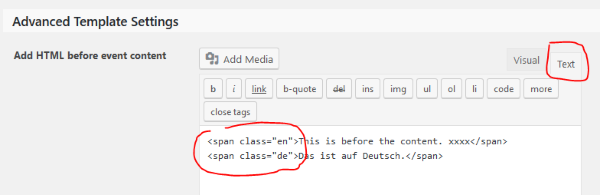
2. Display only the language appropriate span with css, something like this:
.tribe-events-before-html span { display: none; } /* Hide all spans! */

html:lang(en-us) .tribe-events-before-html span.en { display: inline; } /* Show English */

html:lang(de-DE) .tribe-events-before-html span.de { display: inline; } /* Show German */
The same can be done for the text below.
I hope this helps. Let me know.
Cheers,
AndrasKeymasterHello again Jim,
I’m sorry that you are still having issues with the DST.
I ran a quick test if I can recreate this, but so far I didn’t manage.
As a next step I would like you to send me a copy of your site (all files and database) if that is OK with you, so I can spin it up locally and take it for a test drive.
The files will be likely bigger then what is allowed here, so you can upload them to a cloud service and share the link in a private reply.
One more info which might be useful: what operating system does the server have where your site is running? Windows or Linux? (Or something more exotic? 🙂 )
Thanks!
I hope we can nail this.
Cheers,
AndrasKeymasterHello Jennifer,
I would be happy to help you solve this problem, but for that I need your help as we cannot re-create the issue you have described.
I understand that you don’t want to do tests on your live site. Would it be possible for you to create a copy of your site and set it up as a staging site, where tests could be done without ever disrupting your live site? If you need help with this let me know.
Thanks and cheers,
AndrasKeymasterHello Jessica,
Thanks for using our plugins and welcome to the forums!
Great question!
You do have the option to move attendees from one event to another. For this you need to go to the attendee list of an event (https://cloudup.com/c5F7qsXD7DX) and click on “Move” below the Ticket name (https://cloudup.com/cjxRW60i4gV). Then a modal window will help you choose a target event and / or ticket type.
My orders are not show up under the attendee tab.
On the Attendee tab only the list of attendees will show up, with the order number and order status in the “Status” column. (See second screenshot.)
Your ticket orders will show up under the Orders tab and your product orders under WooCommerce > Orders.
I hope this clarifies. Let me know if you have more questions.
Cheers,
AndrasKeymasterHello Ingo, grüss dich,
Thanks for using our plugins and welcome back!
I’m sorry about your issues with the ticket sending.
Recently we have introduced an option where you can choose when the tickets should be sent. You can find it under Events > Settings > Tickets tab > WooCommerce support section and looks like this:
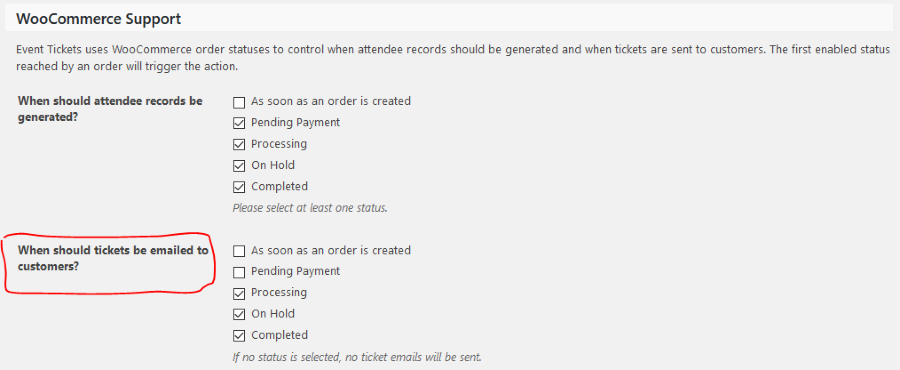
Check your settings there and let me know if that helps you fix this.
Cheers,
AndrasMarch 20, 2017 at 2:09 pm in reply to: Month View Navigation (prev/next) doesn’t stick to language (WPML) #1256875KeymasterHi Mister,
I checked and while this fix will not make it into the upcoming maintenance release (still in March), it has high priority, so there is a high chance it will be in the one after that, sometime in April. Hang in there, the fix is coming soon.
Thanks for your patience!
Cheers,
AndrasMarch 20, 2017 at 2:00 pm in reply to: WordPress database errors, Slow performance and Slow Errors #1256872KeymasterHello Matt,
Sorry to get back to you after such a long pause, the thread got out of my sight somehow.
I checked and the plugins don’t set up or run and cronjobs.
Did you try a caching plugin? Does that help?
Cheers,
AndrasKeymasterHallo nochmal,
I just re-discovered this thread, sorry for the long break.
I was checking what could be done and if the filter bar could be customized.
There is the possibility to add another custom cost filter that would start at $1, however I couldn’t get it to work: when the page loaded it didn’t take that “minimum €1” into account. I needed to change the price range there and back and hit the filter button.
I’m still checking some options, will let you know.
Andras
-
AuthorPosts