Forum Replies Created
-
AuthorPosts
-
September 6, 2018 at 7:46 am in reply to: "check in for for this event" ticket message translation #1615158
Andras
KeymasterHi mrkoozik,
Thanks for reaching out!
If you want to translate that sentence to your local language then I recommend the following webinar recording, which gives you the details: https://www.youtube.com/watch?v=63frO0szyd8&t=1s
Probably the easiest would be to use the Loco Translate plugin on your website.
Once installed and activated, look for the translation files of Event Tickets Plus. Choose the translation of your language.
First click on the Sync button to get the latest string set synchronized to your language file.
Then look for the string you would like to translate (e.g. “Scan this QR code at the event to check in.”), add the translation, save, and you should be done.
Hope this helps.
Cheers,
AndrasKeymasterHi again,
Meanwhile I’m waiting for an answer from my colleagues I did some searching.
I found this plugin: https://wordpress.org/plugins/gdpr/
Gives you a nice set of tools that should allow you to review a users data and delete them.
Once activated go to the GDPR > Requests menu > Erasure tab, there you can add a user by email, then Review their content, and delete the user if wanted.
You might find this plugin useful as well, though I believe this functionality is baked into WP already under Tools > Export / Erase Personal Data.
Cheers,
AndrasKeymasterHello Rob,
Thanks for reaching out to us!
I do apologize for the somewhat long waiting time. We have been receiving an unusually large number of questions in the last couple of days. Our team is working hard to get an answer to every question as soon as possible.
Though I’m not a lawyer or a GDPR expert, to the best of my knowledge it is not a GDPR requirement to automatically delete data after a certain period of time.
The closest paragraph is:
“The right to be forgotten gives users an option to erase personal data, and stop further collection and processing of the data. This process involves the user withdrawing consent for their personal data to be used.”
That though needs the user to request the deletion of the data.
I’m not sure any tools exist in our plugins that would allow an administrator to delete old data with a click of a button, but I will ask the team who is handling GDPR related tasks.
Please hang in there, I will get back to you in the shortest time possible.
Thanks for your patience so far.
Cheers,
AndrasKeymasterHi Jen,
Thanks for reaching out and for the detailed brief!
Our plugins can accommodate some of those but some are out of the scope of its functionality. Let me give you some details.
· Ability to open and close golf/sponsor registration. Need to be able to track per year and need to be able to pull up any year’s registration.
· Ability to register 1, 2, 3 or 4 golfers.
o Golfer names, contact info and handicapBy default our plugins are not set up to handle membership registrations. However you could achieve this for setting up a year-long (or season-long) event, and collect registrations for that.
There is the possibility to register multiple people at the same time and collect the required information. Registration could be done through selling tickets (either for money or for free) for the year-long event.
· Ability to register for hole sponsorship at the same time as golf
o Company Name, contact name & information and ability to select hole sponsor level or add their own amountThis should be also possible. For the year-long event you can set up multiple tickets. One would be the registration (see above) and another cold be the hole sponsorship.
Just like above it is possible to collect extra information with the ticket.
For the above two you will need Event Tickets and Event Tickets Plus and I would recommend using WooCommerce with them as the eCommerce solution.
· Comment section
This could be handled through WooCommerce. By default on the checkout page there is a box for comments.
· Calculate amount due – select if they are paying with check or credit card
o Check payment will calculate amount due and show an invoice that they may print
o Credit Card payment will bump them to a credit card site. Upon payment, they will get a receipt that states the amount they paid for golfers/sponsorship. Also need to be able to tie credit card payment back to registration so it is easy to determine who paid. This is needed for the required payment receipt information that we need to send donors.This is beyond our plugins, but WooCommerce should be able to handle these either straight out of the box or with a suitable add-on.
need to be able to tie credit card payment back to registration
Yes, that is handled. When someone purchases a ticket / registration, that will create an order in the system with the details.
· Sponsorships of $1500 or more will be able to register for a Banquet (up to four guests). We will need to ability to enter entrée options or select buffet if that is what is being offered for that particular year.
This is beyond us. You will need to look for a 3rd-party solution for this. Probably something like this.
· Need to be able to place golfers on a team (for those that are less than 4 golfers)
· Ability to name the golf teamOur plugins do not offer any team management.
· Ability to print golfer names, company, and show who is paid and not paid for year selected
· Ability to print sponsors, amount sponsored and paid or not paid for year selected
· Would also like to be able to pull a complete dashboard with all information that we could pull into excel for year selectedIt is possible to do that though the attendee list functionality. The attendee list looks like this: https://theeventscalendar.com/content/uploads/2018/08/Attendee-list-Full-View.png
Data can also be exported into an excel file.
· Ability to print banquet registration for year selected
If the banquet event and it’s registrations are handled through The Events Calendar then it’s possible like above.
· Be able to view details according to filters we have selected (i.e. golfers for 2018 or golfer name or golfers that have not paid for year selected)
The attendee list of Event Tickets / Event Tickets Plus has limited filtering capabilities. Alternatively if you export the list to Excel you can run there pretty much any kind of filtering.
· Ability to scan in golfers’ team name and register them for golf the day of the event. Need to be able to see that they have not paid so that we can collect $ that day.
Event Tickets Plus comes with QR code checkin functionality. So if a golfer has bought a ticket to the event, he will receive the ticket and a QR code in an email, which can then be scanned at the event. One code can be checked in only once, unless it is manually unchecked on the back-end.
Check-in status can also be toggled on the attendee page on the back-end of the site.
Scanning a golfer’s team name is a different thing, our plugins cannot handle that.
I hope these answer your questions. If something is not totally clear of you have further questions, let me know.
Cheers,
AndrasSeptember 6, 2018 at 3:58 am in reply to: Events Calendar Pro issues with Yoast SEO redirects and switching post types #1614964KeymasterHi Carolyn,
Thanks for your patience.
I ran some test and can confirm this happens on my side as well.
I have filed a bugticket on this and our developers will take a look at it.
I am going to set the status of this ticket to “pending fix” and we will update it once the fix is released.
If you have any new questions or issues please create a new ticket and we’ll help you out.
Thanks and cheers,
AndrasKeymasterHi Zora,
I hear you loud and clear.
If you set up the url as I showed you in the previous post it will do what you need.
Here’s a screencast I just did for a visual experience. 🙂
Let me know…
A.
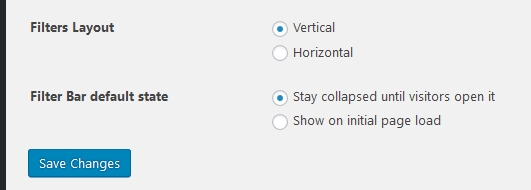
KeymasterUnder Events > Settings > Filters tab, at the bottom you have the option to choose the default state and the position of the filter bar: https://dl.dropbox.com/s/jrbg2iyrivpggsf/shot_180906_121554.jpg
After changing any setting click the ‘Save Changes’ button.
Please note that only those categories will show up in the filter bar that have at least one event. Empty categories will not show up.
If you need further help, then please also share your system information with me.
Cheers,
AndrasKeymasterIf you would like to be able to show only one kind of events on the map at a time, then I would suggest using categories for the events. There are category specific urls for all the views.
Alternatively you could use our Filter Bar plugin which will give you further filtering options.
You can check out the filter bar on our demo page. It is the second grey bar that says “show filters”.
Let me know if you have further questions.
Cheers,
AndrasSeptember 6, 2018 at 2:29 am in reply to: Please verify your API key is correctly entered on the settings page #1614925KeymasterHi David,
Thanks for your understanding.
restart the app
I found that simply exiting the app usually does not help, because the app still stays running in the background.
The app also needs to be removed from the recent apps list. I believe on an iPhone that’s a long-press of the button, on android it’s the button with the square(s). Remove from that list and then start the app again.
Phone restart will also do that, but shouldn’t be necessary.
Additionally what I can do is, if you can share with me your api key in a private reply, I will then buy a fee child ticket on your site and test if I can check myself in on my mobile.
Andras
KeymasterOkay, thanks for letting us know.
We’ll get back to you once we have something.
Cheers,
AndrasSeptember 6, 2018 at 1:55 am in reply to: Problems with url translates – The Event Calendar & WMPL #1614906KeymasterThis reply is private.
KeymasterHi,
Simply exiting (hitting the back or main button) sometimes is not enough, as the application still stays running in the background.
Try opening the list of your recent apps (I believe on iPhone it’s long pressing the button, on Android it’s the button with the square / 2 squares), and remove it from that list. This will fully close the application.
Also make sure that your website is not behind a coming soon or maintenance mode page, because then the app might not be able to connect and check the validity of your API key.
Let me know if this helps.
Cheers,
AndrasSeptember 5, 2018 at 9:14 am in reply to: Please verify your API key is correctly entered on the settings page #1614225KeymasterThe API key is case sensitive, so make sure you enter it as you see it.
A.
September 5, 2018 at 9:04 am in reply to: Please verify your API key is correctly entered on the settings page #1614199KeymasterHi David,
Thanks for reaching out!
Sorry for this issue.
Please try exiting from the application and then removing it from the “running in background” list as well to make sure it is fully closed.
Then start again. Check if your API key is still in place and then try a scan.
Let me know how that goes.
Cheers,
AndrasKeymasterHey Colm,
Thanks for reaching out!
Sorry to hear about this 500 issue. I’d be happy to help you solve that.
The 500 Internal Server Error can be caused by more things. There are many articles on the internet that describe the issue and on how you can solve it. I usually recommend this one:
Beside that you can go through our conflict testing guide to see if it uncovers any conflicts with other plugins.
If you need further help, please also share your system information with me in a private reply.
Thanks and cheers,
Andras -
AuthorPosts