

Forum Replies Created
-
AuthorPosts
-
Andras
KeymasterHi hydeaway,
Thanks for reaching out. I’m really sorry about your issue with GWT.
Could you share with me screenshots where the issues, error messages are shown? Possibly the URL or URLs which produce the errors?
Based on this I can check what can be done about it.
I would also recommend reading through these 2 articles, which might provide some further insights:
Cheers,
AndrasKeymasterHello Maddie,
Thanks for going Pro and welcome to the forums!
Great question you have there. Let me help you out with this one.
We don’t have a template or theme file which has that, which you could easily edit.
Instead I would recommend the following approach based on the code in the knowledgebase article you shared.
https://gist.github.com/andrasguseo/75edb5aa33c88880525996697aae3728
This snippet will basically add the missing spaces and the | character via replacing part of the text.
Would this work for you? Let me know.
Cheers,
AndrasKeymasterHi Philipp,
Thanks for getting in touch with us with your question.
That part of the search results is not handled or generated by us to the best of our knowledge.
There could be some setting in Google My Business that lets you add that information like the opening hours.
I was digging a bit further into this. What I found that on the sample website you shared the list view of the calendar is the only one that lists the 3 events and nothing else. That could potentially be the source of it. Might be there is an option to add the url somewhere in Google My Business.
I hope this helps somewhat.
Is there anything else I can help you with?
Cheers,
AndrasKeymasterHi Jérôme,
Hey, thanks for getting in touch. I think I can help you with that.
You are on the right track. It might be that you need to add “!important” after the value like this:
.tribe-events-tooltip h4 {

color: #00ff00 !important;

}
Try and let me know if that helps.
Cheers,
AndrasKeymasterHello Brandon,
Thanks for reaching out and I’m sorry about this duplication issue.
Today we have released an update for The Events Calendar (version 4.5.10) which is addressing the duplication issues.
Please update your plugins and please test if that solves it for you.
Based on your system information – thanks for sharing it – I see that your Events Calendar PRO is quite outdated. I strongly recommend updating that too.
Note, that before any update it is a good idea to make a full backup of your site and database, just in case.
Let me know if the update helps with this issue.
Thanks and cheers,
AndrasKeymasterHi Tyler,
Thanks for using our plugins and welcome to the forums!
I’d be happy to help you with your questions.
We don’t see global stock on the event page
That is likely a feature of the theme you are using. To check this please switch over to a default theme like twentyseventeen and check if you see the ticket stock there.
This is how it looks with twentyseventeen: https://cloudup.com/cqFIBnqF1uV
When we sold a ticket the global stock level didn’t decrease. See attached file.
For this we need to check 2 pieces of information.
- What is your setting under Events > Settings > Tickets tab > WooCommerce Support section? (Can you send me a screenshot?)
- What is the status of the order? Is it “Processing” or “Completed” or … ?
With these information on hand we’ll be able to go further. 🙂
Cheers,
AndrasKeymasterHello Sabina,
Thanks for reaching out to us with your question.
As Shelby mentioned in the thread you quoted, that function is not yet available for the build-in filters of filterbar.
If you think that is something you would like as a feature I encourage you to visit our User Voice Page and either upvote an existing request or make a new request there.
As a workaround what I can recommend is setting up additional fields for those fields where you want the “and” operator to be available and set that up for the events.
You can do this also with the State as well. Create a checkbox additional field and list all the states. Then set the value for this for all the events. And with a template override or some css you can remove / hide the additional fields from the events on the front end. Then you can set up this additional field as a filter and remove the original “State” filter.
It does require extra work and attention, but it is doable this way if you don’t want to spend time and money on a custom solution.
Do you think this is something you could use?
Is there anything else I can help you with?
Cheers,
AndrasAugust 9, 2017 at 10:24 am in reply to: How to have one event listed but multiple occurrences on calendar #1332965KeymasterHi Shane,
The setting I mentioned above influences all the list views so if you use the
[tribe_events view="list"]shortcode, it will only show only the upcoming show of a recurring event.Same goes for the Event List widget.
Do you have any other questions I can help you with?
Andras
August 9, 2017 at 10:16 am in reply to: Photos Display Only for FREE and RSVP Ticket Sales Modes #1332961KeymasterThis reply is private.
August 8, 2017 at 1:12 pm in reply to: How to have one event listed but multiple occurrences on calendar #1332421KeymasterHello Shane,
Thanks for going Pro and welcome to the forums!
I’d be happy to help you with your question.
There is a setting under Events > Settings > General tab > Recurring Event Instances which could help you with this.
How are you showing the events on your home page? With a widget? Shortcode? Built-in theme feature?
Looking forward to helping you with this.
Cheers,
AndrasKeymasterHi Michelle,
Thanks for sharing those screenshots with me.
Sometimes curious things like that happen. 🙂 I’m happy to hear that the events got updated.
Is there anything else I can help you with before we close the thread as resolved?
Cheers,
AndrasAugust 8, 2017 at 12:57 pm in reply to: Photos Display Only for FREE and RSVP Ticket Sales Modes #1332415KeymasterThis reply is private.
KeymasterHello Ryan,
Thanks for using our plugins and welcome to the forums!
I’m sorry about this issue you are having with the exclusions. We are aware of this bug and we have an internal bugticket on file already. At the moment there is no date set for when the fix is going to be done.
Until then, as a workaround, you could possibly set up your recurrence rules without exclusions like this:
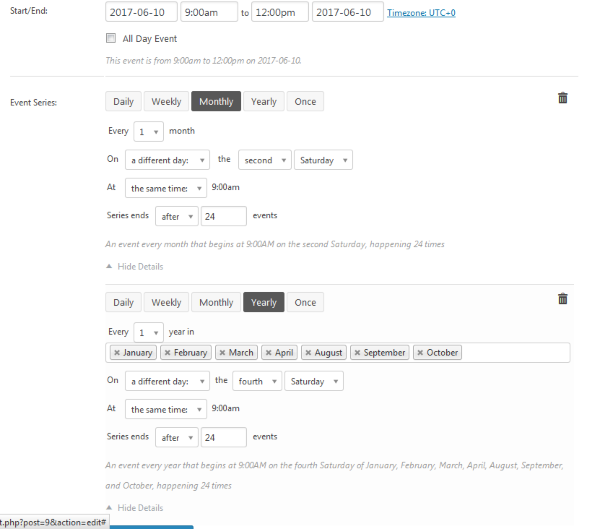
(The series end date you can set to your liking of course.)
Let me know if this helps.
Cheers,
AndrasKeymasterHello Kathi,
Thanks for using our plugins and welcome to the forums!
Great question you have there, let me help you with that.
With some custom development you should be able to show for an event whether tickets are on sale or not at the moment.
For this you will need to create a template override. You can read more about this in our Themer’s Guide.
Depending where you want to show the message you will need to create an override for the single event page and / or the list view.
You can use the tribe_events_has_tickets_on_sale() function to determine whether tickets are on sale or not and show a message based on that.
I hope this can get you started. Let me know if you have any further questions.
Cheers,
AndrasKeymasterHi Adam,
Thanks for the ping.
I checked the status of the ticket, but there is no date set for when a fix is going to be released.
Since this is a duplicate of the above mentioned thread I’m going to close this. If you have a question in the future or just want to ping us for a status update, then please do so in the original ticket. We keep an eye on that one as well and we’ll definitely update it once a fix is released.
Thanks and cheers,
Andras -
AuthorPosts