

Forum Replies Created
-
AuthorPosts
-
July 23, 2018 at 7:46 am in reply to: You are using The Events Calendar PRO but your license key is out of installs. #1581449
Victor
MemberHi Ian!
Thanks for getting in touch with us! Let me help you with that.
You can deactivate the license from your dev site by navigating to your licenses page
The Events Calendar PRO personal license can only be activated on one live site. Of course, you can use one license for a live and dev sites as you can learn in the following article > https://theeventscalendar.com/knowledgebase/using-one-license-live-dev-sites/
I can see that your dev site was counted as a live site because it wasn’t one of the top level domains that we do not count for a dev site.
I hope that helps. Let me know if any follow up question.
Best,
VictorJuly 23, 2018 at 7:38 am in reply to: How do we display the name of the month (May, June, July….)? #1581436MemberHi Christa!
Thanks for getting in touch with us.
I’m not exactly sure where you are trying to display the name of the month. Is it in one of the calendars you mention?
Please let me know more about it and I’d be happy to help you with this. You can send us screenshots as a reference.
Also, when coming back, please share with us your system information by following this guide > https://theeventscalendar.com/knowledgebase/sharing-sys-info/.
Thanks,
VictorMemberHi Bobby!
Thanks for getting in touch with us!
There is an option to show/hide the timezone to the end of the event dates and times. You should see it by navigating to your WP Admin > Events > Settings > General tab and under Time Zone Settings, the Show time zone option should be unchecked.
Does it work for you? Let me know.
Best,
VictorMemberHi Amy!
Thanks for getting in touch with us!
We have a great guide about best practices for implementing custom snippets that will help you with that > https://theeventscalendar.com/knowledgebase/implementing-custom-code-snippets/
In general, most people find it easier and more convenient to paste the code into your child theme’s functions.php file.
I hope that helps. Let me know if any follow up questions 🙂
Best,
VictorMemberHi Rhys,
Thanks for taking the time to report this.
Unfortunately, I’ve been able to replicate the same issue on my end. It seems it’s only a validation error.
I have logged a bug report for this so it can be addressed in one of our next maintenance releases of our plugins.
I will set this thread’s status to “Pending Fix” and link it to the report. This way, we will notify you once a fix is released.
The good news is you can workaround that error by modifying the event url to use .com instead of .co.uk and it should import the event as normal.
Please let me know if this works for you.
We apologize for the inconvenience and we appreciate your patience while we work on this.
Thanks,
VictorMemberHi Mike,
Thanks for your confirmation. In the meantime, adding ticket links is a good workaround as you mention.
Best,
VictorMemberThis reply is private.
MemberThis reply is private.
MemberHi Minda,
You can use the tribe_tickets_get_attendees template function – located at /wp-content/plugins/event-tickets/src/template-tags/tickets.php file – te get all the attendee information, when passing the attendee id as a parameter.
You could customize the attendees-list.php template file located at /wp-content/plugins/event-tickets-plus/src/views/ and use that function to show the attendee_meta. I’d suggest you make a template override of that template, which you can learn how to do that in our Themer’s Guide.
I hope that helps 🙂
Best,
VictorMemberGlad it did Ron! Thanks for letting us know about it.
I’ll close this thread now, but feel free to open a new topic if anything comes up and we’ll be happy to help.
Best,
VictorMemberHi Travis,
Thanks for explaining the issue you were having.
I’ve just made some tests on a WPEngine site with Object Cache enabled and I’m not able to reproduce the attendees not being generated.
I have tested this with RSVP tickets only. Just to confirm, could you please let me know if the issue was happening for RSVP tickets or paid tickets? If it was for paid tickets, where you using Tribe Commerce, WooCommerce or EDD to sell your tickets?
Do you have the link to the thread you mention? This way I can have a look and see if there was a bug report attached to it and check the status of the report.
Nevertheless, I’d suggest you update to the latest versions of our plugins as I can see you are a few versions behind. As always, I’d recommend to setup a dev/staging site so you can test things out and make all plugin updates without disrupting the live site.
Then if everything works on staging, proceed with the updates on your live site and create a test event with some tickets to see if you can replicate the attendees issues with object caching enabled.
Let me know about it.
Thanks,
VictorMemberHi Minda!
Thanks for getting in touch with us!
Unfortunately, there is no shortcode to accomplish what you are looking for.
However, I’m not sure I understand completely the functionality you request. We are fairly limited in how much support we can give for custom development questions like that. But if you give a bit more details about it, I will at least see if it’s doable and point you into the right direction as much possible.
On the other hand, we have the following shortcode that may be of help or even as a starting point for that > https://theeventscalendar.com/knowledgebase/display-a-list-of-attendees-events/
Best,
VictorJuly 12, 2018 at 4:31 pm in reply to: Pre-Sales: Combining Community Tickets and Event Tickets Plus #1574258MemberHi Lindsay!
Thanks for your interest in our plugins!
Our Community Tickets plugin extends the functionality of our Community Events and Event Tickets Plus plugins so that your website visitors can seamlessly create and sell tickets for the events they submit.
would I be able to incorporate the Event Ticket Pro functions like multiple ticket prices, QR codes, etc, into the user-generated forms?
As I mentioned above, you will also need the Community Events plugin to accomplish this. Additionally, you’ll need WooCommerce to be able to enable the creation of tickets from the community submission form.
I’d recommend you take a look at our product bundles if you are planning on getting Community Tickets as they offer a good deal > https://theeventscalendar.com/bundles/
I hope that helps. Let me know if any follow up questions 🙂
Best,
VictorMemberHi John!
Thanks for reaching out to us! Let me help you with that.
The image that shows in the cart is from the ticket product image (in WooCommerce), and not from the event.
You can edit the ticket product image by editing the ticket for the event and then clicking on Edit Ticket in WooCommerce link:
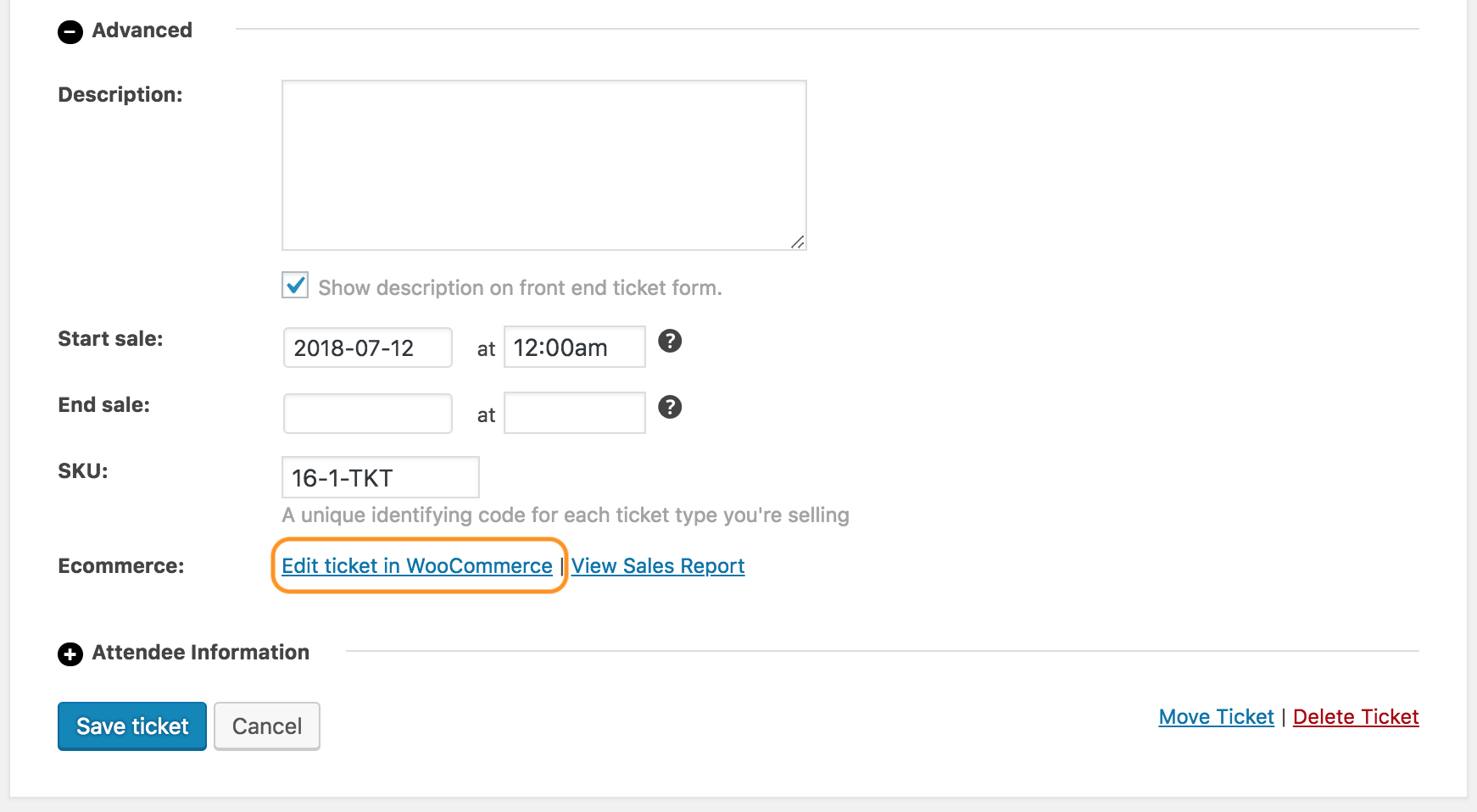
I hope that helps. Let me know if any follow up question 🙂
Best,
VictorMemberHi Thierry!
Thanks for getting in touch with us!
First, please note this is a public topic, so you’ll want to create a private reply or create a Private topic when posting in our help desk if you need to send private information.
That said, we unfortunately cannot accept login credentials as we state in our terms.
I’d be happy to help you find the source of your issue.
Are you receiving other emails from your site such as a password recovery email when trying to reset your password?
Also, there could be a conflict with your theme, another plugin or even some custom code. To make sure we are not dealing with a conflict, please go through the steps outlined in our Testing for Conflicts guide and see if you can reproduce the same issue under default conditions.
When coming back, could you please share with us your latest system information by following this guide > https://theeventscalendar.com/knowledgebase/sharing-sys-info/ ? We’ll see if there is anything strange that would indicate an error from there.
Let us know about that.
Thanks,
Victor -
AuthorPosts