Forum Replies Created
-
AuthorPosts
-
Patricia
MemberHey Doug,
Thank you for reaching out to us! I’m very sorry about this issue you are experiencing, let me help you to solve this!
The 500 Internal Server Error is a very general HTTP status code that means something has gone wrong on your website’s server, but the server could not be more specific on what the exact problem is. This status code is usually associated with a PHP Fatal Error, so to help us to identify the cause of this issue, can you please check your PHP error log? If you don’t have access to this log, you can ask your hosting provider to share this info with you.
You can also check this by yourself by temporarily enabling WP_DEBUG and WP_DEBUG_LOG via FTP and share with us any messages you see while accessing your event submission page. All WP_DEBUG messages will be stored in a debug.log file in /wp-content/debug.log.
If you have any other questions in the meantime, please let me know and I’ll be happy to assist!
Regards,
Patricia
August 14, 2017 at 6:06 am in reply to: Latitude and Longitude fields are present but I cannot input data. #1334896MemberHey Curt,
Thank you for reaching out to us! I’m very sorry about this issue you are experiencing.
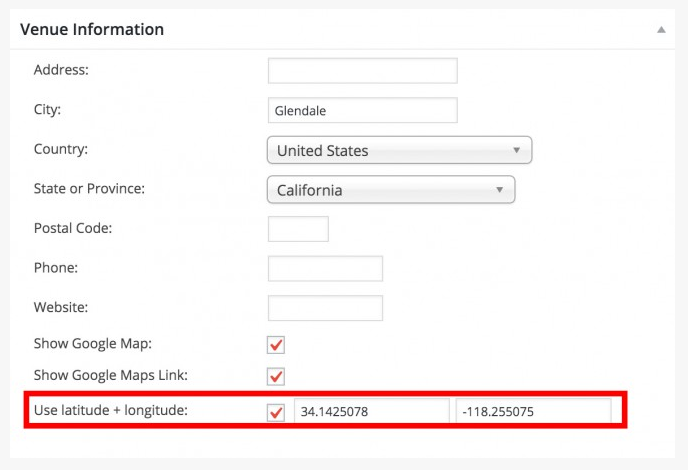
Can you please make sure that you are using this latitude/longitude format to create your Venue coordinates?
You can check the “Using Coordinates” section of this article for further information.
I hope this helps! Let me know if you need anything else in the mean time.
Regards,
Patricia
MemberHi Brandon,
Thank you for reaching out to us! I’m very sorry about this issue you are experiencing.
That is unfortunately an issue we are already aware of: When hitting preview for a Facebook URL that has no upcoming events, it doesn’t let you schedule the import.
I will set this thread’s status to “Pending fix” and link it to the bug report, so we can let you know as soon as it’s fixed.
I apologize for this issue and appreciate your understanding. If you have any other questions in the mean time, please let me know!
Regards,
Patricia
MemberHey Marcus,
Thank you for reaching out to us!
You can decide what happens to events on your site if they are reimported and the event at the original source has changed by accessing your Dashboard and heading over to Events -> Settings -> Imports -> Event Update Authority.
We have an article about EA import settings: it is a little bit outdated but might be helpful to better understand some of the available options:
I hope this helps! Let me know if you need anything else and have a great weekend!
Regards,
Patricia
MemberThis reply is private.
MemberHi Karen,
You are very welcome! Good to know that everything is working as expected now 🙂
Let me know if you need anything else and have a great weekend!
Regards,
Patricia
MemberHey Rodrigo,
Thank you for reaching out to us!
I couldn’t replicate the issue you are experiencing from here. When I test your URL on Redirectcheck, it returns a HTTP/1.1 200 OK status, to redirects in place.
Please let me know if you have further information about this issue and I will be glad to further investigate if necessary.
Regards,
Patricia
MemberHi Scott,
Thank you for reaching out to us! I’m very sorry about this issue you are experiencing.
I’ve ran some tests and could replicate the problem in one of my websites as well.
We’ve already flagged this as a bug and our developers are working to figure out the cause of the issue.
You will be notified as soon as we have a solution.
Regards,
Patricia
MemberHi Karen,
I’ve just finished my tests and I was able to find out the cause of the issue you are experiencing:
on cabarrus-county/lib/core.php, line 240 you have the following filter in place:
add_filter('body_class', 'get_section');When I remove this filter, the time of your event is correctly setup. I’d suggest you to review/update or remove this function.
Let me know if you need anything else and I’ll be happy to assist!
Regards,
Patricia
MemberHi Karen,
Good to know you were able to find out the custom filter that was causing the conflict!
I’ve just downloaded your plugin files and will run some tests from here.
I’ll return to your as soon as I have further information on this!
Regards,
Patricia
MemberHi Louise,
Thanks for sharing your system info with us! As I can see from here you are running a recent PHP version, so it is probably not the cause of the issue you are experiencing.
I’ve ran some tests, but couldn’t replicate the error in my own website.
We released yesterday a new version for both The Events Calendar and Community Events: can you please update your plugins and check if the issue persists after that?
If the update doesn’t solve your problem, there’s probably a plugin or theme conflict causing it. In this case I would suggest you to follow this tutorial to find out what is generating this PHP Fatal error.
I hope this helps! Please let me know your test results and I’ll be happy to further investigate if necessary.
Regards,
Patricia
MemberHi Florian,
Thanks for sending us further information on this! Actually, Event Tickets Plus already matches WordPress time format:
I believe there might be a plugin or theme conflict causing the issue you are experiencing.
To identify the cause, I would suggest you to follow this tutorial. If you decide to run the test, please let me know the results!
If you have any other questions in the mean time, please let me know and I’ll be happy to assist!
Regards,
Patricia
August 10, 2017 at 9:31 am in reply to: Import Google Calendar returns "There was an error fetching the results" #1333502MemberHi Lise,
Thank you for letting me know about your test results!
I’ve ran a test from my end to verify if the problem was associated with your license, but it isn’t: the imports worked as expected while having your license enabled in my website.
Since we have a few more cases regarding this same issue, I’ve informed our developers and they will review your case.
In the mean time, a possible workaround is enabling your license in a different/staging website, importing the events you want from Google Calendar URL and use WordPress Import and Export tools to migrate your events from one site to another. You will find further information about this in the following article:
https://theeventscalendar.com/knowledgebase/using-wordpress-export-tools-to-migrate-events-content/
I realize that this is not a great workaround, but it is the only one available in your specific situation until we receive further information from our developers. Unfortunately, I cannot commit to a date at this point, but you will be contacted as soon as we have further information on this.
If for some reason the imports don’t run in your staging/dev site as well, please let me know and I’ll think about other possible solutions (perhaps I can run the import from my end and share the file with you if the issue persists).
Thanks for your understanding and if you have any other questions in the mean time, please let me know and I’ll be happy to assist!
Regards,
Patricia
August 10, 2017 at 5:39 am in reply to: Calendar causing an internal server error for admin-ajax.php in other plugin #1333357MemberHey Dusty!
No problem at all 🙂
If you have any other questions please let me know and have a great day!
Regards,
Patricia
MemberHi Erick,
Good to know that everything is working as expected now!
Let me know if you need anything else and have a great day 🙂
Regards,
Patricia
-
AuthorPosts