

Forum Replies Created
-
AuthorPosts
-
Caroline
MemberHi Michael,
Thanks for taking the time to reach out to us here! I’d be more than glad to answer these questions for you! 🙂
Allow users to a set time boundary ( I.E 10PM-4AM) for events ?
Yes, both dates and times can be defined for submissions made using Community Events.
Allow users to submit personal bank details for payment ? not just paypal
Unfortunately, automatic split payments for Community Tickets event organizers are only supported by PayPal at this time. If you wish to remit payment to event organizers via bank account, a site administrator will need to receive payment for all events and pay individual organizers manually.
Allow users to set a date & time when tickets go off sale
Yes, start and end dates for ticket sales can be defined when creating a ticket using Community Tickets. If these fields are left blank, ticket sales will begin when the event is posted and will end once the event is over.
Send an automated email to users with a PDF of ticket buyers at the time when tickets go off sale ?
Unfortunately, automated emails of this type are not currently supported by any of our plugins. If you’re interested in exploring third-party options for adding additional email functionality, I’d suggest looking into the Event Calendar Newsletter plugin, as mentioned here in our UserVoice forum: https://tribe.uservoice.com/forums/195723-feature-ideas/suggestions/4131133-mailchimp-integration (Please note that this plugin is not developed by us, and we cannot provide any direct support for issues that may occur with its use.)
Allow users to set a different concession price for a certain amount of tickets. That is a 1st release price (& set ticket number available & price), 2nd Release & so on.. Much in the same way “skiddle do” ?
Just as with our core ticketing plugins Event Tickets and Event Tickets Plus, Community Tickets allows users to define as many ticket types as they’d like for a given event, and each ticket can have different pricing, stock amounts, and so on. For more information on basic ticket creation with our plugins, check out our Knowledgebase article here: https://theeventscalendar.com/knowledgebase/making-tickets/
Allow admin to add addition custom fields to community tickets posts. ?
If your site is running Events Calendar PRO, any custom fields that are defined using the Additional Fields feature will be made available for your users to fill in. You can read more about Events Calendar PRO’s Additional Fields feature here: https://theeventscalendar.com/knowledgebase/pro-additional-fields/
Do your support team supply basic customisation Code if needed ?
Unfortunately, our team is not able to provide custom development services for individual user sites. If you’re interested in learning more about customizing our plugins, I’d suggest beginning with our Themer’s Guide–you’ll find plenty of information there to get you started!
https://theeventscalendar.com/knowledgebase/themers-guide/
You may also wish to search existing posts here on our forums, and it’s worth checking our extensions library, as well. A number of extensions already exist that may provide some of the features you’re looking for!
https://theeventscalendar.com/extensions
Allow admin to vet events before they are put on sale. ?
Absolutely! Site administrators can define what status Community Events posts will receive after submission–you can have new event submissions publish automatically to your site, or they can be saved as drafts until an administrator is able to review. For more information on Community Events settings, check out our Knowledgebase article here:
https://theeventscalendar.com/knowledgebase/community-events-settings/
I hope that helps to get you started here! Thanks again, and let us know if you should have any other questions!
MemberHi Drew,
Thanks so much for stopping by–we’re thrilled to hear that you’re considering using our plugins for this project! 🙂
If you’d like a simple approach for linking to a third-party ticketing site, I’d suggest taking a look at the Additional Fields feature of Events Calendar PRO. This feature allows you to define additional fields in your plugin settings, which can be filled in by the site administrator when creating new events. By simply defining a new field for ticket URLs using the URL field type, your client can enter the URL for a ticket page when creating a new event, and that URL will automatically be converted into a link and displayed with other event details. Here’s an example of how that might look:
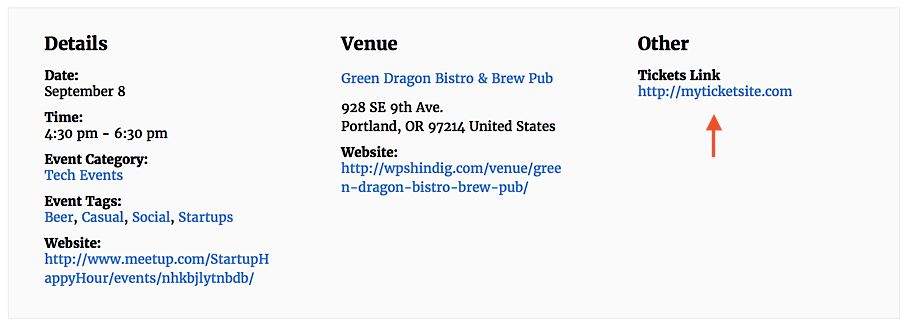
For more information on this feature and how to use it, check out our Knowledgebase article here:
https://theeventscalendar.com/knowledgebase/pro-additional-fields/
This feature by itself will not add a ticketing link to any events displayed in List View, unfortunately. However, you could definitely explore the possibility of adding such a link via template customization. If you’re interested in learning more about customizing our plugin templates, our Themer’s Guide is a great place to start!
https://theeventscalendar.com/knowledgebase/themers-guide/
I hope that helps to give you some ideas here! 🙂 Thanks again for paying us a visit, and please don’t hesitate to let me know if you should have any other questions!
MemberHi Cate,
Thanks for taking the time to reach out! If you’d like to add Events Calendar PRO to another site that you manage, the easiest way would be to purchase an upgrade for your existing license. Upgrading your license from Personal to Business will allow you to activate it on up to three sites, and you’ll have full access to updates and support for an additional year. For more information on how to upgrade your license, check out our Knowledgebase article here:
https://theeventscalendar.com/knowledgebase/upgrading-a-license/
Let me know if you should have any questions after giving it a look over! 🙂 Cheers, and thanks again!
MemberHi Lucio,
Thanks for reaching out! I’m afraid that at the moment, Event Aggregator does not include support for front-end event submission or suggesting events via email form. If you’re interested in having this functionality developed for your site, I’d suggest reaching out to a third-party developer to obtain a custom quote! We maintain a list of developers who work with our plugins and are happy to take on custom projects here on our Knowledgebase:
https://theeventscalendar.com/knowledgebase/find-a-customizer/
Feel free to reach out to any one of them with your project details! 🙂 Thanks again, and let us know if you should have any other questions!
MemberHi Sam,
Thanks so much for your interest in our plugins! While The Events Calendar and its related plugins are only available for WordPress-based sites at this time, we’ve got a great new calendar offering in the works that might be a perfect fit for your needs! If you’re interested in learning more and signing up for our early access program, you can check out the full details here:
Let us know if you should have any other questions after giving it a look over! 🙂 Cheers, and thanks again!
MemberHi Jules,
Thanks for reaching out! If you’d like to add more tickets to your pool of ticket stock, you can do so at any time by simply editing your event and increasing the number of available tickets in the Stock field. Once you’ve published your changes, the new amount of ticket stock will immediately be made available to your visitors. This functionality applies to both RSVP and paid ticket types for Event Tickets and Event Tickets Plus.
I hope that helps to get you started here! Thanks again, and let us know if you should have any other questions!
September 7, 2017 at 9:55 am in reply to: The Events Calendar and linking to Event Registration Pages #1346141MemberHi Ronald,
Thanks for reaching out! If you’d like to include events specifically from the Eventbrite platform on your site calendar, you might consider taking a look at our Eventbrite Tickets add-on for The Events Calendar. This plugin supports easy syncing of full Eventbrite events and tickets, allowing users to view event details and purchase tickets without leaving your site. You can get the full details on the Eventbrite Tickets product page here:
https://theeventscalendar.com/product/wordpress-eventbrite-tickets/
Let me know if you should have questions about this or any of our other plugins–I’d be glad to answer them for you! 🙂 Cheers, and thanks again!
MemberHi Horst,
Thanks so much for getting in touch! I’m afraid that we’re not equipped to provide technical support for current plugin users here in our pre-sales forum. We’d be more than happy to assist you at one of the following locations:
- If you’re using one or more of our free plugins such as The Events Calendar and Event Tickets, you can request assistance on the WordPress.org support forum for the affected product.
- If you’re a current license holder for one of our premium offerings, please log in to your account and submit a post to the appropriate forum for the affected product.
If you can, please take the time to confirm in your post that you’ve run through our conflict testing steps prior to contacting us–this will save us a step and help us to get your issue resolved that much quicker! 🙂
Thanks again, and we’ll see you in the forums!
MemberHi Olivier,
Thanks so much for your interest in our plugins! We’d be more than glad to assist with any pre-purchase documentation that your organization may require. Would you mind reaching out to us via email with some more details? (Please select the option “Help accessing my account” from the drop-down menu to display the full email form.)
https://theeventscalendar.com/contact/
Thanks again–we look forward to continuing the conversation there! 🙂
MemberHi Pablo,
Glad to hear it–thanks so much for confirming! It sounds like you’re all sorted by now, so I’m going to go ahead and close this thread out. Please don’t hesitate to follow up with a new thread if there’s anything else we can do to assist! 🙂 Thank you!
MemberHi Winston,
Thanks for taking the time to reach out! We offer Event Aggregator licensing in multiple tiers depending on your daily import needs–our most basic tier is capped at 100 scheduled import tasks per day, which should be more than enough to meet your requirements! 🙂 Licenses are good for one full year from your original date of purchase and can be renewed if you’d like to continue importing events after the first year. You can get the full scoop on Event Aggregator’s features on its product page here:
https://theeventscalendar.com/product/event-aggregator/
Let me know if you should have any questions after giving it a look over! Cheers, and thanks again!
MemberHi Jorge,
Thanks for reaching out! We do offer a few different options for separating events into distinct calendars on your site. If you’re using The Events Calendar, you can assign events for each of your unique venues to a specific event category, then link to those categories wherever you’d like. Event category links will display as full-sized calendars showing just the events from that category. You can see an example of a category-specific calendar here on our WP Shindig demo site:
http://wpshindig.com/events/category/tech-meetups/
Events Calendar PRO users can take things a step further with the [tribe_events] shortcode. This shortcode allows users to embed a full-sized calendar into any post, page, or custom post type, so you can display these calendars on an existing page rather than linking to a separate location. Simply assign categories to your events, then use the category attribute when creating your shortcode to show only those events in your calendar. Our Knowledgebase article here contains a more detailed breakdown of this feature and how to use it on your site:
https://theeventscalendar.com/knowledgebase/embedding-calendar-views-tribe_events-shortcode/
I hope that helps to get you started here! Thanks again, and let us know if you should have any other questions! 🙂
September 6, 2017 at 2:53 pm in reply to: Can you have one event take place at multiple locations and times? #1345684MemberHi Steve,
Thanks for reaching out! If you’d like to display a grouping of similar events under the same name at different venues and times, there are a couple of ways that you could achieve this:
- Create a single all-day event (spanning multiple days, if necessary to cover the range of possible dates) with no venue details specified in the Location form fields. You can then include more specific details on the entire range of times, dates, and locations in the description field. This option may be best if you’d prefer a simple display with just one calendar event. As an added bonus, this approach will work with the free version of The Events Calendar as well as Events Calendar PRO.
- Using the recurring events feature of Events Calendar PRO, you can create an event series for each different time (and/or date) of your event. This will allow for a bit more precision, since each unique date and time will have its own entry on your calendar. However, event content is shared between all events in an event series, so you’ll still need to provide all of your venue information in the description field. If you’d like to use the Location form fields to provide venue details for each event, you’ll need to create the event series and split each occurrence off into its own single event first. More information on event series can be found on our Knowledgebase here: https://theeventscalendar.com/knowledgebase/pro-recurring-events/
Let me know if you should have any questions about either of these approaches–I’d be glad to clarify further! 🙂 Thanks again!
MemberHi Fabian,
Thanks for getting in touch! Please ensure that you’ve selected your correct country of residence from the drop-down menu below the Email text field. “United States (US)” is selected by default, which will cause options for US states and territories to appear in the State/Region field. Once you’ve changed this selection above, you’ll no longer see US states and territories displayed for that field. 🙂
I hope that helps! Thanks again, and let us know if you should have any other questions!
MemberHi Edward,
Thanks for taking the time to reach out! On reviewing your purchase history with us, it appears that these two orders are for two separate products: Events Calendar PRO, our premium calendar and events solution, and Event Tickets Plus, which adds ticket sales functionality for posts, pages, and events. If you should have any questions about either of these products or whether they might be required for your intended setup, let me know–I’d be happy to clarify further! 🙂
I hope that helps to address your concerns here! Thanks again, and let us know if you should have any other questions!
-
AuthorPosts