
Home › Forums › Welcome! › Pre-Sales Questions › The Events Calendar and linking to Event Registration Pages
- This topic has 4 replies, 2 voices, and was last updated 9 years ago by
Support Droid.
-
AuthorPosts
-
September 6, 2017 at 6:29 am #1345382
Ronald
GuestLets say I have an event on Eventbrite, or another registration/payment system like that, is there a place to link to that or do I need the Event Tickets plugin as well?
I know I can just link to it in the event description, but I am building this for a client and a specific field for registration links would be preferred
September 7, 2017 at 9:55 am #1346141Caroline
MemberHi Ronald,
Thanks for reaching out! If you’d like to include events specifically from the Eventbrite platform on your site calendar, you might consider taking a look at our Eventbrite Tickets add-on for The Events Calendar. This plugin supports easy syncing of full Eventbrite events and tickets, allowing users to view event details and purchase tickets without leaving your site. You can get the full details on the Eventbrite Tickets product page here:
https://theeventscalendar.com/product/wordpress-eventbrite-tickets/
Let me know if you should have questions about this or any of our other plugins–I’d be glad to answer them for you! 🙂 Cheers, and thanks again!
September 7, 2017 at 1:16 pm #1346249GuestCaroline, thank you for the reply! I did see the Eventbrite add-on after I had posted this question, but the event platform we are using is actually apart of my church’s donation software. I just picked Eventbrite as it is a very popular and well known event management service.
I did download and install the free version of the calendar plugin and there is a “website” field that I could possibly refocus to link to this specific event platform. Do you have any other suggestions?
September 8, 2017 at 9:26 am #1346642MemberHi Ronald,
Thanks for following up to clarify! In that case, you could definitely use the Website field for these links, or, if you’re using Events Calendar PRO, you could create a new custom field using PRO’s Additional Fields feature. Simply define and name a new field of the URL field type in your Additional Fields settings, and that field will be displayed when creating new events. URLs entered into URL fields will automatically be converted to links on the front end of your site. Here’s an example of how a custom field for an external tickets link might look:
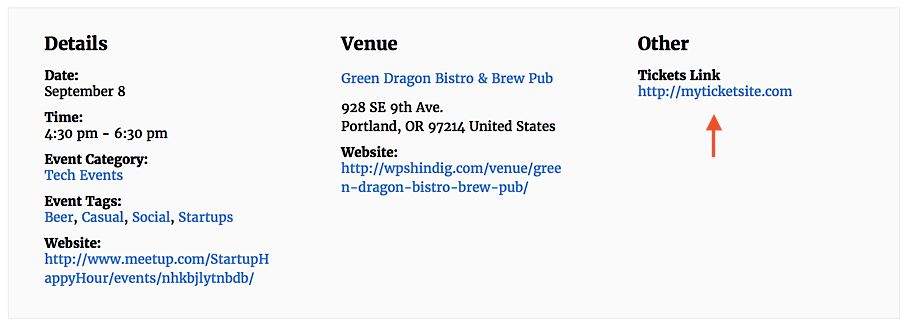
For more information about the Additional Fields feature of Events Calendar PRO, check out our Knowledgebase article here:
https://theeventscalendar.com/knowledgebase/pro-additional-fields/
I hope that helps to get you started here! 🙂 Thanks again, and let me know if you should have any other questions!
September 30, 2017 at 9:35 am #1357282KeymasterHey there! This thread has been pretty quiet for the last three weeks, so we’re going to go ahead and close it to avoid confusion with other topics. If you’re still looking for help with this, please do open a new thread, reference this one and we’d be more than happy to continue the conversation over there.
Thanks so much!
The Events Calendar Support Team -
AuthorPosts
- The topic ‘The Events Calendar and linking to Event Registration Pages’ is closed to new replies.