
Home › Forums › Welcome! › Pre-Sales Questions › Question about tickets/ticket call to action
- This topic has 2 replies, 2 voices, and was last updated 9 years ago by
Support Droid.
-
AuthorPosts
-
September 6, 2017 at 4:07 pm #1345720
Drew
GuestHello,
I’ve been testing this plugin all afternoon and it seems great for what our client (a music hall) needs, but I have a question about the tickets. This client does all its ticketing through agileticketing (an off-site service) so all we’d really need is an option to add a ‘buy tickets’ button that uses a custom link (which would link to the off-site ticketing page). Is there an option for this? Put another way, ideally they’d have an ‘add ticket link’ option/field, whereupon they’d simply paste in the off-site ticketing link.
I see the plugin is great at integrating with current platforms, but that’s a little more robust than they’d need, given what I mention above.
Lastly, this client would only be using the list view and would like this view to appear in multiple places (homepage below the fold, as well as on a dedicated ‘events’ page). Given that, my understanding is that they’d want the Pro version (to enable embedding). Beyond that, would are there any other add-on’s you’d recommend that might help with the ticket issue I mention above? Best case scenario is that a ‘buy tickets’ button/link would also appear in the list view, if that helps with add-on recommendations.
Thanks for your time, and apologies for the long submission! This is a 100+ year old concert hall so I just want to make sure I’m giving them due diligence. 🙂
Thanks again!
September 7, 2017 at 12:37 pm #1346230Caroline
MemberHi Drew,
Thanks so much for stopping by–we’re thrilled to hear that you’re considering using our plugins for this project! 🙂
If you’d like a simple approach for linking to a third-party ticketing site, I’d suggest taking a look at the Additional Fields feature of Events Calendar PRO. This feature allows you to define additional fields in your plugin settings, which can be filled in by the site administrator when creating new events. By simply defining a new field for ticket URLs using the URL field type, your client can enter the URL for a ticket page when creating a new event, and that URL will automatically be converted into a link and displayed with other event details. Here’s an example of how that might look:
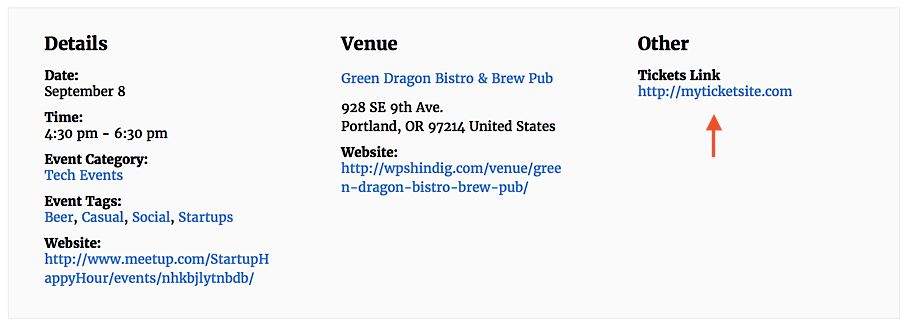
For more information on this feature and how to use it, check out our Knowledgebase article here:
https://theeventscalendar.com/knowledgebase/pro-additional-fields/
This feature by itself will not add a ticketing link to any events displayed in List View, unfortunately. However, you could definitely explore the possibility of adding such a link via template customization. If you’re interested in learning more about customizing our plugin templates, our Themer’s Guide is a great place to start!
https://theeventscalendar.com/knowledgebase/themers-guide/
I hope that helps to give you some ideas here! 🙂 Thanks again for paying us a visit, and please don’t hesitate to let me know if you should have any other questions!
September 29, 2017 at 9:36 am #1356851KeymasterHey there! This thread has been pretty quiet for the last three weeks, so we’re going to go ahead and close it to avoid confusion with other topics. If you’re still looking for help with this, please do open a new thread, reference this one and we’d be more than happy to continue the conversation over there.
Thanks so much!
The Events Calendar Support Team -
AuthorPosts
- The topic ‘Question about tickets/ticket call to action’ is closed to new replies.