

Forum Replies Created
-
AuthorPosts
-
Caroline
MemberHi Risto,
Thanks for reaching out! If you’d prefer an alternative to the RSVP functionality provided by Event Tickets, I’d suggest taking advantage of template customizations to build a simple email form into your single event pages. Our Themer’s Guide is a great place to get started with customizing the look and feel of our plugins–you’ll find a complete list of customizable templates there, along with plenty of tips and resources to add you in your development efforts.
https://theeventscalendar.com/knowledgebase/themers-guide/
I hope that helps to get you started here! Thanks again, and let us know if you should have any other questions! 🙂
September 8, 2017 at 10:58 am in reply to: One Google Calendar, multiple versions displayable by category, is this possible #1346792MemberHi Lisa,
Thanks for reaching out! While our calendars employ their own unique architecture and are not directly powered by Google Calendar, both The Events Calendar and Events Calendar PRO include support for all the features you’ve come to expect, including event categories and category-specific calendars. All event categories will have their own unique category link, which can be used to link to a calendar containing only events from that category. Here’s an example of a category-specific calendar from our WP Shindig demo site:
http://wpshindig.com/events/category/tech-meetups/
All calendars are styled with a basic neutral color palette by default and will integrate beautifully with a variety of themes. If you’d like to change the colors that are displayed on your calendar, this is supported via the WordPress Customizer. For more information on this feature, check out our Knowledgebase article on the subject:
https://theeventscalendar.com/knowledgebase/wordpress-customizer/
Support for different category colors is not included with our plugins by default, but you can easily add this with the third-party plugin The Events Calendar Category Colors!
https://theeventscalendar.com/knowledgebase/the-events-calendar-category-colors/
Lastly, if you do wish to import events into your site’s calendar from an existing Google Calendar, this is supported via our all-purpose importing tool, Event Aggregator. You can check out our Event Aggregator product page for more information on what this add-on can do!
https://theeventscalendar.com/product/event-aggregator/
I hope that helps to get you started here! 🙂 Thanks again, and please don’t hesitate to follow up if you should have any other questions!
September 8, 2017 at 10:37 am in reply to: Event ticket plus – members payment different price. #1346786MemberHi Marcella,
Thanks for reaching out! I’m afraid that members-only ticket pricing is not directly supported by Event Tickets Plus, as all payment processing and order management tasks are handled by WooCommerce or Easy Digital Downloads. For the quickest implementation, I’d suggest looking into extensions that support members-only pricing for your e-commerce platform of choice. Note that if you’re using WooCommerce, you may need to sell your tickets from the WooCommerce products page to obtain full functionality from these plugins–for more details on how to implement this, check out our Knowledgebase article here:
https://theeventscalendar.com/knowledgebase/selling-tickets-from-the-woocommerce-products-page/
I hope that helps to get you started here! Thanks again, and let us know if you should have any other questions!
September 8, 2017 at 10:30 am in reply to: Create custom tickets and ability to push out reminders #1346781MemberHi Jeff,
Thanks for taking the time to reach out! I’d be happy to address these requirements and see if our plugins might be a good match for your client’s needs. 🙂
Required purchase – everyone that is attending the show must purchase a general admission ticket in order to purchase a ticket.
Event Tickets Plus does not include any functionality of this type–most features related to purchase features and requirements are handled by your e-commerce platform of choice (either WooCommerce or Easy Digital Downloads). I’d suggest exploring some extension options to see if this functionality might be available for either plugin! Note that implementing this feature may require you to sell your tickets from the WooCommerce products page. You can learn more about using WooCommerce products pages with Event Tickets Plus on our Knowledgebase here:
https://theeventscalendar.com/knowledgebase/selling-tickets-from-the-woocommerce-products-page/
They would like to have the ability to send out a reminder email two weeks before their show to all of the attendees that would list the date/time/location of the classes the person purchased.
Reminder email functionality is not available for our plugins at this time, though we do have plans to incorporate it into a future product update! You can keep up with the latest updates on this feature in development on our UserVoice forum:
For additional email options in the meantime, you may wish to explore one of the handful of third-party mailing plugins that supports our products, such as Event Calendar Newsletter.
Create a custom name tag template that would be delivered as a PDF along with the reminder.
This feature is not built in to our plugins and would need to be implemented via custom development. For more information on customizing our plugins, our Themer’s Guide is a great place to start:
https://theeventscalendar.com/knowledgebase/themers-guide/
I hope that helps to get you on your way here! Thanks again, and let us know if you should have any other questions!
MemberHi Darion,
Thanks for following up! You should find our core fieldset code in the Fieldset.php file located at /event-tickets-plus/src/Tribe/Meta/. The fieldset types themselves are inside /event-tickets-plus/src/Tribe/Meta/Field/.
I hope that helps! Cheers, and thanks again for reaching out! 🙂
MemberHi Karen,
Thanks for taking the time to submit your inquiry to us on WordPress.org! Our WordPress.org forums are not monitored on a daily basis, and during periods of high support volume, it may be up to several days before a given thread receives a reply. We appreciate your patience as we work to assist all of our users as quickly as possible! For more information on our support turnaround times and forum procedures, please refer to our sticky post on our WordPress.org forums:
https://wordpress.org/support/topic/read-this-first-welcome-to-the-events-calendar-support-forum/
While I’m unable to give a definitive answer to your inquiry (as we haven’t had the opportunity to complete troubleshooting yet), it’s more likely that the source of your problem is a theme or plugin conflict, and upgrading to Events Calendar PRO will not provide an immediate resolution. You may wish to complete a round of conflict testing on your site while you’re waiting–this testing may help to determine the source of a conflict and can provide useful information for our support team!
https://theeventscalendar.com/knowledgebase/testing-for-conflicts/
I’m going to go ahead and close this thread out so that our support team can work with you over on WordPress.org. Please don’t hesitate to follow up with us there if you should have any other questions or concerns! Cheers, and thanks again! 🙂
September 8, 2017 at 9:26 am in reply to: The Events Calendar and linking to Event Registration Pages #1346642MemberHi Ronald,
Thanks for following up to clarify! In that case, you could definitely use the Website field for these links, or, if you’re using Events Calendar PRO, you could create a new custom field using PRO’s Additional Fields feature. Simply define and name a new field of the URL field type in your Additional Fields settings, and that field will be displayed when creating new events. URLs entered into URL fields will automatically be converted to links on the front end of your site. Here’s an example of how a custom field for an external tickets link might look:
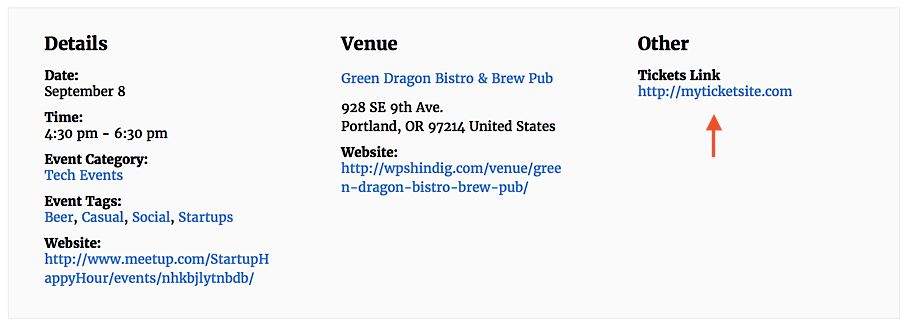
For more information about the Additional Fields feature of Events Calendar PRO, check out our Knowledgebase article here:
https://theeventscalendar.com/knowledgebase/pro-additional-fields/
I hope that helps to get you started here! 🙂 Thanks again, and let me know if you should have any other questions!
MemberHi Karen,
Thanks for following up! Would you please take a moment to submit a new post with the details of your problem to our WordPress.org support forum for The Events Calendar? You can access our forum directly at this link:
https://wordpress.org/support/plugin/the-events-calendar
Once we’ve had the opportunity to begin troubleshooting with you, we’ll be better equipped to determine the source of the problem and what steps might need to be taken! You shouldn’t need to upgrade to Events Calendar PRO to resolve this issue, though you’ll always have the option of upgrading later for PRO’s additional features, should you wish to do so. 🙂
Let me know if you should have any other questions or concerns here! Thanks again, and we’ll see you over on WordPress.org!
MemberHi Justin,
Thanks for reaching out! Please feel free to reach out to us at support [at] theeventscalendar [dot] com with any attachments you’d like to send our way, along with a note referencing your original application. We’ll take care of the rest! 🙂
Thanks again, and let us know if you should have any other questions!
MemberHi Ian,
Thanks for taking the time to reach out! By default, map views embedded using the [tribe_events] shortcode will show events from the current date forward, and past events will not be included. However, you can specify a starting month or day with the date attribute, which will allow you to display past events if desired. For more information on how to use [tribe_events], check out our Knowledgebase article here:
https://theeventscalendar.com/knowledgebase/embedding-calendar-views-tribe_events-shortcode/
You won’t need to enter a starting location or perform any other actions to display the map on first load. The map will simply appear as close as possible to the center of any displayed events. 🙂
I hope that helps to get you started here! Thanks again, and let us know if you should have any other questions!
MemberHi Trish,
Thanks for taking the time to reach out to us here! We’d be more than glad to review your site’s existing account with us and see what your options might be. Would you mind reaching out to us via email with the details of your request and a link to your site? We’ll review and follow up as soon as we’re able!
https://theeventscalendar.com/contact/
Please select the option “Help accessing my account” from the drop-down menu to display the full email form.
Thanks again, and we’ll see you over in email! 🙂
MemberHi Ollie,
Thanks for reaching out! You’ve got it exactly right–once you’re finished developing and are ready to move your site to production, simply disconnect your test site from your account on TheEventsCalendar.com and activate the license again on your live site. We’ve documented the process for moving license keys on our Knowledgebase here:
https://theeventscalendar.com/knowledgebase/moving-your-license-keys/
Let us know if you should have any other questions after giving it a look over! 🙂 Cheers, and thanks again!
September 7, 2017 at 6:10 pm in reply to: Problem with the blog after installed Events Calendar #1346322MemberHi Irene,
Thanks for reaching out–I’m so sorry to hear that you’re having some trouble with your blog posts after installing our plugins! I’m afraid that we’re not equipped to provide technical support for current plugin users here in our pre-sales forum. We’d be more than happy to assist you at one of the following locations:
- If you’re using one or more of our free plugins such as The Events Calendar and Event Tickets, you can request assistance on the WordPress.org support forum for the affected product.
- If you’re a current license holder for one of our premium offerings, please log in to your account and submit a post to the appropriate forum for the affected product.
If you can, please take the time to confirm in your post that you’ve run through our conflict testing steps prior to contacting us–this will save us a step and help us to get your issue resolved that much quicker! 🙂
Thanks again, and we’ll see you in the forums!
MemberHi Darion,
Thanks for taking the time to reach out to us here! I’m afraid that specific bookings for time slots, dates, venues, and other similar booking types are not supported by our plugins at this time. I’m sorry to disappoint. 🙁 You can read more about our decision to maintain focus on ticketing features and functionality on our UserVoice forum:
I’m sorry to be the bearer of bad news here! Let us know if you should have any other questions or concerns here–we’d be more than glad to assist. Thanks again for getting in touch!
MemberHi Cory,
Thanks so much for getting in touch! I’m afraid that we’re not equipped to provide technical support for current plugin users here in our pre-sales forum. We’d be more than happy to assist you at one of the following locations:
- If you’re using one or more of our free plugins such as The Events Calendar and Event Tickets, you can request assistance on the WordPress.org support forum for the affected product.
- If you’re a current license holder for one of our premium offerings, please log in to your account and submit a post to the appropriate forum for the affected product.
If you can, please take the time to confirm in your post that you’ve run through our conflict testing steps prior to contacting us–this will save us a step and help us to get your issue resolved that much quicker! 🙂
Thanks again, and we’ll see you in the forums!
-
AuthorPosts