

Forum Replies Created
-
AuthorPosts
-
Jeremy
KeymasterHi there!
Just wanted to share with you that a new release of our plugins is out which includes a fix for this issue.
Find out more about it → https://theeventscalendar.com/maintenance-release-for-the-week-of-15-july-2019/
We apologize for the delay and appreciate your patience while we worked on this.
As always, we suggest to setup a dev/staging site so you can make all plugin updates without disrupting the live site.
Please update the plugins and let us know if the fix works for you.
Cheers,
JeremyKeymasterHi Debbie!
Just wanted to share with you that a new release of our plugins is out which includes a fix for this issue.
Find out more about it → https://theeventscalendar.com/maintenance-release-for-the-week-of-15-july-2019/
We apologize for the delay and appreciate your patience while we worked on this.
As always, we suggest to setup a dev/staging site so you can make all plugin updates without disrupting the live site.
Please update the plugins and let us know if the fix works for you.
Cheers,
JeremyJuly 18, 2019 at 9:49 am in reply to: Community plugin: "Add new event" link leads to 404 – page not found #1838718KeymasterHi there!
Just wanted to share with you that a new release of our plugins is out which includes a fix for this issue.
Find out more about it → https://theeventscalendar.com/maintenance-release-for-the-week-of-15-july-2019/
We apologize for the delay and appreciate your patience while we worked on this.
As always, we suggest to setup a dev/staging site so you can make all plugin updates without disrupting the live site.
Please update the plugins and let us know if the fix works for you.
Cheers,
JeremyKeymasterHi there!
Just wanted to share with you that a new release of our plugins is out which includes a fix for this issue.
Find out more about it → https://theeventscalendar.com/maintenance-release-for-the-week-of-17-june-2019/
We apologize for the delay and appreciate your patience while we worked on this.
As always, we suggest to setup a dev/staging site so you can make all plugin updates without disrupting the live site.
Please update the plugins and let us know if the fix works for you.
Cheers,
JeremyKeymasterHi there!
Just wanted to share with you that a new release of our plugins is out which includes a fix for this issue.
Find out more about it → https://theeventscalendar.com/maintenance-release-for-the-week-of-17-june-2019/
We apologize for the delay and appreciate your patience while we worked on this.
As always, we suggest to setup a dev/staging site so you can make all plugin updates without disrupting the live site.
Please update the plugins and let us know if the fix works for you.
Cheers,
JeremyKeymasterHi there!
Just wanted to share with you that a new release of our plugins is out which includes a fix for this issue.
Find out more about it → https://theeventscalendar.com/maintenance-release-for-the-week-of-17-june-2019/
We apologize for the delay and appreciate your patience while we worked on this.
As always, we suggest to setup a dev/staging site so you can make all plugin updates without disrupting the live site.
Please update the plugins and let us know if the fix works for you.
Cheers,
JeremyJune 25, 2019 at 12:11 am in reply to: CE new install and lot of problems – Need help or refund #1825108KeymasterHi there!
Just wanted to share with you that a new release of our plugins is out which includes a fix for this issue.
Find out more about it → https://theeventscalendar.com/maintenance-release-for-the-week-of-17-june-2019/
We apologize for the delay and appreciate your patience while we worked on this.
As always, we suggest to setup a dev/staging site so you can make all plugin updates without disrupting the live site.
Please update the plugins and let us know if the fix works for you.
Cheers,
JeremyApril 1, 2019 at 11:46 am in reply to: API Key does not work in Events Ticket Plus App for Android #1752201KeymasterHi there!
Just wanted to share with you that we’ve released an update. Find out more about it → https://theeventscalendar.com/maintenance-release-for-the-week-of-1-april-2019/
We apologize for the delay and appreciate your patience while we worked on this.
If this doesn’t resolve your issue, please see the following article: https://support.theeventscalendar.com/483229-REST-API-Check-in-for-Event-Tickets-Plus-App-
In some instances, the webhost settings prevent use of the ET+ QR Code App. The article will provide you with further details on what to ask your host, as well as a more thorough explanation.Cheers,
JeremyApril 1, 2019 at 11:45 am in reply to: Please verify your API key is correctly entered on the settings page #1752199KeymasterHi there!
Just wanted to share with you that we’ve released an update. Find out more about it → https://theeventscalendar.com/maintenance-release-for-the-week-of-1-april-2019/
We apologize for the delay and appreciate your patience while we worked on this.
If this doesn’t resolve your issue, please see the following article: https://support.theeventscalendar.com/483229-REST-API-Check-in-for-Event-Tickets-Plus-App-
In some instances, the webhost settings prevent use of the ET+ QR Code App. The article will provide you with further details on what to ask your host, as well as a more thorough explanation.Cheers,
JeremyKeymasterHi there!
Just wanted to share with you that a new release of our plugins is out which includes a fix for this issue.
Find out more about it → https://theeventscalendar.com/maintenance-release-for-the-week-of-1-april-2019/We apologize for the delay and appreciate your patience while we worked on this.
As always, we suggest to setup a dev/staging site so you can make all plugin updates without disrupting the live site.
Please update the plugins and let us know if the fix works for you.
Cheers,
JeremyKeymasterHi there!
Just wanted to share with you that a new release of our plugins is out which includes a fix for this issue.
Find out more about it → https://theeventscalendar.com/maintenance-release-for-the-week-of-1-april-2019/We apologize for the delay and appreciate your patience while we worked on this.
As always, we suggest to setup a dev/staging site so you can make all plugin updates without disrupting the live site.
Please update the plugins and let us know if the fix works for you.
Cheers,
JeremyKeymasterHi there!
Just wanted to share with you that a new release of our plugins is out which includes a fix for this issue.
Find out more about it → https://theeventscalendar.com/maintenance-release-for-the-week-of-1-april-2019/We apologize for the delay and appreciate your patience while we worked on this.
As always, we suggest to setup a dev/staging site so you can make all plugin updates without disrupting the live site.
Please update the plugins and let us know if the fix works for you.
Cheers,
JeremyApril 1, 2019 at 9:26 am in reply to: Too many attendees is leading to memory and execution time issues #1752113KeymasterHi there!
Just wanted to share with you that a new release of our plugins is out which includes a fix for this issue.
Find out more about it → https://theeventscalendar.com/maintenance-release-for-the-week-of-1-april-2019/We apologize for the delay and appreciate your patience while we worked on this.
As always, we suggest to setup a dev/staging site so you can make all plugin updates without disrupting the live site.
Please update the plugins and let us know if the fix works for you.
Cheers,
JeremyKeymasterHi Sarah,
Here is how it looks like on a iPhone 6:
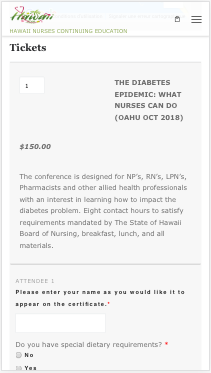
Is it different when you look at it? If so, could you make sure you have cleared your cache? And could you tell me which device/browser you are using?
If the problem comes from the text area which you think is not wide enough, then you could add the following snippet, still in Appearance > Customize > Additional CSS:
@media only screen and (max-width: 800px) {
  .tribe-event-tickets-plus-meta textarea {
    width: 100%;
  }
}
Please let me know how it goes.
Cheers,
JeremyKeymasterHi Sarah,
Instead of the snippet I gave you last time, could you add this one?
.tribe-mini-calendar-event .list-date .list-dayname {
    padding: 2px !important;
    font-size: 10px;
    letter-spacing: inherit;
}
Please let me know how it goes.
Cheers,
Jeremy -
AuthorPosts