

Forum Replies Created
-
AuthorPosts
-
February 13, 2017 at 11:07 am in reply to: How to display event's price, but it's not for ticket (or RSVP) #1233959
Hunter
ModeratorWelcome back 🙂
If you have Event Tickets and Event Tickets Plus activated, the cost field will not display. We have provided a workaround in this Knowledgebase article, so please take a look and let me know if you have any more questions.
Cheers!
ModeratorHey Nick 🙂
Whatever you have entered in the ‘Number of events to show per page‘ setting under Events > Settings > General (screenshot below) is how many events will display at a time, including map view.
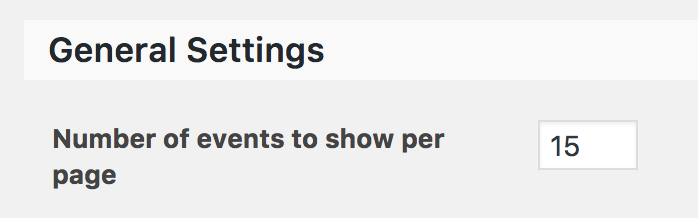
If you wanted to work around that, you could either increase the number of events in that setting or overwrite the number of events in map view using tribe_get_events.
Please let me know if this helps answer your question and have a great rest of your weekend. Cheers!
February 11, 2017 at 1:13 pm in reply to: Recurring events not appearing in event category archive or shortcode #1233431ModeratorHello again, Lesley 🙂
As requested in the other thread I’m assisting you on, please review our Testing for conflicts guide and let me know what you learn.
Before I start to overthink things, can you navigate to Events > Settings > General and check/uncheck the Recurring event instances option, then refresh your https://cbisd.org/programs/category/adultlearners/ page to see if has any effect? Make sure you do this while going over the Testing for conflicts guide so we can rule out the possibility of a theme and/or plugin conflict.
Keep me updated with your findings and take care!
February 11, 2017 at 1:13 pm in reply to: "One event on invalid date at [time]" error on recurring events #1233430ModeratorHey Lesley 🙂
Welcome back and thank you for being so descriptive about the issue you’re experiencing and for providing the screenshot and link you believe to be relevant. Before I’m able to provide much support, I’ll need you to review our Testing for conflicts guide and let me know what you find. To ensure I’m not missing anything I did a quick check of our logged bug reports but am not currently finding anything relevant to your issue. I’ve also contacted Barry to see if he can provide more information about his response in the conversation you linked to.
Can you review our PRO Recurring Events tutorial to ensure you’re creating valid recurrence rules?
Once I have that information from you I’ll have a better idea on how to proceed. Thanks again and have a pleasant rest of your weekend. Cheers!
ModeratorHi and welcome back 🙂
I checked our logged bug reports but am not finding anything resembling what you’ve shared with me. I see you checked ‘Yes’ to reverting back to the default WordPress theme and deactivating all plugins other than ours as instructed in the Testing for conflicts guide, but can you please confirm this?
If so, do you mind testing again as outlined in the Testing for conflicts guide, but please make sure WP_DEBUG and WP_DEBUG_LOG are enabled on your site’s wp-config.php file. Any errors will display at the top of your page as you try to reproduce the conflict. I also recommend right-clicking your mouse and opening the ‘Inspect’ tool to see if any errors display in the console. Note what you find and please include it in your reply.
Once I have that information I’ll have a better idea on how to proceed. Thank you and have a great rest of your weekend. Cheers!
ModeratorHi Jacquie 🙂
First off, thank you for your purchase and welcome to our premium plugin support forums! I can completely understand your frustration on the matter. I checked the report and it looks as if it’s set to Priority Level 1 which is an indication it’s being “fast-tracked”. Unfortunately, we aren’t able to provide any sort of timeline in these instances, but I’ve included this forum thread to the report which helps increase attention. We truly appreciate your patience while we get everything developed and properly tested before releasing it. Please stay tuned to our Release Notes and the plugin changelogs for more information.
Also, if you wouldn’t mind sharing how you’re allowing users to bookmark particular events, I’m sure other users would find it helpful. Thanks again and let me know if you’ve got any additional questions or comments. Cheers!
February 11, 2017 at 12:13 pm in reply to: Filters not retrieving all events with the value #1233417ModeratorHi and welcome back,
I skimmed over our logged bug reports but am not finding anything relevant to what you’ve shared with me. I also took a look at your site System Information and notice you’re running outdated versions of our plugins. It’s best to keep updated to the latest versions to avoid conflict. With that said, I recommend updating all of our plugins, then review the Testing for conflicts guide once more to see if the conflict persists.
Please make sure WP_DEBUG and WP_DEBUG_LOG are enabled on your site’s wp-config.php file. Any errors will display at the top of your page as you try to reproduce the conflict. I also recommend right-clicking your mouse and opening the ‘Inspect’ tool to see if any errors display in the console. Note what you find and please include it in your reply.
It might be best you set up a fresh WordPress installation where you can fully troubleshoot the issue. Make sure you have only the default WordPress theme and The Events Calendar installed and activated on the test site. Please review our Using One License for Live and Dev Sites and Moving Your License Keys tutorials for more information.
Let me know what you find and have a great rest of your weekend. Cheers!
ModeratorHey Mike,
Sorry to see you’re having troubles with the dropdown. Before I’m able to confirm the behavior you’re experiencing is from our plugin(s), I’ll need you to review the Testing for conflicts guide and let me know what you find out. Please include your System Information as a private reply.
Please make sure WP_DEBUG and WP_DEBUG_LOG are enabled on your site’s wp-config.php file. Any errors will display at the top of your page as you try to reproduce the conflict. I also recommend right-clicking your mouse and opening the ‘Inspect’ tool to see if any errors display in the console. Note what you find and please include it in your reply.
Thanks and I look forward to getting this resolved in the near future. Cheers!
ModeratorThank you for the update. We have a bug logged resembling what you’ve described, so I’ve added this forum thread to the ticket which helps expedite the process of getting a fix included in an upcoming release. I don’t have a precise date when it will be available, but please stay tuned to our Release Notes and the plugin changelogs for more information. Thanks again and let me know if you’ve got any additional questions or comments. Cheers!
ModeratorThis reply is private.
ModeratorHello 🙂
My apologies for the delayed response, I was working with another support team member to come up with a working snippet which will set categories by default. Here is a link to the snippet. You will need to add it to the bottom of your theme’s functions.php file. You’ll most likely need to remove the opening php tag, which looks like this:
<?php
Please let me know how it goes and if you get stuck, try doing some general web searches on adding code to a WordPress functions.php file. Have a great weekend!
ModeratorThank you for letting me know you’ve got things figured out and also for sharing your solution for others to learn from. Feel free to create a new thread if you have any more questions or comments and have a pleasant evening. Cheers!
ModeratorHi and welcome back,
My apologies Hans-Gerd, I did somehow missed you needed assistance. Would you please create a separate thread for your issue? I’ll keep an eye on the incoming queue. Thank you and have a great weekend ahead!
February 10, 2017 at 3:37 pm in reply to: Related Events – How to display description, location etc #1233132ModeratorAwesome! I appreciate the update and glad to hear the issue has been resolved. Please open a new thread if you have any more questions. Cheers!
ModeratorThank you for letting me know the issue has been resolved and please feel free to create a new thread if you have any more questions or comments. Take care!
-
AuthorPosts