

Forum Replies Created
-
AuthorPosts
-
August 17, 2016 at 11:54 am in reply to: Community events submitting changing field date format #1152743
Hunter
ModeratorJorge,
It was my pleasure! One last recommendation I have is to visit our UserVoice Feature Ideas and submit it as a request there. The more attention you can bring to the matter, the better! Like I said, I’ve created a ticket for the developers to review. Thanks again for everything and have a great upcoming weekend. Cheers!
ModeratorHey Michael and @port,
Until we address this in an upcoming feature or maintenance release, the best way to add Attendee details is to visit the ‘Tickets’ page on the front end of your website and update the fields with necessary info. (Example: http://your-site.com/event/tickets/tickets/ – see screenshot below)

With that said, I’ve gone ahead and created a ticket for our developers to review and hopefully incorporate into a release shortly. Another way to get the ball rolling is by visiting our UserVoice Feature Ideas and submit it as a request.
I understand this is not the ideal situation for you at this time and thanks for choosing PRO! Let me know if you have any more questions or comments in the mean time. Cheers 🙂
ModeratorHey Jan,
Welcome back and thank you for your patience! Is WP_DEBUG set to ‘true’ on your wp-config.php file? Can you send over your System Information as a private reply?
Thanks again and have a great rest of your day. Cheers!
ModeratorHey Amal,
I see the validity in your reasoning, but I unfortunately cannot answer whether or not it is a bug or done by design, but as I previously mentioned, I see a few tickets relating to address duplicate venues, cities, states, etc. I’ve gone ahead and linked this thread to the logged tickets. At this time, I don’t have a solution for you until we get it packed into an upcoming maintenance release.
Thanks again and have a good evening. Cheers!
August 16, 2016 at 3:53 pm in reply to: iCal Import overwriting categories chosen after import #1152343ModeratorHey Christine,
Sorry to hear about the continued frustration. Let me know how the testing on the dev environment works out and we’ll continue investigating from there. Thanks for understanding and have a wonderful evening. Cheers!
ModeratorHi and thanks for sharing the System Info with me 🙂
You essentially led us right to the cause of conflict when you said, “FYI This ticket used to be a WooCommerce ticket, but was later switched to RSVP.”
We have a logged bug aimed to address this specific issue in an upcoming maintenance release. I unfortunately don’t have a viable workaround for the time being, but I’ve attached this thread to the logged report for the developers to reference during improvements. Stay tuned to your wp-admin and theeventscalendar.com/blog for maintenance release info.
I wish I had a better answer for you at this time and please feel free to reply back with any questions or comments you have. Cheers!
August 16, 2016 at 1:22 pm in reply to: Community events submitting changing field date format #1152292ModeratorHi and welcome back,
From a quick Google search, it looks like the date/time format for Switzerland is (dd.mm.yyyy) – is this correct? After a great amount of discussion and testing with a few support team members, it looks like I’m going to have to create a “ticket” for this to be addressed in an upcoming maintenance release.
I unfortunately don’t have any workaround for you in the meantime, but we do have a list of customizers that might be able to help out. I’ve logged the ticket and attached this thread for the developers to reference during improvements. Hang tight and keep an eye on your wp-admin and theeventscalendar.com/blog for maintenance release info.
I truly apologize I don’t have a better answer for you at this time. Please feel free to reply with any questions or concerns you might have and take care. Cheers!
ModeratorHello and thank you for sharing your System Information with me 🙂
I can confirm that file does contain those two functions. Unfortunately, it doesn’t look like I’m going to be able to do much here. I checked our logged bug reports and chatted with a few other support team members and we’ve come to the conclusion that it looks like this is either going to be related to your hosting provider and/or your theme/plugin situation. I notice you’re using WP Super Cache which can be finicky… one wrong setting can throw the entire website out of whack. I’ve pasted a few helpful resources below in regards to caching:
- https://theeventscalendar.com/knowledgebase/caching-basics/
- https://theeventscalendar.com/the-events-calendar-performance-considerations/
- https://theeventscalendar.com/knowledgebase/problems-with-minification/
However, we have seen a few hosting providers disable those functions, but due to the lack of users reporting similar issues, there’s not much we can do until it becomes a more common problem :-/
I know this isn’t the most ideal answer, but it might be worth asking your provider if it’s possible to enable those functions for your site only. Let me know what else you find out and I appreciate your patience while I worked on a practical answer. Have a great afternoon. Cheers!
ModeratorHey David,
Thank you for posting 🙂
Do you happen to have a folder named tribe-events saved in your theme folders that contain custom templates with the event title commented/deleted from the code? What about any CSS on your style.css stylesheet that have the event titles “hidden”? Lastly, I see you checked ‘Yes’ to reverting back to the default theme and deactivate all plugins besides ours as recommended in our Testing for conflicts guide, but can you please confirm this?
We don’t have any logged bugs of users reporting similar issues and I’m unable to replicate the issue on my test environment, so I imagine the issue lies somewhere in your setup. Let me know what you find and have a great evening. Cheers!
ModeratorHey Michael,
Welcome back! If you’re using WooCommerce in cahoots with Event Tickets Plus, you can add orders manually under WooCommerce > Orders > Add Order (at the top).
Let me know if this helps answer your question and have a great evening. Cheers!
ModeratorHey Edith!
Welcome to the PRO support forums 🙂
To clarify, can you give me a visual example of what you would like displayed and which template you’re referring to? For example:
Home > Event Category > Event Title (single event page)
Let me know if this makes sense and please note that we are fairly limited on the amount of support we can provide regarding theme customizations. With that said, I look forward to your response and also recommend reaching out to your theme author to see if they have any insight on the matter.
Thanks for choosing PRO and have a great rest of your evening. Cheers!
August 15, 2016 at 8:07 pm in reply to: Community events submitting changing field date format #1151918ModeratorHey Jorge!
Welcome back to the premium support forums! I wouldn’t mind being in Switzerland right about now! Hopefully all is well in your neck of the woods.
One way I can think of to help get your dates in the preferred format would be to visit Events > Settings > Display > Date Format Settings and set it to the format you’d like.
The Community Events datepicker should honor your settings. Let me know how it goes and thanks again. Cheers from the U.S. 🙂
August 15, 2016 at 8:03 pm in reply to: I've added Organizers tags now…. how do I use them? #1151916ModeratorHi and welcome back,
Glad to hear our plugins have helped you and your community! It’s always nice hearing the positives. I’ve come to expect a “but” – so don’t feel too bad about it!
Can you possibly link to the thread that helped you add tags to Organizers? I’m kind of shooting in the dark here, but maybe this ‘Listing venues and organizers‘ can be of use?
I look forward to your response and have a great rest of your evening. Cheers!
August 15, 2016 at 7:53 pm in reply to: Make upcoming events preview on home page similar to blog preview post #1151913ModeratorHey Nic,
Welcome to the support forums! I don’t have a concrete answer for you, but a few options I can think of include our PRO Widget Shortcodes and The Events Calendar Shortcode plugin (not by Modern Tribe).
Hopefully one of these gets the layout you’re looking for and please let me know if you have any more questions or comments. Have a great evening. Cheers!
ModeratorHello and thank you for purchasing PRO and welcome to the support forums 🙂
If you visit Events > Settings > Display, we’ve included a few options that might come in handy here. Try selecting each option, save the settings, then refresh your main events page. Hopefully one of those settings does the trick (see screenshot below).
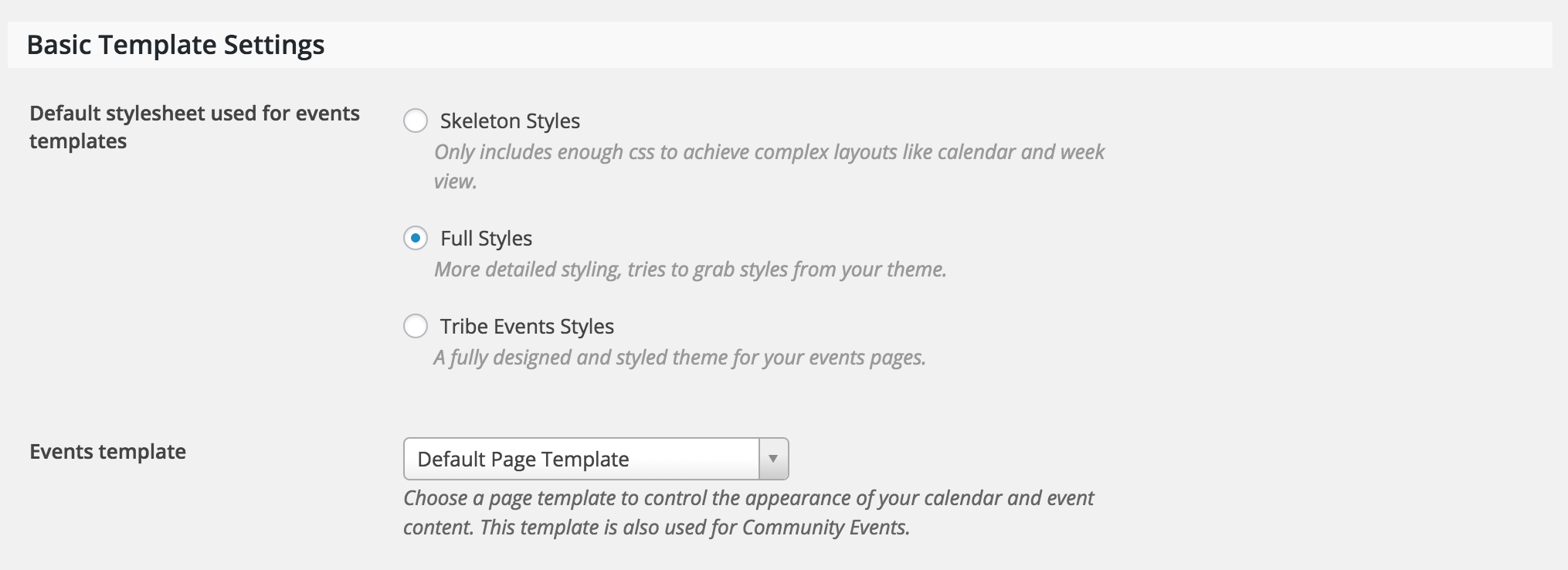
If not, our Themer’s Guide is a great resource on creating custom templates. It might seem difficult at first, but I can assure you it is a short learning curve.
If you need any specific instruction, feel free to respond and I’ll do my best to accommodate. Please note that we are limited on the amount of support we’re able to provide. I hope this helps and I look forward to your response. Have a great evening and thanks again for choosing PRO. Cheers!
-
AuthorPosts