Page Width not Working

Home Forums Ticket Products Event Tickets Plus Page Width not Working

Viewing 3 posts - 1 through 3 (of 3 total)
  • Author
    Posts
  • #1151522
    Imran Mughal
    Participant

    Just installed the pro version of the plugin and it does not seem to respect the container width.

    Here’s a sample of what the container width should look like: http://sierra.imranmughal.com/about/privacy-statement/

    And this is what my calendar looks like: http://sierra.imranmughal.com/events/category/event/

    Is there a way to get the calendar to respect the container width so that the calendar does not bleed past the margins?

    I’m using the X Theme from Themeco.

    Regards,

    Imran.

    #1151908
    Hunter
    Moderator

    Hello and thank you for purchasing PRO and welcome to the support forums 🙂

    If you visit Events > Settings > Display, we’ve included a few options that might come in handy here. Try selecting each option, save the settings, then refresh your main events page. Hopefully one of those settings does the trick (see screenshot below).
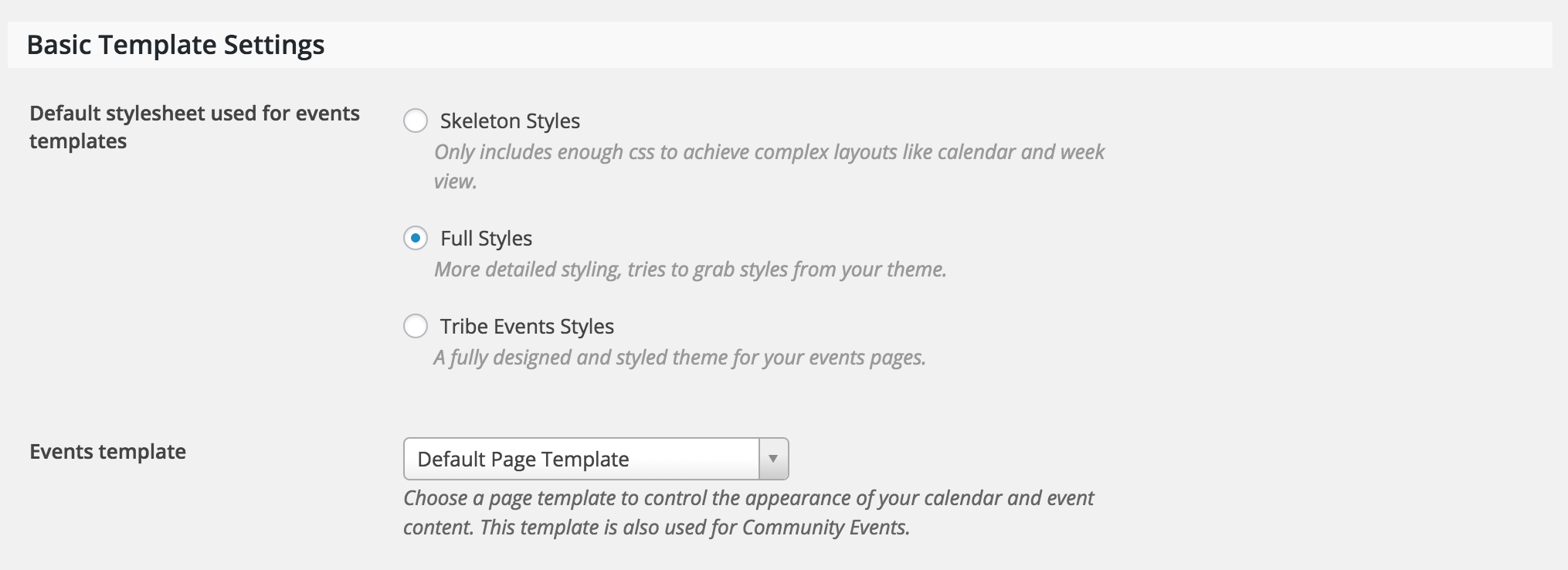
    If not, our Themer’s Guide is a great resource on creating custom templates. It might seem difficult at first, but I can assure you it is a short learning curve.

    If you need any specific instruction, feel free to respond and I’ll do my best to accommodate. Please note that we are limited on the amount of support we’re able to provide. I hope this helps and I look forward to your response. Have a great evening and thanks again for choosing PRO. Cheers!

    #1160468
    Support Droid
    Keymaster

    Hey there! This thread has been pretty quiet for the last three weeks, so we’re going to go ahead and close it to avoid confusion with other topics. If you’re still looking for help with this, please do open a new thread, reference this one and we’d be more than happy to continue the conversation over there.

    Thanks so much!
    The Events Calendar Support Team

Viewing 3 posts - 1 through 3 (of 3 total)
  • The topic ‘Page Width not Working’ is closed to new replies.