

Forum Replies Created
-
AuthorPosts
-
November 4, 2016 at 3:28 pm in reply to: Can I display also the day of the week in the date section? #1187987
Hunter
ModeratorGreat! Thank you for letting me know you’re all good and please feel free to open a new thread if you have any more questions. Have a great weekend!
November 4, 2016 at 3:27 pm in reply to: Tickets & Payment details now showing on community tickets front end #1187984ModeratorAhh, the old, “turn it off, then back on again” does it again! Glad to hear you’re on the right track and feel free to open a new thread if you have any more questions. Cheers!
November 4, 2016 at 3:25 pm in reply to: New Plugin Conflict: "Content Timeline" + Footer Widget Issue #1187982ModeratorHello,
I took another look and I unfortunately don’t have any idea what is causing the footer display issue. I would recommend reviewing the Themer’s Guide to see if it’s a template override issue. I also recommend watching Customizing WordPress #1 – How To Create A Child Theme by LevelUpTuts. You might also want to try visiting Events > Settings > Display to see if the options are set to what fits your situation best.
I’m truly sorry I can’t help out more as I’ve been in your position before and wish you the best of luck getting everything resolved.
ModeratorJames,
I’m not sure which file you’re referring to (tickets.php or email.php), but please review the Themer’s Guide.
If you are still having troubles, let me know which specific file you want to save as an overwrite and I’ll send over the correct file structure. Cheers!
November 4, 2016 at 3:05 pm in reply to: Events not listed correctly in Google search results #1187970ModeratorWelcome back,
You have pretty much everything correct. It’s best to keep your sitemap updated based on how often new content is being added. Updating the sitemap should remove the old listings from appearing, but it’s hard to say what will happen, and more importantly when because a lot has to do with Google itself. I recommend seeking out a reputable sitemap plugin. If you’re using a plugin for SEO, review it’s features to see if it includes sitemaps as most SEO plugins include this feature.
Yes, it would be difficult to follow the steps of the Testing for conflicts guide due to the reason you stated. I think once you get your Google Webmaster situation set up, these issues should subside.
Please let me know if you have any more questions and have a great weekend ahead. Cheers!
ModeratorHello,
Sorry to hear things just aren’t working out for you. Try the following steps below and let me know if the import cancels:
1. Backup site and database
2. Remove Events Aggregator license from Events > Settings > Licenses
3. Deactivate all Tribe plugins
4. Delete all Tribe plugins
5. Reinstall The Events Calendar pluginSorry again you had a difficult time with Events Aggregator and if you decide to attempt the troubleshooting, we’re here to help. If there is a bug, we’d love to document it so we can get a fix released as soon as possible.
Please keep me updated and if you’d like to proceed with the refund, please visit our Refunds page and we’d be happy to process that for you. Have a great evening.
November 4, 2016 at 2:47 pm in reply to: Input fields for new/editing event page are often too small to use comfortably #1187953ModeratorExcellent! Thank you so much for taking the time to voice your feedback and hopefully the improvements get incorporated into a release in the near future. I’ll close this thread out but feel free to open a new one if you have any more questions. Cheers!
ModeratorHello,
Thank you for the helpful response. You do not need to create pages for the submit event page. It is automatically generated by the plugin, so please delete the page you’ve created and try visiting your-site.com/events/community/add and you should see the page to add events on the front end.
Same scenario goes for your main /events/ page. If you have created a page with the same slug you have entered into the Events > Settings > General > ‘Events URL slug‘ setting, you need to delete the page. Your events will display at your-site.com/events (or whatever you decide on for the ‘Events URL slug‘).
Please let me know if this helps. Cheers!
ModeratorHi and welcome 🙂
Thank you for purchasing Event Tickets Plus! I would be more than happy to help direct you to the information you need. To add tickets, look for a section titled ‘Tickets’ on the add/edit event page. (see screenshot below)
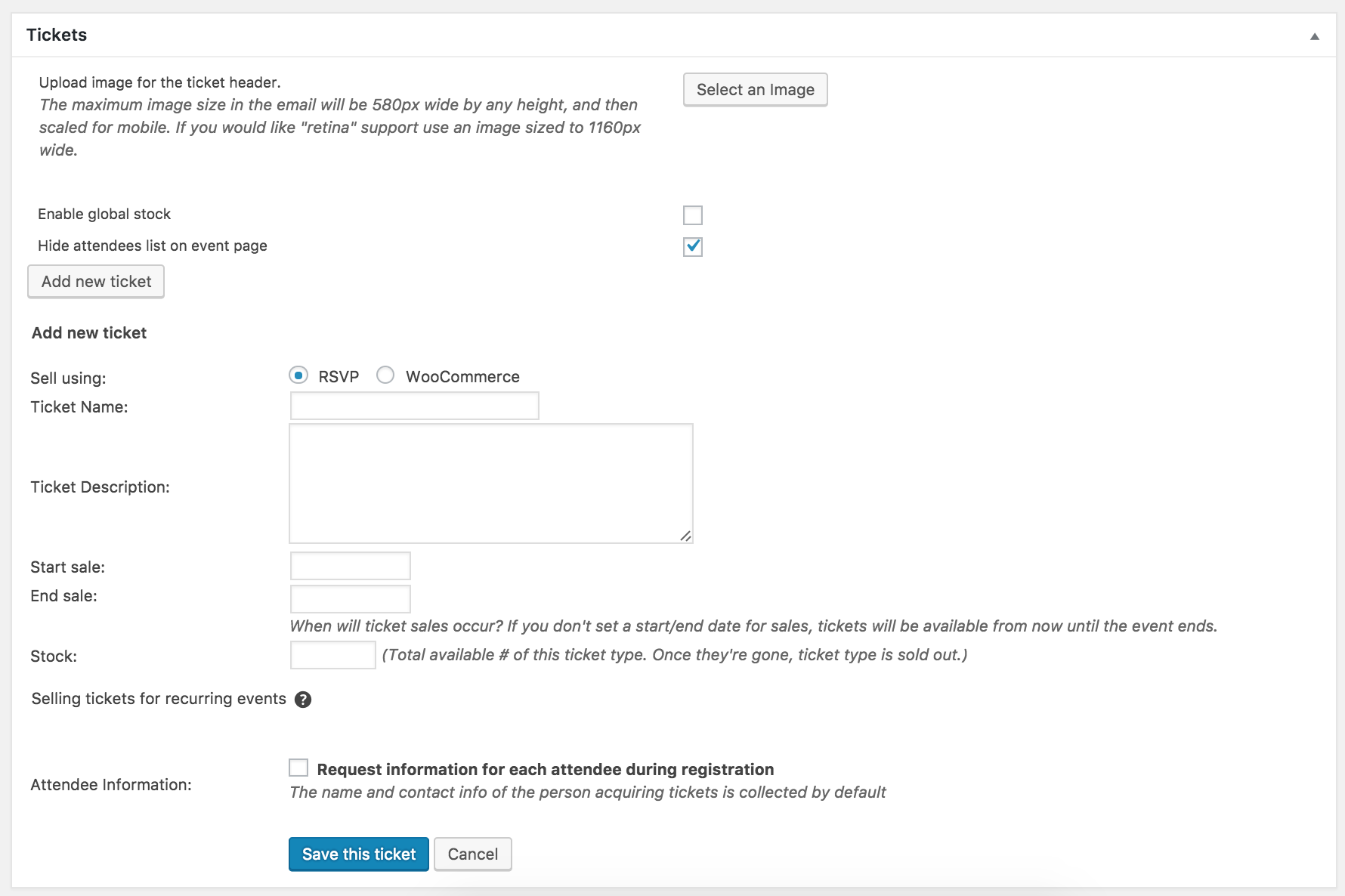
From there, the best route would be to review our New User Primer: Event Tickets and Event Tickets Plus. It goes into detail on how to get everything set up properly so you can start selling tickets.
If you still have any questions after reviewing the New User Primer, please feel free to reply back and I’d be happy to help answer them.
Thanks again for your purchase and I look forward to your response. Cheers!
ModeratorHi and welcome 🙂
Thank you for choosing us for your events calendar needs! If you’ve created a page with the same slug as what you’ve entered under Events > Settings > Community > Community rewrite slug setting (see screenshot below) – you’ll need to delete the page.

Please let me know if I’ve understood your situation clearly. If not, respond back with step-by-step instructions on how to reproduce your issue. Screenshots are also very helpful in these situations.
Thanks again and I look forward to your response. Cheers!
November 3, 2016 at 8:50 pm in reply to: New Plugin Conflict: "Content Timeline" + Footer Widget Issue #1187505ModeratorAlec,
Welcome to our support forums and thank you for reaching out! Sorry to see you’re having issues at the moment. I hate to be the bearer of bad news, but we are not able to provide support for theme or third-party plugin conflicts :-/
More info on what we can help with can be found on our What support is provided for license holders? Knowledgebase article.
If things get beyond your level of expertise, I encourage you take a look at our list of customizers as I’m sure someone can help get you over the hump.
I truly apologize we can’t do more here and wish you the best of luck resolving the conflicts. Thanks again and have a great Friday. Cheers!
ModeratorHey Russell,
Welcome back 🙂
I’m unfortunately not experiencing the same behavior on my test environment. Can you please review our Testing for conflicts guide and reply back with your findings?
We’ll need to rule out a theme and/or plugin conflict before moving onto the next step. Thanks for posting and have a great evening. Cheers!
November 3, 2016 at 8:40 pm in reply to: Map finds nothing when asked to look near 'United states' #1187502ModeratorHi Sara,
Thank you for reaching out. We are familiar with the Tribe Events Bar shortcomings. Unfortunately I don’t have a way to address the exact situation you’ve encountered, but I’ve linked this forum thread to the bug report for the developers to review while making improvements to the Tribe Search bar.
I wish I had a better answer for you, but stay tuned to our Release Notes for more info. I also recommend taking a moment to submit this idea over at our UserVoice Feature Ideas page.
Thanks again and please let me know if you have any questions or comments. Take care!
ModeratorHi Thomas,
Welcome back and thank you for posting. I am not experiencing the same behavior on my test environment. Can you please review our Testing for conflicts guide and reply back with your findings?
Thanks again and have a great evening. Cheers 🙂
November 3, 2016 at 8:27 pm in reply to: Tickets & Payment details now showing on community tickets front end #1187499ModeratorHey Sam,
Can you elaborate when you say:
“its just not showing when you try and add a ticket from the front end.”
Are users able to add tickets on the submit event form? Or are the tickets users create on the submit event form not displaying on the event? The more information you can provide, the better. Screenshots are also very helpful.
I also see you checked ‘Yes’ to reverting back to the default WP theme and deactivating all plugins other than ours as required in our Testing for conflicts guide, but can you please confirm this?
Thanks and I look forward to your response. Take care 🙂
-
AuthorPosts