

Forum Replies Created
-
AuthorPosts
-
Hunter
ModeratorHey Jeffrey,
Thank you for posting and welcome to our premium plugin support forums! Is there any way you can set up a test environment using the default WordPress theme and only our plugins to confirm there are no theme and/or plugin conflicts in play? Please review our Testing for conflicts guide for more information.
Once we can pinpoint the cause of conflict, we’ll have a better idea on how to proceed. Thanks again and I look forward to your response. Cheers!
November 15, 2016 at 3:20 pm in reply to: reactivate a event ticket plus after changing domain #1192769ModeratorHi Karolina 🙂
Please review our Moving your license keys Knowledgebase article. Let me know if it helps answer your question and have a great evening. Cheers!
ModeratorHello,
We are unfortunately unable to provide support through our Pre-Sales Channel. I was awaiting a response on the thread you linked to and working towards bumping up the priority level in hopes of getting a developer to further investigate the matter.
If you would like to proceed troubleshooting your issue, you’ll need to renew your license. Sorry I can’t do more and thank you for understanding. Have a good evening.
November 15, 2016 at 3:06 pm in reply to: Integrating Events Calendar with Lava Directory Listings #1192763ModeratorHello and welcome 🙂
This question is more suited for our PRO support forums, so if you wouldn’t mind, please create a new thread there and we’d be happy to help as much as possible. I can at least tell you the organizer meta information is stored in the wp_postmeta table. Sorry we can’t provide support in our Pre-Sales Questions channel and thanks for understanding. Cheers!
November 15, 2016 at 3:03 pm in reply to: Export or archive old events to increase calendar speed? #1192760ModeratorHi and welcome!
How many events does your site currently have? Are you using recurring events? If so, you can set how many months you’d like your recurring events to remain your site under Events > Settings > General. (see screenshot below)
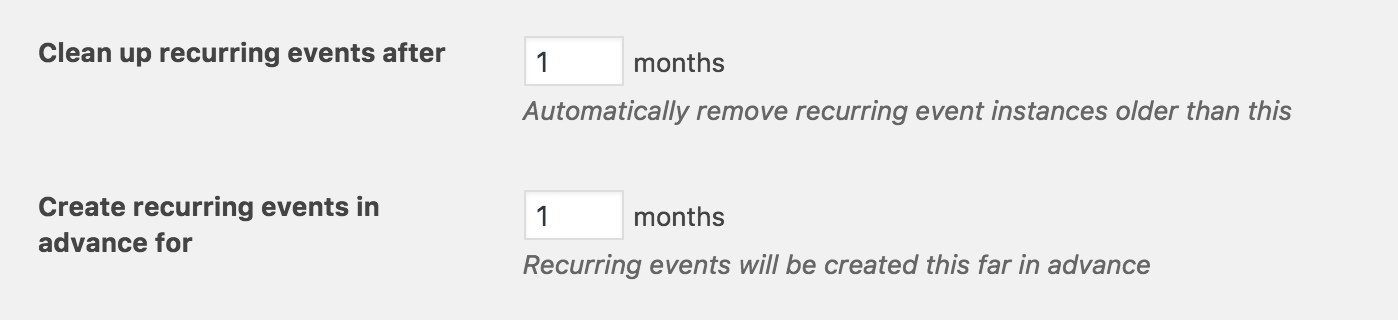
We don’t currently have any logged bugs relating to users reporting poor load times, though it is a topic discussed often both in the forums and on our support/dev teams. I’ll provide all the information I have regarding performance below. I highly recommend using WP Rocket to help cache your content.
- https://theeventscalendar.com/knowledgebase/caching-basics/
- https://theeventscalendar.com/knowledgebase/caching-month-view-transients/
- https://theeventscalendar.com/knowledgebase/caching-basics/
- https://theeventscalendar.com/the-events-calendar-performance-considerations/
- https://theeventscalendar.com/favorite-developer-plugins/
Deleting old events might have an impact on your load times, but make sure you set up redirects for those deleted events. There isn’t a way to export event data and it remain searchable on your site as far as I know, but you might want to research the forums and visit our UserVoice Feature Ideas to suggest it as a request.
I hope this helps and best of luck with the performance issues. Cheers!
ModeratorHello and welcome 🙂
I attempted to reproduce the issue you’re having, but I’m not experiencing the same behavior. Can you please confirm you reviewed our Testing for conflicts guide? We need to eliminate the possibility of a theme and/or plugin conflict before proceeding.
Let me know and we’ll continue investigating. Thank you and have a great afternoon!
ModeratorHi Laura,
Thank you for sharing that info with me. Seems strange they would recommend our plugins when they don’t appear to work with their theme. Did you ever get a response from them with a fix? You might also want to try deleting the tribe-events folder inside your theme folder. I’d also try different options under Events > Settings > Display.
I checked our forum history and can’t find any other threads relating to your theme. Sorry again and good luck with the conflict. Take care!
ModeratorArmando,
Thank you for the update. You can purchase the Filter Bar plugin here. If anywhere on our site lead you to believe the Filter Bar plugin was included with Events Calendar PRO, please provide a link so we can address that incorrect information.
Thanks again and please let me know if you’ve got any more questions. Cheers!
ModeratorHey Laura,
You are correct – we’re not able to provide much support in these instances. Please see our What support is provided for license holders? for more info.
A few ways to identify the conflict include reviewing our Themer’s Guide to see if any custom templates you’re using have outdated code. This Identifying errors using the ‘Inspect’ tool YouTube video is very helpful.
Also setting ‘wp_debug’ to ‘TRUE’ on your wp-config.php file will output any errors at the top of your site. It’s recommended setting up a test environment so you can fully troubleshoot the issue.
Sorry I can’t do more here and best of luck coming up with a solution. Cheers!
ModeratorHello, Hugh 🙂
Sorry to hear you’re experiencing performance issues. We have a few reports aimed to improve how our plugin handles large amounts of events, but we don’t have any high-priority bug reports which relate to what you’ve described.
We have quite a few users with tens of thousands of events on their sites, the majority with little to no issues. I’ll provide all the documentation I have in regards to site performance, but ultimately these issues are left up to the site owners.
- https://theeventscalendar.com/knowledgebase/caching-basics/
- https://theeventscalendar.com/knowledgebase/caching-month-view-transients/
- https://theeventscalendar.com/knowledgebase/caching-basics/
- https://theeventscalendar.com/the-events-calendar-performance-considerations/
- https://theeventscalendar.com/favorite-developer-plugins/
I have tried a couple caching plugins but they both actually crash the page.
Have you given WP Rocket a chance? I too struggled with essentially every other caching plugin and had poor results until I tried WP Rocket. Another big difference was moving from shared hosting to DigitalOcean. I highly recommend looking into the possibility of switching your hosting provider to a VPS.
Sorry I can’t be of more help here and best of luck with the performance issues. Take care and please let me know if you have any additional questions or comments. Cheers!
ModeratorHello,
We aren’t able to provide support through email, so the best I can do is provide assistance here. I’m unfortunately not able to provide support for theme conflicts. For more info on what is covered, please review our What support is provided for license holders? Knowledgebase article.
I would personally start by reviewing our Themer’s Guide as I imagine it’s a simple template issue. I’d also check out Events > Settings > Display and explore the options presented there.
Sorry I can’t be of more help and thanks for reaching out. If it comes to it, we have a list of customizers available to help further troubleshoot. Take care!
ModeratorHey Stephen,
I believe what you’ve described is definitely achievable using the Event Aggregator. You have a valid Event Aggregator license, so grab it from your License Keys page and input it under your WordPress > Events > Licenses ‘Event Aggregator‘ field and give it a shot!
If the events are all on one singular Google Calendar, you could do it all in one import. If you have multiple calendars in your Google Calendars account, just grab the calendar URLs and import them individually.
I hope this helps answer your question and let me know if you have any additional inquiries or comments. Take care and have a great evening. Cheers!
November 14, 2016 at 7:36 pm in reply to: Community users not receiving emails to edit their events #1192245ModeratorHello,
Thank you for posting and sorry to hear about the email issues. I recommend installing a plugin such as Easy WP SMTP to help ensure emails get delivered correctly.
There are a multitude of reasons the emails aren’t getting delivered, from your server to a potential theme and/or plugin conflict. If that plugin doesn’t do the trick, try it out with the default WP theme active in addition to TEC, PRO, and Community Events. This will eliminate the potential for a theme and/or plugin conflict as we don’t support conflicts for code not written/maintained by us. Please see our What support is provided for license holders? Knowledgebase for more info.
Please keep me updated on the status of your issue and thanks again. Cheers!
ModeratorHi Laura,
Welcome to our support forums and thank you for your purchase! I would be happy to help troubleshoot the issue. The first step here is to review our required Testing for conflicts guide and reply back with what you learn.
Once we have the results, we’ll have a better idea where to look for a solution. Thanks again and take care 🙂
ModeratorHi Armondo,
Welcome to our forums and thank you for your purchase! It appears you don’t have a license for the Filter Bar plugin. Can you check your order history to see if I am somehow missing it? I’m looking at your account and don’t see any record of a purchase for Filter Bar, though I do see a business license for Events Calendar PRO. I recommend reviewing our PRO Additional Fields Knowledgebase article.
Let me know and we’ll continue investigating.
-
AuthorPosts