

Forum Replies Created
-
AuthorPosts
-
George
ParticipantThat version of jQuery is indeed likely the culprit — remove it if so, and ensure that the WordPress-included version of jQuery is the one that’s running, and you should find some progress with the Community Events form!
Cheers,
GeorgeParticipantHi Monty,
I appreciate your patience here and your posting of the system information. I unfortunately was not able to even activate the themes you sent. Here’s a screenshot of what I see in my wp-admin when I upload the files you shared (click for a larger-sized image):
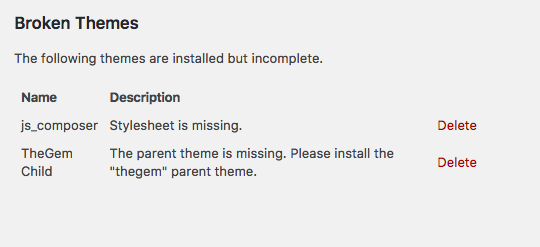
• Can you send over the “gem” parent theme?
Thank you for your patience,
GeorgeParticipantHey Michael,
Thanks for your patience here. One of our developers, Trisha, was able to identify that your site is using version 2.1.0 of jQuery — WordPress ships with 1.12 of jQuery, and it’s this version of jQuery that our plugins are currently built to work with.
A WordPress themes or plugin on your site, therefore, is loading its own version of jQuery and this is causing the breakage.
WordPress themes and plugins are not supposed to load their own versions jQuery — this is very bad practice, and both themes and plugins are supposed to just use the version of jQuery built into WordPress directly.
To resolve this problem, then, we need to identify the source of the non-official version of jQuery being loaded on your site. It appears to be coming from your theme. To test this, you could temporarily activate a default theme like Twenty Twelve or Twenty Seventeen on your site. In either theme, do your issues persist?
I would encourage you to contact the developer of your current theme in the meantime — ask them how to disable the theme’s loading of unofficial JavaScript. They should be able to recommend a solution so that their theme does not break other plugins and UI elements that rely on jQuery.
Let us know what you find!
Sincerely,
GeorgeJanuary 5, 2017 at 5:59 pm in reply to: Event Order and Attendees numbers not matching. Big issue #1214132ParticipantThis reply is private.
ParticipantHey Peter,
Thanks for reaching out.
I’m sorry to hear about this issues—I’m also a bit stumped about them, because I cannot recreate any problems with the Media library in any view. We also don’t have any other reports of this sort of problem, so there may be something happening on your site that is unique to your site.
For reference, here’s a screencast I made of my own local testing site. I’m using the latest versions of The Events Calendar and its premium add-ons, as shown in the video, have no issues with the Media library whether in Grid View or otherwise. ? https://cloudup.com/cpn-8JaeXuV
You mention having done extensive testing with plugins — what about with your theme? Do you find anything different if you deactivate your currently-active theme and activate a default theme like Twenty Twelve, Twenty Sixteen, etc. instead?
Let me know what you find.
Thanks!
GeorgeParticipantI’m really sorry about this issue, Michael — we have just begun an investigation into this issue, which appears to be the result of a JavaScript bug within our code.
We have currently not been able to replicate the problem consistently, and so are having trouble identifying the exact cause of this problem. I have reached out to developers on our team for some additional help on this, and will let you know what they say.
Stay tuned to this thread for updates on this issue, and please let me know if there are any other issues or questions I can try to help with in the meantime!
Thanks,
GeorgeParticipantI’m sorry to hear this, Warren! I cannot recreate this issue, nor have other folks reported this specific problem recently, so there may be a problem unique to your site that is happening here.
With that in mind, can you share your site’s complete System Information? Here’s how to do that → https://theeventscalendar.com/knowledgebase/sharing-sys-info/ I’ll take a look at that information to see if anything stands out to me as potentially relevant to these issues.
Thank you!
Cheers,
GeorgeJanuary 5, 2017 at 4:23 pm in reply to: add to revolution slider post-based the venue shortcode #1214101ParticipantHey Yohanan,
Our plugins don’t currently have any specific out-of-the-box integrations with any “slider” plugins, so what you’re trying to do specifically may not be possible without custom coding.
To be clear, are you referring to the “[tribe_featured_venue]” shortcode? If so, how specifically are you envisioning this integration with a slider plugin?
Thanks,
GeorgeJanuary 5, 2017 at 4:18 pm in reply to: How can I get the .dev development site to work with cron jobs? #1214097Participant🙂
January 5, 2017 at 4:16 pm in reply to: Please consider making select2 selector more specific #1214093ParticipantGlad to hear it, @papertower. Stay tuned! (I will “close” this thread for now, but will re-open it to post updates if and when they arise.)
ParticipantHi there,
Thank you for reaching out. These forums here are our “Pre-sales Questions” forums, so we unfortunately cannot field technical support questions here.
It doesn’t currently appear that you have a premium license with us. If this is wrong, and you do have a premium license with us, then apologies for my misunderstanding!
However, in that case please log into the account on this site that has your premium license, and then post this question in a premium support forum.
If you indeed do not have a premium license, then please post your question in our free support forums here → http://wordpress.org/plugins/the-events-calendar
We check those forums a bit more than once per week, so hopefully we will be able to get to your question there.
Thank you,
GeorgeParticipantHi Kaylin,
Thanks for reaching out.
These support forums are the only means by which we can offer assistance for using Events Calendar Pro. We are only able to offer assistance within the parameters explained on this page → https://theeventscalendar.com/knowledgebase/what-support-is-provided-for-license-holders/
Can you please clarify what your questions are? I’ll do my best to help address them! 😀
— George
ParticipantHello,
You should be able to hide that bar and the “Évènement précédent” part by adding this bit of CSS to your site:
.tribe-bar-disabled {

    display: none !important;

}
.tribe-events-sub-nav {
display: none !important;
}
I hope this helps!
GeorgeJanuary 5, 2017 at 1:16 pm in reply to: Please consider making select2 selector more specific #1214013ParticipantI appreciate this feedback, @papertower, and agree with you that our configurations of Select2 should not affect instances of Select2 outside of our own plugins.
I have filed a bug report about this and will post again in this thread when there is news about an update that fixes this problem.
That could several weeks or more, to be honest—but I assure that this thread will eventually be updated with news if there is news to share.
Thanks for sharing these thoughts! Please let me know if there are any other issues or questions I can try to help with in the meantime.
Sincerely,
GeorgeParticipantHey Cliff,
My mistake—you’ll actually find the relevant commits in Tribe Common, not in The Events Calendar directly (The Events Calendar, like all of our plugins, uses Tribe Common).
This is the specific pull request containing a fix for these issues: https://github.com/moderntribe/tribe-common/pull/304
— George
-
AuthorPosts