
Home › Forums › Welcome! › Pre-Sales Questions › PRO breaks Visual Composer
- This topic has 10 replies, 2 voices, and was last updated 9 years, 9 months ago by
George.
-
AuthorPosts
-
January 4, 2017 at 6:04 am #1213080
Monty
ParticipantI am using VC with my theme to build pages. I started out with the free Event Calendar plugin and then decided to upgrade to PRO. Unfortunately, when the PRO plugin is activated VC stops showing up on my pages. Theme owner said contact you, sooo
January 4, 2017 at 9:42 am #1213307ParticipantSorry to hear about this, Monty!
Can you post your site’s complete system information to this thread? Here’s how to do that → https://theeventscalendar.com/knowledgebase/sharing-sys-info/
Next, can you upload a copy of your version of Visual Composer, and any child themes you may be using, to a place like Dropbox.com or http://ge.tt and then share the download links here so that we can download those files and test out the conflict ourselves?
Thanks!
GeorgeJanuary 4, 2017 at 10:44 am #1213353ParticipantI hope I did this right…I attached the child theme folder to this thread and posted the link for VC in dropbox. Thanks
https://www.dropbox.com/s/725v9d13qg8n6u8/js_composer.zip?dl=0
January 4, 2017 at 5:00 pm #1213514ParticipantThanks Monty! Looks good so far. In addition to these files, can you please post your site’s complete system information to this thread? Here’s how to do that → https://theeventscalendar.com/knowledgebase/sharing-sys-info/
That will help us a lot.
Thanks!
GeorgeJanuary 4, 2017 at 5:44 pm #1213537ParticipantThe instructions for post info on this thread say to mark private if you don’t want the information available publicly. No such option exists where the article indicates it should. My info is below
HOME URL
http://nrt.rocks
SITE URL
http://nrt.rocks
SITE LANGUAGE
English
CHARACTER SET
UTF-8
NAME
NorthRiverTavern
EMAIL
[email protected]
INSTALL KEYS
events-calendar-pro = 4114################################0eb7
WORDPRESS VERSION
4.7
PHP VERSION
7.0.14
PHP
max_execution_time = 120
memory_limit = 768M
upload_max_filesize = 128M
post_max_size = 128M
display_errors = 1
log_errors = 1
SERVER
Apache
SAPI
cgi-fcgi
PLUGINS
LayerSlider WP version 6.1.0 by Kreatura Media(https://layerslider.kreaturamedia.com)
Black Studio TinyMCE Widget version 2.3.1 by Black Studio(http://www.blackstudio.it)
Contact Form 7 version 4.6 by Takayuki Miyoshi(http://ideasilo.wordpress.com/)
The Events Calendar PRO version 4.3.4 by Modern Tribe, Inc.(http://m.tri.be/20)
Google Analytics by MonsterInsights version 5.5.4 by MonsterInsights(https://www.monsterinsights.com/)
WPBakery Visual Composer version 5.0.1 by Michael M – WPBakery.com(http://wpbakery.com)
Loginizer version 1.3.2 by Raj Kothari(http://www.loginizer.com)
MailChimp for WordPress version 4.0.11 by ibericode(https://ibericode.com/)
Slider Revolution version 5.3.1.5 by ThemePunch(http://themepunch.com)
The Events Calendar version 4.3.5 by Modern Tribe, Inc.(http://m.tri.be/1x)
TheGem Theme Elements version 2.0.2 by Codex Themes(http://codex-themes.com/thegem/)
TheGem Import version 2.0.0 by Codex Themes(http://codex-themes.com/thegem/)
Wordpress Page Widgets version 3.2 by CodeAndMore(http://www.codeandmore.com/)
Easy Forms for MailChimp by YIKES version 6.2.4 by YIKES(http://www.yikesinc.com/)
NETWORK PLUGINS
–
MU PLUGINS
–
THEME
TheGem Child
MULTISITE
–
SETTINGS
schema-version = 4.3.5
recurring_events_are_hidden = exposed
previous_ecp_versions =
Array
(
[0] => 0
[1] => 4.3.4.2
)
latest_ecp_version = 4.3.5
last-update-message-the-events-calendar = 4.3.5
tribeEnableViews =
Array
(
[0] => list
[1] => month
[2] => week
[3] => day
)
donate-link =
postsPerPage = 10
liveFiltersUpdate =
showComments =
showEventsInMainLoop =
eventsSlug = events
singleEventSlug = event
multiDayCutoff = 02:00
defaultCurrencySymbol = $
reverseCurrencyPosition =
embedGoogleMaps = 1
embedGoogleMapsZoom = 10
debugEvents =
tribe_events_timezone_mode = event
tribe_events_timezones_show_zone =
earliest_date = 2016-12-19 20:00:00
earliest_date_markers =
Array
(
[0] => 28806
)
latest_date = 2018-12-31 22:30:00
latest_date_markers =
Array
(
[0] => 29189
)
disable_metabox_custom_fields = show
pro-schema-version = 4.3.4
hideSubsequentRecurrencesDefault =
userToggleSubsequentRecurrences =
recurrenceMaxMonthsBefore = 24
recurrenceMaxMonthsAfter = 24
geoloc_default_geofence = 25
geoloc_default_unit = miles
stylesheetOption = full
tribeEventsTemplate = default
viewOption = list
mobile_default_view = day
tribeDisableTribeBar =
hideLocationSearch =
hideRelatedEvents =
week_view_hide_weekends =
monthEventAmount = 3
enable_month_view_cache =
dateWithYearFormat = F j, Y
dateWithoutYearFormat = F j
monthAndYearFormat = F Y
weekDayFormat = D jS
dateTimeSeparator = @
timeRangeSeparator = –
datepickerFormat = 1
tribeEventsBeforeHTML =
tribeEventsAfterHTML =
eventsDefaultOrganizerID = 0
eventsDefaultVenueID = 28808
eventsDefaultAddress = 8879 Roswell Rd
eventsDefaultCity = Sandy Springs
eventsDefaultState = GA
eventsDefaultProvince =
eventsDefaultZip = 30350
defaultCountry =
eventsDefaultPhone = 770-552-8784
tribeEventsCountries =
WP TIMEZONE
Unknown or not set
WP GMT OFFSET
Unknown or not set
SERVER TIMEZONE
UTC
WP DATE FORMAT
F j, Y
WP TIME FORMAT
g:i a
WEEK STARTS ON
1
COMMON LIBRARY DIR
/home/montya40/public_html/wp-content/plugins/the-events-calendar/common/src/Tribe
COMMON LIBRARY VERSION
4.3.5January 5, 2017 at 1:44 pm #1214035ParticipantAny luck?
January 5, 2017 at 7:58 pm #1214167ParticipantHi Monty,
I appreciate your patience here and your posting of the system information. I unfortunately was not able to even activate the themes you sent. Here’s a screenshot of what I see in my wp-admin when I upload the files you shared (click for a larger-sized image):
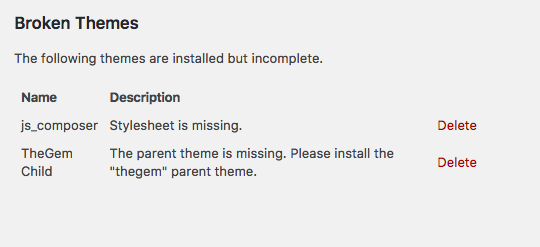
• Can you send over the “gem” parent theme?
Thank you for your patience,
GeorgeJanuary 6, 2017 at 5:06 am #1214271ParticipantSorry about that…
January 6, 2017 at 8:48 am #1214396ParticipantThanks for this Monty, and for your continued patience here. I have activated the child theme successfully now, but am not able to find any issues with Visual Composer. I am able to use Visual Composer successfully to modify any post type I try: posts, pages, and events, specifically.
Are there specific types which don’t work for you? If possible, any chance you could share a screenshot or screencast video demonstrating your specific issues?
I’m genuinely sorry for the continued back-and-forth here—I’m just trying to isolate and identify your specific problems so that we can best try to help out.
Thanks a ton for sticking with me here and working with us by providing all of these files and your system information — I’m determined to continue to help!
— George
January 6, 2017 at 9:14 am #1214407Participantidk what happened here. I tried it again just now and it works. Even the theme author was having the same issue I was having before. Magic? You mentioned that VC was working for you to edit events? I am not getting this. That is not a big deal, but makes me think something is still not right.
January 10, 2017 at 9:49 am #1215981ParticipantHey Monty,
I’m glad to hear things are working now. I agree with your sentiments here, though, and can understand why you suspect issues still laying under the surface that will emerge again…
A potential source of problems here is Visual Composer itself, and themes like the one you’re using—which integrate with Visual Composer. These products, the themes that integrate with VC especially, deviate from WordPress Coding Standards in a number of ways. This isn’t meant to disparage the products, by the way! They’re awesome products and we do our best to support page-builders like VC and others—I’m just noting that it’s the VC framework and VC-enabled themes that may be the source of these issues that you face, not necessarily our products.
If you ever run into issues again, I would recommend doing the troubleshooting steps on this page first → https://theeventscalendar.com/knowledgebase/testing-for-conflicts/ After EACH STEP in that troubleshooting process, go back to where you had the issues and try to recreate them—if you don’t have the same issues when running the Twenty Seventeen theme, for example, then you can be certain that the problem lies within whatever custom theme or child theme you’re running at the time.
I hope this information is helpful. Since these specific issues have been resolved, I will close this thread for now—but feel free to open a new thread any time if other issues or questions arise!
Best of luck with your project,
George -
AuthorPosts
- The topic ‘PRO breaks Visual Composer’ is closed to new replies.