

Forum Replies Created
-
AuthorPosts
-
January 11, 2017 at 9:27 am in reply to: Edits in pro/photo/single-event.php and pro/photo/loop.php break the calendar #1216713
George
ParticipantHi Daan,
It’s indeed true that customizations to old versions of code may not work in new versions of code.
This is an inherent fact about customizations, and is one of the reasons we do not provide any assistance with or support for customizations. Please read here to learn about what we can help with in terms of product support → https://theeventscalendar.com/knowledgebase/what-support-is-provided-for-license-holders/
In other words, you are ultimately responsible for creating, testing, fixing, and maintaining your customizations, and we cannot guarantee a solution to your issues here.
With all of this being said, I would be happy to at least try taking a quick look at your custom coding. I may be able to identify an obvious factor in the code that is causing issues, and may be able to recommend a fix.
Again, such a resolution is not guaranteed, and is unlikely—but I’m happy to try! 😀
To help me help you out on this, please copy and paste the full, un-edited version of your custom pro/photo/single-event.php file into a Gist at http://gist.github.com
Then share a link to that Gist here and I will take a look, and will try to identify the culprit.
Thanks!
GeorgeJanuary 11, 2017 at 9:23 am in reply to: The Events Calendar 4.4.0.1 crashes the whole wordpress site (HTTP ERROR 500) #1216707ParticipantI’m sorry to hear about this, Dave! As Geoff noted in that other thread, this appears to be a problem with one of our plugins’ internal libraries, called Tribe Common. We are actively investigating this—I will update this thread with news about these issues.
In the meantime, can you please clarify how, specifically, you are hosting your website? Are you hosting it on your own server? Are you using a web host? If the latter, which web host: for example, HostGator, Media Temple, WP Engine, BlueHost, Dream Host, A2, GoDaddy, etc. etc. — whatever your host is, specify it by name.
Thank you!
GeorgeJanuary 11, 2017 at 9:18 am in reply to: Plugin could not be activated because it triggered a fatal error. #1216702ParticipantHi @paulgriffiths,
Ack, sorry for the fatal errors! We hate seeing those pop up and know how frustrating they are. Props to you for testing on a local environment before updating!
This appears to be related to a similar issue I saw earlier this morning where one of our libraries (Tribe Common) is not fully updated in The Events Calendar.
Will you please download fresh copies of:
- The Events Calendar (4.4.0.1)
- Events Calendar PRO (4.4)
You can download both of those by logging into your account on this site and heading to My Account > Downloads.
Once you have those versions, please reinstall the plugins manually by uploading them directly to the wp-content/plugins directory.
I’m hoping that resolves the error. Let’s give that a try and go from there.
Thanks!
GeorgeJanuary 11, 2017 at 9:17 am in reply to: Another "Fatal error: Allowed memory size of …" issue #1216700ParticipantHi John,
Ack, sorry for the fatal errors! We hate seeing those pop up and know how frustrating they are. Props to you for testing on a local environment before updating!
This appears to be related to a similar issue I saw earlier this morning where one of our libraries (Tribe Common) is not fully updated in The Events Calendar.
Will you please download fresh copies of:
- The Events Calendar (4.4.0.1)
- Events Calendar PRO (4.4)
You can download both of those by logging into your account on this site and heading to My Account > Downloads.
Once you have those versions, please reinstall the plugins manually by uploading them directly to the wp-content/plugins directory.
I’m hoping that resolves the error. Let’s give that a try and go from there.
Thanks!
GeorgeParticipantHey Jennifer,
So sorry to hear this! Can you share a screenshot of the specific error messages you get, or copy and paste them in full? Or is it just literally the text “WordPress Failure”, with no other error text?
Thank you!
GeorgeParticipantHey Pete,
Thanks for reaching out.
There are number of wp-cron tasks inside of our plugins. The best way to find all of them is to search for instances of the WordPress function wp_schedule_event() within our plugin code.
When it comes to optimizing these in some way, there’s unfortunately not anything “out of the box” that our plugins would provide that would help to optimize the cron tasks. You could modify the code extensively, you could alter your site’s web hosting infrastructure to improve its performance, or you could reduce the number of events—but there’s not really anything within the plugin options or features directly that would allow for optimization of the cron tasks.
Some of the Events Calendar Pro functions that most use WP-Cron are related to recurring events, recurring events cleanup tasks, etc.
Please let me know if there are any other issues or questions I can try to help with!
— George
January 11, 2017 at 8:57 am in reply to: Since 4.4.0.1 Activate The Events Calendar Pro kills Appearance -> Customize #1216676ParticipantHi Gilbert,
Thanks for reaching out.
1. When you say, “That was repaired by deactivating The Event Calendar Pro”, can you clarify what the “that” is that you’re referring to? If you’re referring to another thread on these forums can you link to that thread for reference?
2. Next, can you confirm if your screenshot is of the wp-admin or of the front-end submission form for Community Events? If the problem is on the front end, can you share a link directly to this front-end submission form?
Thank you!
GeorgeParticipantOh no! I’m sorry to hear this Josh—I’m also a little confused about why this would be happening in a way that does not respond to any increase of the WP_MEMORY sizes.
Since the error is seemingly not responding to increased allotments of WP memory, this may indicate another issue on your site. With this in mind, can you address the following questions?
1. How are you hosting your website, specifically? Are you hosting it on your own server? Are you using a web host? If the latter, which web host: for example, HostGator, Media Temple, WP Engine, BlueHost, Dream Host, A2, GoDaddy, etc. etc. — whatever your host is, specify it by name.
2. Can you please open a support ticket with your web host? There may be a server-side issues here that they can identify and offer insight on / help with. Let us know if you can do this and, if so and if you get a response quickly, what they say about these issues.
3. Finally, can you clarify when this started happening? Was it working fine for weeks on end, then you updated our plugins yesterday and things broke? Whatever the history is of our calendar plugins on your site, and of this specific error, let us know!
Thank you,
GeorgeJanuary 11, 2017 at 8:26 am in reply to: add to revolution slider post-based the venue shortcode #1216559ParticipantHey Yohanan,
Thanks for your reply. While we don’t have any further support for this at this time, I do have some good news: we have heard from a number of folks requesting support for Revolution Slider and our calendar plugins, and so hopefully in the next couple of months we will introduce better support for Revolution Support.
I am sorry that I do not have any specific time estimate for when this support will arrive—it may take a significant amount of time to arrive. I can assure you, however, that this thread will be updated when those features are published.
If you don’t see this thread updated, then there is no news—but if you see an update, it means the features are live! 😀
I will close this thread for now. If you have any other questions, comments, concerns, etc., open a new thread any time!
Cheers,
GeorgeParticipantHi Trevor,
You can specify a custom map marker from within the WordPress Customizer, as described on this Knowledgebase guide → https://theeventscalendar.com/knowledgebase/wordpress-customizer/
I do not have any issues with the map marker customization on my own testing site, so make sure you are using at least version 4.4.0.1 of The Events Calendar and 4.4 of Events Calendar Pro.
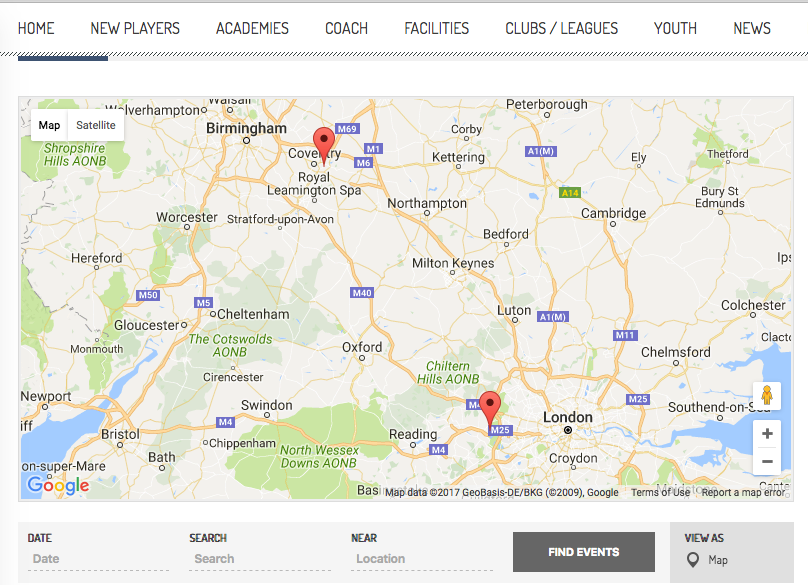
As for the other issues on your Map page, when I visited your site I had no problem seeing the map markers, and was not able to identify any especially-long loading or any sort of page-loading that looked erroneous. Here’s a screenshot of the Map Markers I’m seeing on your page, for example (click for a larger-sized image):
I also cannot produce any issues along these lines on my own testing site, so if you have issues with the Map page, its loading, its map functionality, anything like that, what I would recommend is the following set of steps:
1. Make sure you’re running the most recent version of WordPress—at this time, it’s 4.7. If you’re running a version lower than that, update.
2. Run through the complete set of troubleshooting steps on this page → https://theeventscalendar.com/knowledgebase/testing-for-conflicts/ After EACH STEP in that process, check back on your issues and try to reproduce them—see if anything improves along the way.
☝️ These two steps will help reveal if there’s a theme or plugin conflict whatever issues you run into.
Cheers!
GeorgeJanuary 11, 2017 at 8:17 am in reply to: Very Big Issue buying different tickets simultaneously from one event #1216551ParticipantHey @Gergana,
I’m sorry for the slow pace of progress here. I wanted to let you know that I’m still working on this. We technically do not provide any support for snippets, customizations, extensions, and so on — and if I am unsuccessful at getting this to work, then unfortunately the snippet may remain unusable.
However, I’m working on this and hope to have an update for you soon.
Thanks so much for your patience — real sorry for the trouble here!
Stay tuned,
GeorgeParticipantThanks for the follow-up, Mark.
I will address your updates here below. Before doing so, I should note that the “Core” features of the calendar are available totally for free here → wordpress.org/plugins/the-events-calendar. The premium add-ons to this free Core plugin, like Events Calendar Pro, just add extra features to the core calendar functionality—so you may find it very helpful to tinker around with the Core calendar plugin and get a sense of how it all looks and works, take a look at its code to see what is involved with customizing it, etc.
As for your followup questions, I can address #1 and #2 at the same time as follows:
- When I say that something is not possible without custom coding, all that I mean is that there is no “out-of-the-box” way to achieve what you describe—there is no setting or option you can check to make it so, in other words, nor any way to achieve it with the WordPress Customizer options for The Events Calendar.
- When it comes it what sort of actual custom coding would be required to achieve the desired outcome, however, we are unfortunately not able to shed much light on this—there are a number of ways to achieve any given customization, and even for license-holders we cannot assist at all with scoping, assessing, demonstrating, or doing customizations. You can read more about what Support we provide here → https://theeventscalendar.com/knowledgebase/what-support-is-provided-for-license-holders/
- With all this being said, we do try to offer basic tips about customizations when able. So yes, for example, to achieve what you describe for #1 you would have to do some extensive writing of custom PHP code in your theme or in a custom plugin.
- Likewise, in regards to what you describe for #2, it sounds like you would have to make some extensive custom templating from within your theme (more on this below) and would also have to write a good deal of custom CSS and possibly JavaScript to achieve the desired look and functionality.
- As for what you mention in #3, this too is unfortunately not possible without custom coding. To clarify: Our “out-of-the-box” functionality for custom map pins includes literally just changing the image used for the map pin. To change the functionality of actions upon those map pins, you’d need to write custom JavaScript.
Now, in the opening of your follow-up here you ask about how open the code is and what reference materials there are for customizing. A few things on this point:
- Our plugins, like WordPress itself, are GPL-licensed. This affords you many freedoms in terms of customizing and altering our plugins. Read more here and here.
- The code itself is the best documentation of the code. So, for example, if you want to see how a specific function works within The Events Calendar, you can’t find a better resource on how it works than locating the function itself within the code, and reading the code directly to ascertain each aspect of how it works.
- Along with the code itself, we have a number of documentation resources:
- Check out our Knowledgebase for extensive Knowledgebase coverage of features, code, and functionality → http://theeventscalendar.com/knowledgebase
- Our Themer’s Guide is especially widely-used by folks—it covers, in detail, how to make custom templates with our plugins (which I mentioned doing above) → https://theeventscalendar.com/knowledgebase/themers-guide/
- We’ve also got a technical reference here of all functions within the code → https://theeventscalendar.com/knowledgebase/themers-guide/
Apologies for the length of this—I just wanted to thoroughly address your questions so you can best move forward with your decisions and project. Please let me know if this helps and if there are any other issues or questions I can try to help with!
Thanks,
GeorgeParticipantHey Monty,
I’m glad to hear things are working now. I agree with your sentiments here, though, and can understand why you suspect issues still laying under the surface that will emerge again…
A potential source of problems here is Visual Composer itself, and themes like the one you’re using—which integrate with Visual Composer. These products, the themes that integrate with VC especially, deviate from WordPress Coding Standards in a number of ways. This isn’t meant to disparage the products, by the way! They’re awesome products and we do our best to support page-builders like VC and others—I’m just noting that it’s the VC framework and VC-enabled themes that may be the source of these issues that you face, not necessarily our products.
If you ever run into issues again, I would recommend doing the troubleshooting steps on this page first → https://theeventscalendar.com/knowledgebase/testing-for-conflicts/ After EACH STEP in that troubleshooting process, go back to where you had the issues and try to recreate them—if you don’t have the same issues when running the Twenty Seventeen theme, for example, then you can be certain that the problem lies within whatever custom theme or child theme you’re running at the time.
I hope this information is helpful. Since these specific issues have been resolved, I will close this thread for now—but feel free to open a new thread any time if other issues or questions arise!
Best of luck with your project,
GeorgeJanuary 10, 2017 at 9:26 am in reply to: Can't Create recurrence rules with HTTPS on Multisite installation #1215969ParticipantExcellent! Glad to hear it, Kjartan—and thanks for the kind words! Happy New Year to you, too!
— George
ParticipantThanks for reaching out, Ravi!
You can absolutely customize the code 😀 This is because our plugins, like WordPress itself, are licensed under the GPL license, which gives you the right to modify it however you’d like.
You can read more about the license generally here: https://en.wikipedia.org/wiki/GNU_General_Public_License
And you can read the actual license itself here: https://www.gnu.org/licenses/gpl-3.0.en.html
Please let me know if there are any other issues or questions I can try to help with!
Cheers,
George -
AuthorPosts