

Forum Replies Created
-
AuthorPosts
-
George
ParticipantHello,
This issue’s been sitting here a while so I’m going to go ahead and close it for now – if other issues arise, don’t hesitate to come back and open a new ticket, and if you need to open a new ticket about the same issues you originally brought up here, please share a link to this original ticket so we can pick up where we left off.
Cheers!
GeorgeParticipantHello,
This issue’s been sitting here a while so I’m going to go ahead and close it for now – if other issues arise, don’t hesitate to come back and open a new ticket, and if you need to open a new ticket about the same issues you originally brought up here, please share a link to this original ticket so we can pick up where we left off.
Cheers!
GeorgeParticipantHey Francsico,
This issue’s been sitting here a while so I’m going to go ahead and close it for now – if other issues arise, don’t hesitate to come back and open a new ticket, and if you need to open a new ticket about the same issues you originally brought up here, please share a link to this original ticket so we can pick up where we left off.
Cheers!
GeorgeParticipantHey @lalebarde,
Since we’ve addressed the main concerns in this ticket, and it’s been sitting here a while, I’m going to go ahead and close it for now – if other issues arise, don’t hesitate to come back and open a new ticket, and if you need to open a new ticket about the same issues you originally brought up here, please share a link to this original ticket so we can pick up where we left off.
Cheers!
GeorgeParticipantHey Roby,
This issue’s been sitting here a while so I’m going to go ahead and close it for now – if other issues arise, don’t hesitate to come back and open a new ticket, and if you need to open a new ticket about the same issues you originally brought up here, please share a link to this original ticket so we can pick up where we left off.
Cheers!
GeorgeParticipantHello,
This issue’s been sitting here a while so I’m going to go ahead and close it for now – if other issues arise, don’t hesitate to come back and open a new ticket, and if you need to open a new ticket about the same issues you originally brought up here, please share a link to this original ticket so we can pick up where we left off.
Cheers!
GeorgeParticipantHey Jason,
This issue’s been sitting here a while so I’m going to go ahead and close it for now – if other issues arise, don’t hesitate to come back and open a new ticket, and if you need to open a new ticket about the same issues you originally brought up here, please share a link to this original ticket so we can pick up where we left off.
Cheers
!georgeParticipantHey Maria,
Thanks for your update here.
I’ve been going over possible culprits here for a while – your patience means more than you think! – and I think I’ve boiled down the fundamental problem here:
Basically that simple little JavaScript error is preventing things from functioning correctly on your page, even though I think most things about your site are indeed set-up correctly and should work mostly fine if this JavaScript error were to be resolved.
But here’s the thing – the un-minified development JavaScript of our plugin is being loaded instead of the minified version, which is causing the random debug error and breaking other JavaScript-reliant elements on your page.
I think the source of why this development script is being loaded is because of your domain mapping.
Check out this screenshot, for example, of your page’s source code – note how some scripts are loaded from zbidf.org, while others (especially ones from The Events Calendar) are being loaded from zambia.partnershipsfordevelopment.net: https://cloudup.com/cWigPRVJJQy
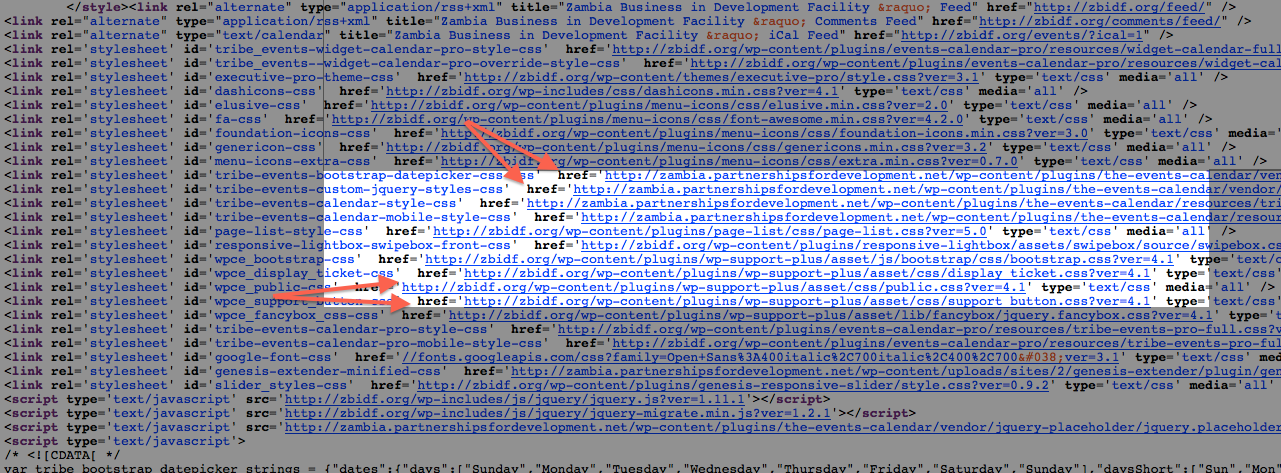
I think this is because, deep down in the inner workings of Events Calendar PRO, the following variables are used to generate the URLs to the resources folder – and the scripts within it:
$this->pluginDir  = trailingslashit( basename( dirname( dirname( __FILE__ ) ) ) );
$this->pluginPath = trailingslashit( dirname( dirname( __FILE__ ) ) );
$this->pluginUrl  = plugins_url( $this->pluginDir );
So maybe, despite aspects of the domain mapping that you have set up, the references to __FILE__ will bypass that and prevent the proper file being loaded.
I have two suggestions that might help here, or are worth trying. First, is to head to your site’s wp-config.php file and add this line of code:
define( 'SCRIPT_DEBUG', false );I doubt this will change anything, but it’s worth forcing that “false” value there.
Next, would you be comfortable modifying core plugin code on your site? This is usually never recommended 🙂 But for the purposes of this issue, it may be worthwhile for testing just to see if any of my assumptions here are correct.
Basically, what you’d want to do if interested is to navigate to wp-content/plugins/the-events-calendar/lib/tribe-template-factory.class.php and look for the function called getMinFile() – it looks like this → http://goo.gl/X04lFC
If you modify that function as follows and then save the file, and refresh things on your site, let me know if anything changes – and at least let us know if you’ve made the change, and leave it up on your site until we reply if possible – the exact changes are in this Gist here → http://goo.gl/ipZ9ZW
To clarify:
- the original → http://goo.gl/X04lFC
- the modified version → http://goo.gl/ipZ9ZW
Maria: thank you so much for your patience so far, and I’m very sorry if my attempted solution here does not help. But it’s something I think is promising and worth looking into.
You may also want to update WPMU support about the possibility of the issues I described here being to blame, and contact them about whether domain mapping and the use of director-referencing functions like dirname( dirname( __FILE__ ) ) can play nicely together and reference the same files/directories on your server.
Thanks Maria!
Cheers,
George-
This reply was modified 11 years, 6 months ago by
March 21, 2015 at 11:32 am in reply to: Scrolling cursor over the event link on the monthly calendar creates… #949887ParticipantHey Aaron,
Thanks for all the information here. I’m sorry to here about your developer leaving, although the fact that they might have modified things but you’re not 100% certain either way is indeed a bit of a potential red flag, as is the possibility of someone from oDesk meddling with code somewhere on your site, but neither of these things are definitive and I’d just be speculating if I were to say they were problematic.
The code that you posted above should not be problematic here either.
To get a better sense of possible conflicts being at play here, can you run through the debugging steps laid out here and let us know what you find? → https://theeventscalendar.com/knowledgebase/testing-for-conflicts/
Thanks!
GeorgeMarch 21, 2015 at 11:27 am in reply to: Missing month header, missing tooltip, missing date – no venue up front #949885ParticipantHey Catherine,
In regards to the padding on the single event listings, here’s a basic example of some code that might help:
.tribe-events-single.vevent.hentry {
    padding: 2em !important;
}
I had to use such specific selectors and !important there to override some styles coming from your theme. If you want to extend this customization to other parts of your site, or make other little CSS tweaks, definitely check out out a tool like Firebug if you use FireFox, or the Developer Tools for either Safari or Chrome – if I’ve recommended these before to you, sorry to repeat myself, but they’re extremely helpful!
Okay, now as for the tooltips, I found some CSS stemming from your theme that sets an overflow:hidden; rule on everything with some pretty generic class names. To override this, try adding the following CSS to the bottom of your theme’s style.css file, and let me know if it helps your Month View tooltips display:
.hentry.tribe_events {
    overflow: visible !important;
}
You may not have any actual HTML or PHP problems with your tooltips after all, and it literally could just be a CSS issue like I described here.
Let us know if this helps!
Thanks,
GeorgeParticipantHey Peter,
Thanks for reaching out to us here. A few things worth pointing out are that, while your willingness to share login information to resolve things more quickly is appreciated, we cannot log into user sites – I’ve removed the login information you posted here. Nobody has logged into your site thus far from our team, and nobody will – nothing personal, just an important security policy we follow to the letter! 🙂
Now, as for your issues, your theme is definitely at least hugely at play here. If the issue is entirely resolved by doing nothing other than activating a default theme, that’s exceptionally strong evidence of this.
However, that could mean many things, and could be an issue stemming from one script on your site or something.
To help with investigation a bit here, can you head to your site’s wp-config.php file and add the following of code:
define( 'SCRIPT_DEBUG', true );That might help us identify what exact instance of our Google Maps-related JS function deleteMarkers() is causing this specific error, which might help us figure out where things are failing.
Let us know if you can make this change!
Thanks,
George-
This reply was modified 11 years, 6 months ago by
ParticipantHey Mark,
Thanks for searching for other tickets on the forums related to your reply, I’m glad the answer you linked to addressed your question here.
One extra thing I’d like to note is that we do indeed have a “Ticket User Meta” solution coming soon, which would making adding things like Lunch Order specifications much easier to implement. I don’t have a specific launch date to share, and it would still require some extra coding to configure things exactly like you want with that forthcoming solution, but it would make it much, much easier.
Sorry if any of the information in that other ticket or this one is disappointing – let us know if your questions have been addressed here or if you have any other questions, comments, et cetera 🙂
Cheers,
GeorgeParticipantHey Larry,
Sorry you’ve run into this error here. What it indicates could be one of a few things: actual missing tables or rows in your database, which is not intended behavior at all, or something about queries to the database that is getting muddled by another higher-level bug on your site.
To investigate this problem, I think a good place to start is to first clarify two things and then proceed with a simple debugging step. First, those two things:
1. When exactly does this issue arise for you? And where? Is it just on the front-end, just on the admin, or everywhere? Is it just on specific pages? Does it only happen after clicking certain things or performing certain admin actions?
2. When did this issue start arising? Has it existed since the moment you activated The Events Calendar, or were things working fine, and these issues only appeared recently after changing something on your site – a plugin update, a theme installation, a WordPress Core update, a code customization you made somewhere, anything?
Now, after addressing those two items, something I’d recommend doing would be to run through the debugging steps we’ve laid out in our “Testing for Conflicts” page here → https://theeventscalendar.com/knowledgebase/testing-for-conflicts/
Those steps will help enormously, and help us test whether or not there’s a theme or plugin conflict here that’s causing this issue.
Let us know what you find!
Thanks,
GeorgeParticipantHey Arman,
Thanks for reaching out to us. There are a few different aspects to your question here, so to get started, the first thing worth pointing out is that we cannot log into user sites, so I’ve removed your login information for security purposes, and no one on our team has logged in or will be logging into your site. Nothing personal! 🙂 Just a security policy that we take seriously and enforce universally.
Now, as far as how to integrate Events content with your specific “Fusion Builder” theme – for specific theme-related homepage questions, there’s not much specific information we can provide here, and your best option is to reach out to your theme providers’ support for help and information on that.
There are, however, several different ways of retrieving events, for use on any page or area of your site.
For example, the most common way of doing this is using our tribe_get_events() function, which you can learn about here. Since this function is essentially just a wrapper for WordPress’ own get_posts() function, you may also find it helpful to read up on that function itself if you’re not familiar with how to use it – the WordPress codex page for it even includes some code examples → https://codex.wordpress.org/Template_Tags/get_posts
For example, if you have an events category called “Concerts”, and you wanted to get all events in that category, you could retrieve them – note that displaying them requires more code than just this example – with code like this:
$concert_events = tribe_get_events( array(
    'tribe_events_cat' => 'concerts',
    'posts_per_page'   => -1
) );
Then, $concert_events should hold an array of events in the “Concerts” event category, and you can display things how you’d like from there.
I hope this all helps! Let us know if it does, or if you have further questions or concerns of any kind.
Cheers,
GeorgeParticipantHey Stuart,
I’m curious, when you describe having tried to configure things in the plugin settings, do you mean the “Events Template” option specifically? We have this under the “Basic Template Settings” section of the events “Display Settings” tab, as shown in this screenshot → https://cloudup.com/c6kLmOFHlMJ
If various WooCommerce templates do not show up there, then you may be able to make things work by making those templates actual theme “Page Templates”, which you could contact the WooCommerce support team for assistance with.
Now, apart from all of these things, is your question about embedding events or specific event views. While there are no shortcodes built into our plugins by default as of now, there is a separate, un-official, un-supported plugin called Event Rocket by one of our awesome developers Barry → https://wordpress.org/plugins/event-rocket/
That plugin does have shortcodes, though they may not meet your needs. We don’t offer support for that plugin, but if you check it out and play around with it a bit, you might find a working solution for now.
Let me know if anything here is helpful Stuart!
Cheers,
George -
AuthorPosts