Forum Replies Created
-
AuthorPosts
-
September 3, 2015 at 3:20 pm in reply to: Help! A lot translation bugs in the events calendar pro #1001836
George
ParticipantHey Torben,
I cannot guarantee I’ll be able to fix your issues, and we cannot operate on your deadline, however if you share a link directly to a page on your site where the widget issue can be seen on the front-end of your site then I will happily take a look!
Be sure to leave your site in the state where a default theme is active, and all plugins except for The Events Calendar and Events Calendar Pro are deactivated like from those troubleshooting steps.
As for the language issues, I’m not sure where the exact problem is coming from – if you have strings in the German translation file that are not translated, the best solution is to translate them. If there are code problems I unfortunately do not know when they will be fixed 🙁
Sorry Torben,
GeorgeSeptember 3, 2015 at 3:15 pm in reply to: No image options, sign in issues, and pending review #1001832ParticipantHey Daniel,
You should be able to hide that link by adding CSS like the following to the bottom of your theme’s style.css file:
#wp-admin-bar-tribe-events-add-event {

    display: none !important;

}
I hope that helps!
ParticipantHey @codeink,
Thanks a ton for trying that Permalinks trick and for sharing your site information here.
Unfortunately, I was unable to spot anything problematic in your System Information, which means that there could be a code conflict at play here.
Before we dive into more troubleshooting steps, can you just clarify what exactly you’re trying to do here?
You describe your issue as this:
I’m trying to show a calendar with the past events.
What does this mean? Do you mean that your “Previous Events” links do not work, for example?
Do you mean that you’re trying to build a separate calendar that only shows events in the past?
Does your main /events/ view not even work for you?
Just curious about this and trying to get a better understanding of your issues!
I really appreciate your patience here.
Thank you,
GeorgeParticipantHey @Kayla,
You should be able to fix that with additional CSS:
#tribe-mobile-container .type-tribe_events .entry-summary.description {

    display: none !important;

}

#tribe-mobile-container .tribe-events-event-thumb {

    display: none !important;

}
I hope that helps!
— George
ParticipantHey Folks,
Thank you all for your patience here, I’m sorry that you’ve encountered these bugs but I have some great news: just in the past few hours we were finally able to isolate the problems, which related to how Facebook’s Graph API has changed recently.
Our developer Matt came up with a great fix and hopefully it will make it into the 3.12 release of our plugins which is coming next week.
I tested this new version of the plugin and it resolved these issues for me – we’re testing the fix and running it through our QA process, we’ll get this out to you as soon as possible!
ParticipantAnna – thanks a ton for sharing your solution here! Great to know. I’m sorry that something simpler isn’t currently possible, but stay tuned to plugin updates in the event that we are to come up with a clever workaround here.
Best of luck with your site!
Thanks,
GeorgeSeptember 3, 2015 at 1:46 pm in reply to: Month Selector (creating next/previous month links) #1001789ParticipantHey Will,
You should be able to use the following CSS selectors without issue:
.tribe-events-nav-previous

.tribe-events-nav-next
both of which are contained within:
.tribe-events-sub-nav
Is this not the case for you? If so, what are your specific issues in more detail, and what is the custom CSS you’ve written thus far for the prev/next links?
If you do not have these links showing up on your site, then I’m curious: do you have any custom template files for The Events Calendar? If so, make a backup of them and then temporarily remove them from your theme, and see how things behave.
Thanks,
GeorgeParticipantHey John,
While removing the end time from tooltips is quite tricky, you can reduce the date and time displays elsewhere by doing two things. First is to just use a bit of Custom CSS – add code like the following to the bottom of your theme’s style.css file:
.tribe-events-schedule .endtime.dtend {

    display: none !important;

}
This will still leave the “-” separator, however, which you can’t target with CSS, so for that you’ll have to add code like the following to your theme’s functions.php file:
add_action( 'tribe_events_event_schedule_details_inner', 'tribe_support_1001350' );function tribe_tribe_support_1001350( $inner ) {
return str_replace( '-', '', $inner );
}
We don’t offer support for customizations here, so I hope this helps and hope you can play around with it enough on your own to pull off a satisfactory customization. If you’re interested in removing end time/date info from tooltips, unfortunately the simplest way I can think of for doing that is to customize the tooltip template file directly.
You can learn more about how to do that in general here → https://theeventscalendar.com/knowledgebase/themers-guide/
Best of luck with your customizations!
George
ParticipantHey Allan!
YES – 3.12 will indeed include support for “free-form recurrence” which should satisfy these needs for you and your client quite nicely 😀
We’re also happy to issue a refund immediately for any reason within 30 days of your purchase, so if for some reason you’re still not satisfied with how the “free-form recurrence” works, reach out immediately for a refund and we’ll issue one to you, no problem.
If you’d like to learn more about the fast-approaching 3.12 release, we sent out an email this morning which you can also view online here → http://goo.gl/kru4CB
Give that a read and let me know if you have any other questions!
Cheers,
GeorgeSeptember 3, 2015 at 12:12 pm in reply to: Combine Events, by publish date, in mutli CPT query #1001731ParticipantHey Graham,
I’m sorry you’re having trouble here! Just to put the disclaimer out early, we cannot help with custom code and such, so you’ll mostly have to take the reins on this one.
With that out of the way, I’m happy to at least try and help as much as possible within reasonable scope of our forums here.
I’m wondering what you find if you try simply adding the WP_Query ‘orderby’ parameter, then specify something like ‘modified’ etc.
Have you tried this? So, for example, something like this:
$the_query = new WP_Query( array(

    'offset'         => 1,

    'posts_per_page' => 6,

    'post_type'      => array( 'tribe_events', 'news', 'feature', 'resources' ),

    'orderby'        => 'modified'

) );
What happens if you try that out?
ParticipantHey Jess!
Thanks for the kind words about the plugin 🙂 Your interest is appreciated and I’m happy to answer your questions – which I’ll do in reverse order:
Yes, you can add forms and any “normal” post content to Events just like you would a “normal” post, page, etc. Events come with a full-on content editor so you can add shortcodes, forms, galleries, etc. – pretty much anything, as long as it works with your site in general to begin with!
As for your question about recurrence patterns, until next week or so there really wasn’t much that you could’ve done about these free-form recurrence patterns…
…However, your timing is impeccable because free-form recurrence is one of the biggest features coming in version 3.12, which should launch next week if all goes to plan!
We sent out an email just this morning detailing the 3.12 release, you should definitely give it a read to learn more → http://goo.gl/kru4CB
I hope this information helps!
Cheers,
GeorgeParticipantHey @charrame,
Sorry about these issues. I checked out your site and am a bit curious about what your issues are.
Do you mean that the widget areas on the bottom of your site used to be up on the left or ride of the page?
If so, then this is something that your theme dictates. We try to accommodate theme templates by allowing you set the template used for even pages.
To change this, try heading to Events > Settings > Display in your wp-admin, and try different options for the “Events Template” option which I screenshotted here for reference:
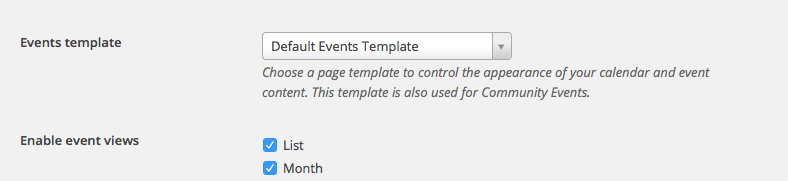
Try all the options and see if any of them improve the layout on your page.
Let us know if this helps! 🙂
Thanks,
GeorgeParticipantHey Jako,
Do you mean that you only want one event per date to appear? Or all the events of one date, but no other dates than just that one date?
Either way, this will most likely boil down to requiring some custom code, which we unfortunately cannot help with.
With that disclaimer out of the way though, I’ll share a quick code example with you to hopefully get you started 🙂 This assumes that you mean that you indeed want all the events of a given day, but only from that day. In other words, for example, this code would only list events happening today September 3, but not ones from Sep. 4, 5, so on.
You’d achieve this by adding code like the following to your theme’s functions.php file:
add_filter( 'tribe_events_list_widget_query_args', 'tribe_support_1001539' );function tribe_support_1001539( $args ) {
$args['eventDisplay'] = 'custom';
$args['start_date'] = strtotime( 'now' );
$args['end_date'] = strtotime( 'now' );return $args;
}
I hope that helps!
— George
ParticipantHey Jeff,
If you head to Events > Settings > Community and scroll down to the “Access Control” settings area, what are all of your settings there? Take a screenshot of the whole area if possible – you can upload it to a site like imgur.com or flickr and share a link to that here, we’ll take a closer look.
If possible, can you also please share your system information with us? Here’s how to do that → https://theeventscalendar.com/knowledgebase/sharing-sys-info/
Thanks!
George -
AuthorPosts