

Forum Replies Created
-
AuthorPosts
-
George
ParticipantHey David,
I’m really sorry that you’ve run into this issue! We’ve actually got a bug in our code that we are hoping to fix in our maintenance release coming early next week which should resolve these issues.
Is waiting for this release a viable solution for you? We don’t really have many alternative options at the moment, as the bug is deep down in core code, but let me know what you think about this.
Sincerely,
GeorgeSeptember 18, 2015 at 10:51 am in reply to: Multiple Eventbrite accounts with Eventbrite Tickets #1006519ParticipantHey Nicky,
Unfortunately, Eventbrite Tickets currently only allows for one account’s API Keys to be used with our plugin, meaning that other accounts that are not “authorized” with these keys will not work 🙁
Sorry to disappoint!
Please let me know if there’s anything else I can help with.
Cheers!
GeorgeParticipantHey Pete,
Unfortunately the [event_embed] shortcode is not something provided by any of our plugins. You may be getting it from a plugin called Event Rocket or something, which is unfortunately a third-party plugin and we do not offer support for third-party plugins here.
For whichever plugin you get this shortcode from, I’d recommend reaching out to that plugin’s support team specifically for some help here.
Sorry to disappoint! I will close up this thread for now with all this in mind, but I wish you the best of luck with this shortcode and your site.
Cheers!
GeorgeSeptember 18, 2015 at 10:40 am in reply to: When running an iCal import ALL categories are imported #1006515ParticipantThank you so much for the elaboration here, it definitely paints a clearer picture of things and should help us better help you 🙂
For starters, can you share your “System Information” with us as described here? → https://theeventscalendar.com/knowledgebase/sharing-sys-info/
That will be a good place to start, from which I can then try reproducing your issues and see what I can learn here.
Thank you!
GeorgeSeptember 18, 2015 at 10:34 am in reply to: Need to move ticket prices above the event details. #1006514ParticipantNo worries @pagan11460!
I’ll leave this thread open for sure – if our support-droid bot auto-closes it after 15 days of inactivity, then I’m really sorry about that. He means well but sometimes closes threads a little too aggressively 🙂
In the event that that happens, just open a new thread and link back to this one for reference – we can pick up right where we left off.
No worries about timeframes at all here, @pagan11460! Just keeps up in the loop and we’ll resume the thread whenever you’re ready.
Cheers, and good luck with all that you’re busy with.
— George
ParticipantGlad to hear it Jane! If you’re curious about what it is in fact doing in the background, then essentially all that’s happening is that where normally a date and time function are both used to generate the schedule details, this “hijacks” that process and only gives the code the time function – so no date is generated. 🙂
Best of luck with your site!
George
September 18, 2015 at 10:27 am in reply to: Venue name and City are required after update….when they're in the Saved Venue #1006510ParticipantHey @mad dog,
Unfortunately specifying the venue city sub-field at this time is not possible 🙁
ParticipantThanks for your input here Nadia, I’m really sorry that these issues have affected you, too! We’re working hard on this update and should have it ready for release – hopefully! – by sometime next week.
Stay tuned! We’re working to get this out as soon as possible and it should hopefully fix these issues.
Thanks,
GeorgeParticipantHey Laura,
Thanks for the level-headed and polite response even in the face of our plugins being, it appears, a waste of money. I’m really sorry about the time you’ve sunk into this and would first like to touch on the original question/answer thing:
MY QUESTION: Also, can people purchase tickets for multiple events in one transaction?
RESPONSE: Indeed! Folks can buy many tickets from many different events all at once.I was the writer of that response, and indeed thought that you just meant that if there was, for example, an event each on Friday, Saturday, and Sunday that someone wanted to attend, they could buy tickets for all three events in one cart checkout.
I’m sorry for my lack of depth in the response! I’m also sorry to bear the news that refunds past 30 days are unfortunately very tricky to do – these are not limitations imposed by us, but by our payment processors. Our processors are Stripe and PayPal, who have strict cut-offs for refunds, but I will reach out to some other team members and see what we can do here!
Can you forward a copy of your original receipt to us at [email protected]? This “receipt” is one your Order Number in bold at the top of it from our site itself, and with your license keys and stuff – it’s not a PayPal receipt, for example.
We can take that information and match it to our records and see what we can do from there.
Thank you!
GeorgeParticipantHey Mirit,
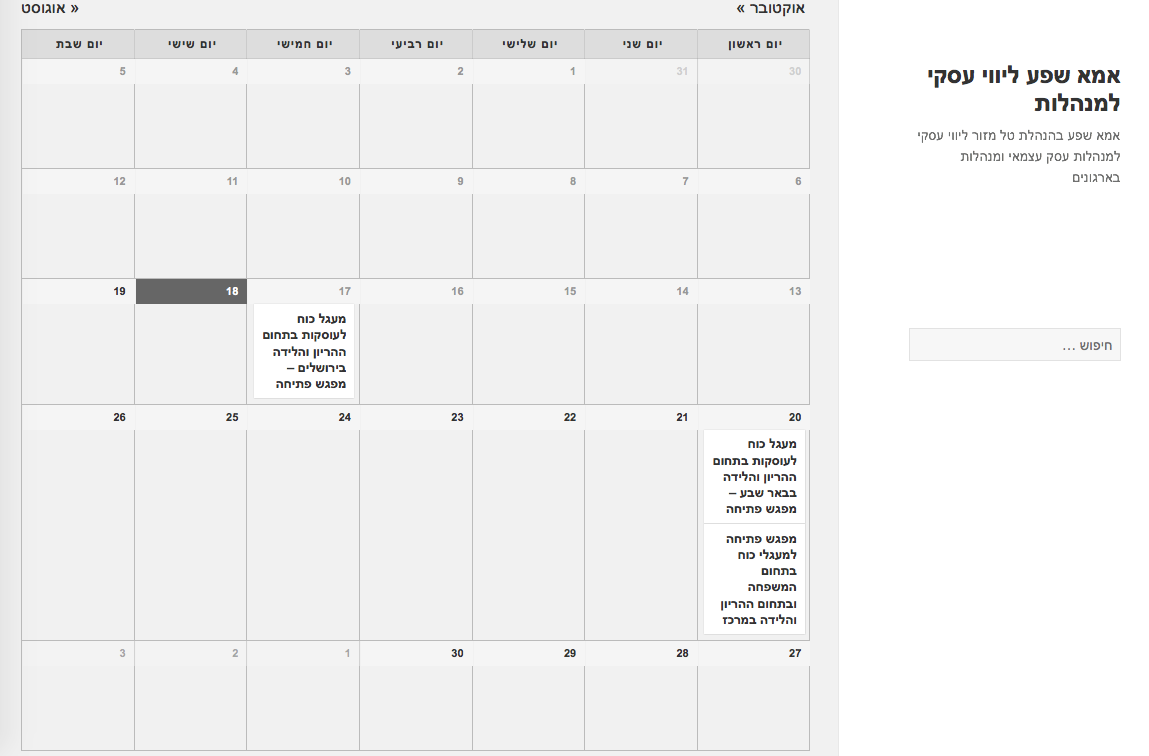
Thank you for doing that! I found the URL that you linked to still had RTL code, as shown in this screenshot:
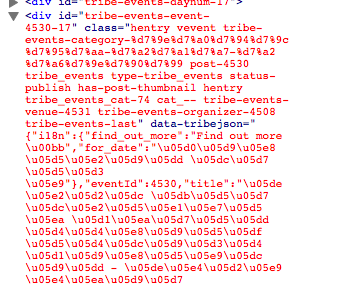
The problem persists. For example, when I look at the HTML source code for your tooltips, it seems like whatever is enabling RTL on your site (or possible something else) is messing up the encoding of parts of the HTML document itself:
Can you please answer the following questions?
1. How specifically are you enabling RTL? Are you just using RTL-language .mo and .po files, and then adding some rules to wp-config.php? Or are you using a plugin or something else? If so, what are you using specifically?
2. If you completely disable RTL, for example if you set your site so that it uses English and no other plugins except The Events Calendar and Events Calendar Pro are active, do the problems persist? If so, please leave your test site in this state, with English the active language and no other plugins except The Events Calendar and Events Calendar Pro active.
Your answers will be very helpful here – thank you for your patience Mirit!
— George
ParticipantHey Darren,
Thanks so much for your patience and cooperation here. I’m trying to recreate problems without luck, but you are not the only user who is currently reporting some sync problems, so I do believe there is a valid problem at play here and possibly even a bug in our code (or something related to a change with Eventbrite’s API, which they sometimes do without documentation and that has broken sites before!)
There are two things I can think of from here that are worthwhile for investigation – first is to reflect on a question I asked early in this support exchange, which was whether or not these issues happen for any Eventbrite event on your site regardless, or if it only happens for a select few events…
Your response to that was this:
Sadly we rarely create Eventbrite events, so this is a one-off for now.
I’m wondering if first we can circle back to this, and if you’d be able to create some “test” events on Eventbrite.com – brand new events, listed publicly, but just with free tickets and not actual events that will happen. Don’t worry about this being a problem – it’s just temporary for testing and you can immediately delete the events once things are resolved. You can, and should, even title the events “TEST: (rest of title)” to make it clear that they’re not real events.
Once some of these events are created, what do you find if you try to import them on your WP site? Do any of the same problems re-emerge?
If so, then I’d recommend first making a few more test events, and then running through our complete set of troubleshooting steps here → https://theeventscalendar.com/knowledgebase/testing-for-conflicts/
Test some event imports once your site is in a state where a default theme like Twenty Twelve, Fourteen, etc. is active, and all plugins except The Events Calendar and Eventbrite Events are deactivated.
I’m sorry ahead of time for how tedious this process might sound – having done these steps hundreds of times myself, I can assure you that it’s much faster to work through than it sounds!
Thanks so much for your patience here Darren. Let me know what you think about my proposed next steps from here, and if you run through them, let me know what you find!
Sincerely,
GeorgeParticipantHey Linda,
Thanks for doing those tests!
I’m sorry to say this, but unfortunately I think the next best step from here is a more thorough set of troubleshooting steps we have that will help reveal or rule out a code conflict on your site.
I think this is worthwhile because on my local testing site, with all the same Tribe plugin versions that you have, I cannot recreate this issue.
These troubleshooting steps can be found here → https://theeventscalendar.com/knowledgebase/testing-for-conflicts/
I’d recommend checking those out and doing each step as recommended. Let us know what you find by going through this process!
Thank you,
GeorgeSeptember 18, 2015 at 9:21 am in reply to: When running an iCal import ALL categories are imported #1006485ParticipantHey Seth,
I apologize for both my delayed response here, and for my lack of understanding about your issue. Can you clarify what you mean, for example, by this quote:
we import menu items for food items from 4 different categories at our district school level to our individual school calendars
I’m just not clear on the relationship of your different school sites and then the district site, etc.
Do you have The Events Calendar on every single individual school site, and then on your district site, you are running scheduled imports from each of these sites?
If so, then we can narrow down the problem to be the generation of the iCal feeds themselves.
Let me know what you think about my questions here, and again, I’m really sorry about the delayed response! We aim for response times within 24 hours, and I just dropped the ball here – I took your thread in a morning where we had tons of other threads coming in, and then I had some unexpected outage time yesterday for most of the day.
Real sorry about that Seth – I won’t be delayed again and am eager to help you get things working again 🙂
Cheers!
GeorgeParticipantHey Ueli,
Thanks for your patience and cooperation! Try adding the following CSS to the bottom of your theme’s style.css file:
#tribe_events_filters_wrapper select[name="tribe_eventcategory"] option[data-slug="internal"] {

    display: none !important;

}
Here’s how that works for me:
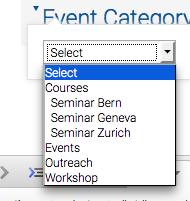
I hope that helps!
Cheers,
GeorgeParticipantHey @Gloria,
Thanks for reaching out!
Achieving the exact thing you’re looking for here would unfortunately require a level of custom coding that is beyond the scope of our support forums. I’m sorry to bear that news.
However, you should be able to get started on this by doing a few simple things:
First, check out our Themer’s Guide and read through it to get an understanding of how to make these sorts of customizations. Our themer’s guide is online here → https://theeventscalendar.com/knowledgebase/themers-guide/
Next, check out the /views/pro/related-events.php file in your Events Calendar Pro plugin files. Reading this, along with its related CSS, will show you how the “Related Events” module is assembled and made to look like it does.
Finally, with all of this information in mind, you should then customize venue-related views so that they have Events content similar to the layout of /views/pro/related-events.php
I hope this is information all helps, Gloria.
Best of luck with your customizations! 🙂
— George
-
AuthorPosts