

Forum Replies Created
-
AuthorPosts
-
George
ParticipantHey Rob,
I checked out your events page and noticed a JavaScript error coming from this script on your site:
http://freeindeedchurch.org/wp-content/cache/minify/000000/M9bPKixNLarUMYYydHMz04sSS1L1cjPzAA.js
As the URL there implies, that’s indeed a minified script…
Can you confirm that you have minification totally disabled for all JavaScripts and all CSS? If not, please ensure that minification is disabled and then clear your caches.
This script seems to be a core WordPress script and is thus quite crucial for the page to function; and just to note this, many people use W3TC and The Events Calendar together fine as long as minification is disabled. There are some problems with W3TC and The Events Calendar’s AJAX functionality, but this is not something we can work around due to the way that AJAX and Caching both literally work at a browser level.
Let me know about the minification and cache-clearing efforts here, and if they make any difference!
Thanks,
GeorgeParticipantHey Phil,
There are no current plans to do this, but it’s an interesting idea and you are right that it might be helpful to users curious about how well these plugins are integrated together…
At this time, our compatibility is greatly improved than in older versions of The Events Calendar, but is still not 100% compatible. Issues and conflicts persist, especially with AJAX-related translation features from WMPL.
Let me know if you have any other thoughts on this or any other questions I can help out with! 🙂
— George
October 2, 2015 at 6:04 am in reply to: Purchasing Events Plugin Pro using SOW &P urcahse Order #1010843ParticipantHey Gabe,
Thanks for your interest in our plugins! We don’t have any special sales department or special handling of payments/invoicing/etc. for customers, and strive to provide the same services equally to all customers. To explore options for buying a plugin, the plugin’s product page itself on this site contains almost all of the relevant information for price, payments, subscription terms, etc.
For example, check out the product page for Events Calendar Pro → https://theeventscalendar.com/product/wordpress-events-calendar-pro/
All the license options are listed there, and are the only license options available.
In terms of “statement of work”, our plugins are just products; they are not client deliverables and do not come with hiring us or anyone else for development work or anything like that. It’s just a yearly subscription for support and updates, like a magazine subscription.
When it comes to invoices, if you purchase a license you can generate an invoice at any time for your purchase of it in the “My Account” page on this site. Here’s an article in our Knowledgebase that details this process → https://theeventscalendar.com/knowledgebase/order-invoices/
Does all of this information help? Let me know! If not, let me know what specific things I can do a better job of elaborating on 🙂
Cheers,
GeorgeParticipantHey Bill,
I’m not Geoff, though since my name is George I’ve at least got a few letters in common with him 🙂 Hopefully I can be even half as good a support agent as him.
Just to be clear, when you mention an old thread with Geoff, do you mean this one? → https://theeventscalendar.com/support/forums/topic/how-to-get-the-right-format-url-for-events-at-ical-and-google/
For now, can you share your system information with us? Here’s how to do so → https://theeventscalendar.com/knowledgebase/sharing-sys-info/
Thank you!
GeorgeParticipantHey @eastlife,
The ability to more easily change/customize the ordering of events in various views is something we’re working hard on, but at this time there is unfortunately no easy way to do this. It would require some extensive code customization, and not even the recommended kind where you can make all the code tweaks outside of the plugin itself in your theme or something; it would take customizing internal plugin code directly, which is a bad idea and means that a plugin update would wipe your customizations out completely unless you back them up and then manually replace them one-by-one in the new code after update.
Alternatively, you might be able to write some clever JavaScript that checks for events in each day on a page and shuffles things around based on data attributes and the calendar date; but this, too, is some extensive custom development and I can’t think of an efficient/performant way of doing this.
I’m sorry about this disappointing news @eastlife – let me know what you think about it all, and/or if I can help with anything else!
— George
ParticipantAwesome! Thanks for the update @Vera 🙂
I’m glad things are working for now and wish you the best of luck with your site.
Cheers,
GeorgeOctober 2, 2015 at 5:44 am in reply to: Next/Prev event navigation links doesn't lead to correct events #1010824ParticipantThanks for the update @twkmedia, I’m sorry that issues are persisting here…
1. Have you updated your site’s version of WordPress at this time yet? Updating to 4.3.1 may make a difference here.
2. Also, just to be sure, what are your site’s “Permalinks” settings?
3. You mention testing out the removal of your custom templates already, which is a useful test, but unfortunately if updating to WordPress in step #1 here still does not make a difference, then the troubleshooting steps here are the next best recommendation → https://theeventscalendar.com/knowledgebase/testing-for-conflicts/
Now, I know how wary you are of doing those tests, and I don’t blame you for feeling that way. But I fail to reproduce problems here with the prev/next links, and you mention having already tried some of the other weird fixes like the “Recurring events instances” toggle – to no avail 🙁
So if upgrading to WordPress does not help, then a theme and/or plugin conflict is the only thing left standing as a very likely culprit here, and so those troubleshooting steps are called for.
Let me know what you think about all of this! I appreciate your patience with this thread and all of your testing so far, and if there’s anything I can do to make the testing of theme or plugin conflicts easier, let me know!
Sincerely,
GeorgeParticipantHey @Laughmasters,
That might be the root of the problem, actually – I do not know how that plugin adds its customizations, but I’m curious: to test for this, can you temporarily deactivate that plugin altogether on your site, and then go to your theme’s functions.php file and try adding this filter to change the “Add to Basket” text to “My Button Text”:
add_filter( 'woocommerce_product_add_to_cart_text', 'woo_archive_custom_cart_button_text' );function woo_archive_custom_cart_button_text() {
return __( 'My Button Text', 'woocommerce' );
}
This is a code example taken from here: https://docs.woothemes.com/document/change-add-to-cart-button-text/
Once you do this, let us know what you find; does the button text indeed change?
Thanks!
GeorgeParticipantI’m sorry @Sitecrafting, but I unfortunately do not have a timeline or a specific ETA for this feature 🙁 I’m not being intentionally obtuse here, we just have many other features that are taking priority over this for now.
One thing that might help, in the meantime, is admittedly not the slick graphic UI of the events data generation stuff. But you might find some luck by using a plugin like this one → https://wordpress.org/plugins/wp-crontrol/
This lets you manually run “WP Cron” jobs, one of which is called “tribe-recurrence-cron” which checks for new events to add and old events to delete. If you manually run this cron, it MIGHT help with deleting some old, unused event instances based on these settings in your wp-admin page at Events > Settings:
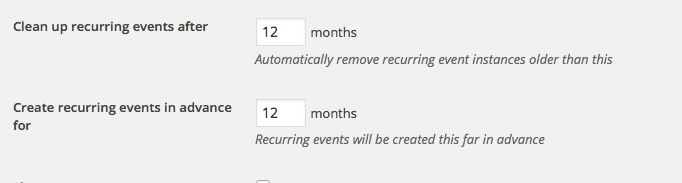
If you shorten the “cleanup recurring events after” option to something like 1 month, it may make a difference on your site and help keep the load of recurring events in the past to only show events in the past few weeks, with anything beyond that being deleted.
I hope all this helps!
— George
October 2, 2015 at 5:27 am in reply to: Does The Events Calendar Pro use Structured Data Markup #1010817ParticipantGlad to hear it Phil, thank you for your input in this thread. And just to be clear, I’m not saying that we cannot make any improvements to our handling of structured data! We actually have a few development tickets related to it, so over the next several releases there should hopefully be some improvements for even better compatibility with Google’s standards.
Since your original questions have been addressed here, @Anthony, I’m going to close up this thread for now. If other questions arise, though, don’t hesitate to open a new thread any time! 🙂
Cheers,
GeorgeParticipantHey Phil,
Thanks for elaborating on things and for your patience with me here! To me, there seem to be separate questions. First is this one, as you highlighted:
I think all I’m really asking for is to have the Facebook importer automatically change the Author of events once the are imported.
Okay – if this is the case, then unfortunately the answer for this is that it would still require some custom coding to auto-change the author upon import 🙁
But next, you go on to specify the functionality of this a bit more as follows:
Now I run the import and all of the imported events have me as the author. Next I change the author of one of those events to be BikerGirl. At that point, she can do whatever she pleases to the event for which I made her the author, but cannot modify anyone else’s events.
Keep in mind the first question which I highlighted above in this post; that if this was just a matter of setting a custom author upon import, it’s still a custom coding project.
But then in addition to changing the author, you specify here how the permissions for the author should work like this: “she can do whatever she pleases to the event for which I made her the author, but cannot modify anyone else’s events”. Unfortunately, even if you did get the author reassignment feature working, it would not enable this specific feature of only letting the author work on her own events, but nobody else’s. The closest thing to that is the “Contributor” user role, but then this User Role itself doesn’t allow full editing access….
So there are some inherent issues here that are both with our plugins and with WordPress itself, and getting around them would require custom development.
Finally, you mention this as an example of your goal:
“Hey look, I’ve set up this cool site with a calendar of events, and I’ve included some of your events. If you’d like to take control of them, I’ll set you up with a user-id and you can modify them however you like.”.
I want to be clear that you can, indeed, manually do this. Access control and the user system on your site are all general WordPress things, and are not parts of The Events Calendar or Facebook Importer. But wiring up some automatic way for all of this to work is unfortunately not native to The Events Calendar/FB Importer OR WordPress itself, so it would unfortunately require custom development.
I hope all of this information helps!
— George
October 2, 2015 at 5:16 am in reply to: Calenda turns back to the original language when clicking on next month button #1010814ParticipantThank you for the kind words about our plugin, Alex, even despite some of its bugs that are impacting your site here! It’s greatly appreciated. We are working hard on better compatibility with WPML; stay tuned to plugin updates! 😀
Cheers,
GeorgeParticipantThanks for this Brandon. Just to be clear, this event on your site does have tickets created in the back-end, right? → http://sharecmi.com/event/cmi-media-camp/
If so, then I’m curious: can you temporarily leave your site active in a default theme like Twenty Twelve? I will take a closer look at the site then and see if I can notice any useful details about this issue.
Next, can you take a screenshot of the event’s edit screen? This should include all of the ticket details, for example, and so then I can look at precisely how your event is created and see if that helps. You can upload the screenshot to a site like Imgur.com, then share links to those screenshots here. Please do not post any site login information, as we are not permitted to log into customer sites for any reason and it is a security risk to post login information.
Thank you!
GeorgeParticipantAwesome! I’m sorry that, at this time, you have to go to such relatively large lengths to change such a relatively small detail, but we can definitely improve the handling of URL fields. And we will be 🙂 Stay tuned to plugin updates!
Best of luck with your site,
GeorgeParticipantNice! 🙂 Best of luck with your site,
George -
AuthorPosts