

Forum Replies Created
-
AuthorPosts
-
George
ParticipantHey Tom,
My understanding of WPML was that you could serve multi-lingual views as subfolders on the same site, and that this was the default method. So for example if your site was example.com, then a page in English would be at example.com/en/page, while the French version is at example.com/fr/page
Regardless, what I wrote here still stands as true:
This is not something The Events Calendar is built to work around
There are many incompatibilities with WPML and this seems like unfortunately one more 🙁 We are working hard on improving compatibility but don’t have any code-based solutions at this.
I’m sorry Tom!
ParticipantHey @terrizsolo,
Thank you for looking into these things. I noticed that you mention having some custom template files in your child theme – can you temporarily activate a default theme like Twenty Twelve or something (any default theme that you have NOT customized or made a child theme for in any way)? Once you’ve activated this, go to Settings > Permalinks in your admin area, and just click “Save Changes” without actually making any changes. This may seem like an odd thing to do but is a little “trick” within WordPress to get the permalinks across your site to refresh.
After these two steps have a look at the next/prev links issues – do the problems persist?
Thank you!
GeorgeOctober 16, 2015 at 8:51 am in reply to: Next/Prev event navigation links doesn't lead to correct events #1015318ParticipantI am truly baffled here, and am so sorry about that! I’ve tested this on my original testing site and then also a brand-new test site and cannot reproduce this issue. I’m going to rope in some developers here and see if they might have some insights.
I’m really sorry for the oddity of this issue – your patience means a lot. I will update this thread as soon as I learn more.
Thank you!
GeorgeParticipantThanks you @Bernd!
I don’t mean to dwell on one detail, but I noticed in your system information that it looks like there isn’t even a timezone set on your site:
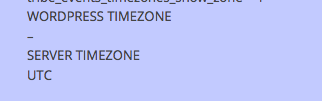
Just to be 100% certain of things, when you say you have tried those different timezones, do you mean in “Settings > General” in your WordPress admin?
If not, then make sure to try the timezone setting there specifically.
One thing I’m curious about is this – what if you set your WordPress timezone to “UTC +1”, but then the event’s local timezone to UTC +0. That might help!
(For more information on local event timezones, check out our knowledgebase article on the subject here: https://theeventscalendar.com/knowledgebase/working-with-timezones/)
— George
October 16, 2015 at 7:48 am in reply to: get the Events landing page title to change to Events – not latest event #1015295ParticipantHey @David,
Sorry to hear about these issues – Brian’s script indeed won’t work here, because that script addresses a problem from the Yoast SEO plugin. Your issue here, meanwhile, is related to/caused by your theme, as evidenced in the header tag’s HTML:

We don’t officially offer any theme support and such, but if you can send a .zip of your theme over to use by uploading it to http://ge.tt and then sharing the link there, I will download the theme and take a look at what is generating this. I should be able to recommend some code to fix this.
A simple solution would be to just use JavaScript to overwrite this from the outset on page load. You can do that by adding this code snippet to your theme or child theme’s functions.php file:
if ( function_exists( 'tribe_get_events' ) ) { /** * Force the page title to say "Events". * @link http://theeventscalendar.com/?p=1015185 */ function tribe_support_1015185() { ?><script> var title_replace = document.querySelector( '.uk-article-title' ); title_replace.innerText = title_replace.textContent = 'Events'; </script><?php } add_action( 'wp_footer', 'tribe_support_1015185' ); }-
This reply was modified 11 years ago by
ParticipantHey @Zros,
If your website was example.com, for example, then if you have installed and activated the plugin the calendar of events should appear at example.com/events.
If it does not appear there, please share your System Information with us as described here → https://theeventscalendar.com/knowledgebase/sharing-sys-info/
And then also do the troubleshooting steps described here → https://theeventscalendar.com/knowledgebase/testing-for-conflicts/
Let us know what you find!
– George
ParticipantHey Peter,
You can use Eventbrite tickets and any other add-on with just the free version of The Events Calendar.
Events Calendar Pro is not required for any add-on, including Eventbrite Tickets.
As for whether Eventbrite Tickets is the right choice for you, that’s something that is hard for me to say; it’s a great add-on and if you would prefer to sell tickets through Eventbrite.com, it’s our only add-on that does so.
If, however, you would like to sell the tickets directly from your site and thus keep 100% of the revenues (because selling on Eventbrite.com means that they take a cut of the sales), then you can use our WooCommerce Tickets add-on instead or a similar add-on.
Check out all of our Ticketing add-ons, with more information about each of them, here → http://theeventscalendar.com/tickets
I hope that helps!
— George
ParticipantHey Olivia!
Letting people sign up for your site is a general WordPress sort of thing – i.e. it’s not specific to Community Events or The Events Calendar. So you should be able to enable it in general by going to Settings > General in your wp-admin.
Once there, click the “Anyone can register” checkbox and save your changes:
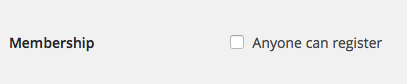
Now anyone can go to [yoursite.com]/wp-register.php and make an account on your site! 🙂
So you can share that link with people you would like to become Organizers, or on a page or in your site’s navigation menu, etc.
Now, if someone submits an event anonymously, and then signs up for an account later, there’s no way for WordPress to “know” that the anonymous person in the past was this newly-registered account’s person, so the event will not be linked to their account.
But as soon as someone has an account and then submits events, the events will be tied to them and they can manage those events that they submitted.
I hope this helps!
– George
ParticipantI’m sorry to hear about this @bernd! What timezone are you using on your site – is it a straightforward “numeric” timezone like e.g. “UTC + 1” or something, or are you using a “named” timezone like “Berlin”?
Also, can you share your “System information” with us? Here’s how to do that → https://theeventscalendar.com/knowledgebase/sharing-sys-info/
— George
ParticipantSorry to hear this Simon!
Licenses work fine for me on my local test site, so I’m curious – can you share your “System Information” with us? I’ll take a look at that and see what I can learn (if anything) to try and reproduce the error.
Also, if you go http://theeventscalendar.com/my-account/license-keys, does the URL on which you tried activating the license show up there? If so, try using the “Disconnect now” link next to the URL to disconnect the license; then see if adding the license on your site works any more successfully.
Thanks,
GeorgeParticipantHey @Bart,
We unfortunately cannot field technical support questions here in our “Pre-Sales Forum”, but just to comment on what you in some sense, I’m curious about what you said here:
I have disabled the capability publish_tribe_events for contributors.
How, specifically, did you disable this capability?
Depending on your method, what you might find a lot of success with is just using a Role-editing plugin to try and restrict Events access. There are many such plugins out there, this one is just one example I found on a quick Google search:
• https://wordpress.org/plugins/user-role-editor/
Since we unfortunately cannot field technical support questions here in our “Pre-Sales Forum”, if you have further technical questions about The Events Calendar please post in our free forums here → https://wordpress.org/support/plugin/the-events-calendar
Sincerely,
GeorgeParticipantHey @onelittlemoose,
I’m sorry that issues are persisting! What versions of the Tribe plugins are you currently running?
Also, is this happening with many events, or is it only with a select few events that might have similar characteristics (like being all-day events, for example)?
Thank you!
GeorgeParticipantNo worries Nikolaus! I appreciate your concern and, as I noted in my other thread, we aren’t trying to make things harder for you at all. I appreciate your awareness of our policies and agree with you that the language barrier is making things harder than normal.
We unfortunately do not have a forum for customizations at this time, though have been discussing making one very soon. I’m sorry about these limitations Nikolaus!
If you need a lot of custom development work, we have a list of well-reviewed developers for hire here → http://m.tri.be/18k1
I hope that helps!
Sincerely,
GeorgeOctober 15, 2015 at 2:12 pm in reply to: Slow lag time in support forum vs. here in pre sales forum #1015090ParticipantThank you @Melissa! Keep your eyes out on your other thread; for now, I will close this thread.
Best of luck with your site!
GeorgeParticipantHi Craig,
I can understand the concerns for sure, but in general for most themes if the themes are coded correctly, simply changing the theme will not wipe out the structure of a site or anything like. Any settings you have set for The Events Calendar / Events Calendar Pro, for example? They’ll be fine. Things you’ve set in the “customizer” if your theme supports it? If coded correctly, should be fine.
Most of the time, activating or deactivating theme usually entails just some things like dragging some widgets back into place; you might also need to re-choose some page templates on given pages. Otherwise the changes should not be destructive.
This is of course totally your call – if you’d like a refund and made your purchase within the last 30 days, we can issue a refund immediately and I will do that. If you’d like to proceed, let us know what you find by activating a default theme and adding the Events Calendar Pro mini calendar widget to it.
If simply activating the default theme does not seem to make things work, then leave the default theme active – then proceed with deactivating all plugins except for just The Events Calendar and Events Calendar Pro, and see if things are improved at all.
Let me know what you think!
— George
-
This reply was modified 11 years ago by
-
AuthorPosts