

Forum Replies Created
-
AuthorPosts
-
October 15, 2015 at 9:51 am in reply to: replace date time icon on event list shortcode with featured image #1014991
George
ParticipantHey Karrie!
We unfortunately do not offer support for customizations, but your questions here are “general” enough that I will try to help with as much information as reasonably possible.
—
1. I must make a child theme to change or create template files for this plugin (so they do not get overwritten in theme updates)
I think you’re simply telling us your plan to make a child theme here – which is totally fine! The things we describe in our themer’s guide work fine if you use a parent theme or a child theme → https://theeventscalendar.com/knowledgebase/themers-guide/
—
2. How do I modify the layout of the event list shortcode display (particularly replacing the date/time icon, as noted in the title)
The event list shortcode is really just a wrapper that calls the same template as the event list widget. So, you can create customized versions of either (or both!) of the following files:
• In The Events Calendar: /src/views/widgets/list-widget.php
• In Events Calendar Pro: /src/views/pro/widgets/list-widget.phpSo in your child theme:
• /tribe-events/widgets/list-widget.php
• /tribe-events/pro/widgets/list-widget.php—
3. I have already created a new directory for css customizations, but I’m not sure that applies here – I think what I want to do has to happen in templates.
If you have a child theme, then that child theme’s style.css is a good place to write custom CSS tweaks. You can indeed also add another directory for CSS files if that is more organized for you, for example.
Modifying the Date Icon Specifically
If by “date icon” you mean the thing shown in this screenshot, then you will have to also add a customized version of this file from Events Calendar Pro:
/src/views/pro/widgets/modules/single-event.php
Now, that path looks long. But the customization is simple. You can simply duplicate this file into your child theme here:
[child-theme]/tribe-events/pro/widgets/modules/single-event.php
Then, look for the div at the top of the file called “list-date”.
This div is the square icon shown in the screenshot above, and so to replace this you will need to replace this code with the alternative you’d like.
—
4. I would also like to change the related posts calendar icon image to something else, and I think that happens in the CSS.
As for this icon, do you mean the gray icon/images as shown in this screenshot? → https://cloudup.com/cOAXxDvL9jF
If so, then those are just placeholder images – if you add a “featured image” to the event, then that featured image will be used instead of the placeholder. If you want the image to be hidden regardless of whether its a feature image or placeholder anyways, then you can hide the image area there altogether with the following CSS:
.tribe-events-single ul.tribe-related-events .tribe-related-events-thumbnail {

    display: none !important;

}
—
As I noted earlier in my post here, we do not officially offer any support for customizations. I hope that the information I shared is helpful despite that, and that you find this information useful for getting started with your customizations.
One last tip I have is to definitely check out a [free!] tool like Firebug if you use FireFox, or the Developer Tools for either Safari or Chrome. They have “Inspector” tools that let you zoom right over the element you’d like to customize; it makes things so much easier, and I used Firebug for Firefox myself a bit to answer this question in fact 😀
Best of luck with your customizations!
GeorgeOctober 15, 2015 at 9:27 am in reply to: Recurring Events – Exclusion not working (2nd round) #1014976ParticipantI’m sorry to hear about this @andreas!
First can you create a new event with exclusions and share a screenshot of it like you did with this one in your original thread? → http://weberand.myhostpoint.ch/kulturmarkt/test/exclusion.JPG
If possible, can you temporarily set your site to be in English before you take that screenshot? I’m embarrassed and sorry to request this! But it might make it easier to see exactly what your settings are, in context.
After doing that, can you upgrade your site’s version of WordPress to 4.3.1 instead of its current version, 4.2.5? That may make a difference here.
Thank you!
GeorgeOctober 15, 2015 at 9:20 am in reply to: Comments on Single Event and Advanced Template Setting on Community Event Form #1014972ParticipantHey @James,
Unfortunately the issue where the venue details and such are ending up below the comments is because of your theme – it is putting the venue/organizer information in the sidebar of the page, and then the theme itself pushes the sidebar down below content on mobile views, so the venue/organizer info ends up there 🙁
One thing within our plugin that might help combat this is changing the Events Template – if you go to Events > Settings > Display in your site’s wp-admin, there will be an option that is literally named “Events template”. Try out all the different templates there and see if any of them handle the organizer/venue data for events in a better way than the current template. If not, unfortunately your best course of action is to contact the theme developer about how to change the page layout here.
As for hiding the after-content HTML on the community page, this is indeed quite possible. You can hide that on the community page by adding the following CSS to the bottom of your theme’s style.css file:
body.tribe_community_edit .tribe-events-after-html {

    display: none !important;

}
I hope that helps!
— George
ParticipantHey Antony,
This is our “pre sales forum”, where no technical support is offered. If you have a license, or your client does, can you log into that account and post in the Premium Forums here so we can get you the premium support you have paid for? 😀
If you do not have a premium license, nor does your client, you can only post technical support questions in our Free public forums on wordpress.org here → http://wordpress.org/support/plugin/the-events-calendar
Thank you!
GeorgeParticipantHey Peter,
We unfortunately do not offer help with design or style customizations, but I took a look at your site and noticed some extra pre tags around your shortcode output. So head into your page content editor and look at where you’ve added the shortcode – make sure that the shortcode looks only like this:
[tribe_events_list limit="10"]
And not anything like this:
<code>[tribe_events_list limit="10"]>/code>
or this:
[tribe_events_list limit="10"]
Or any combination of those things…
I hope that helps!
— George
October 15, 2015 at 9:08 am in reply to: Fatal Error in daily overview of Events Calendar PRO #1014963ParticipantHi @atisatis,
I’m sorry you’re having trouble here!
The file path in the error that you reported points to a file in your theme. It looks like there are custom Events templates in your theme, and so to see if those are the cause of the problems here, can you try navigating to the /tribe-events folder in your theme and do the following steps:
1. First, make a backup of your theme and of this /tribe-events folder especially. Do not proceed until have at least one back up that you know you can restore the original files from, in case you lose the files permanently in the next steps I will recommend.
2. Once you have a backup, try removing the entire /tribe-events folder from your theme.
3. After doing this, do the issues and error notices persist on your site?
4. If so, I would recommend proceeding with the troubleshooting steps here → https://theeventscalendar.com/knowledgebase/testing-for-conflicts/
It is also worth noting that you are using outdated versions of Community Events and Facebook Events. Updating those to their most recent versions is recommended and may help with your issues as well.
Cheers,
GeorgeOctober 15, 2015 at 8:59 am in reply to: Pre-sales question – Revolution Slider compatibility #1014957ParticipantHey Al,
Apologies for the delayed reply on this thread – I’m not sure why this wasn’t coming up in our support tools, but your questions and wording are all very similar to what you wrote in your other thread on this topic here → https://theeventscalendar.com/support/forums/topic/is-tec-compatible-with-revolution-slider
So maybe our spam filters accidentally blocked your second thread here because of the similarities?
I’m not sure, but regardless, it seems like your questions here have been addressed in that other thread. As noted in that other thread, no, there is not any specially-coded compatibility with Revolution Slider, and so whether any Revolution Slider-specific feature will work or not is dictated by Revolution Slider itself, not our events plugins.
With that in mind, then, The Events Calendar is free, so you can try out that free plugin and see if it works with RevoSlider. If you also want to try Events Calendar Pro, it’s not free of course, but we do have a no-questions-asked Refund Policy so that if you request a refund for any reason within 30 days of your original purchase, we can issue a 100% refund immediately.
Hopefully these facts all help you in trying out our plugins and Revolution Slider on your site. Best of luck with the experimentation! 🙂
— George
ParticipantHey Nikolaus,
I am sorry that you feel like we’ve not given you much help. Please read my reply here very carefully, as I will address this claim:
The issue is not that we are not giving you help. We have provided a lot of help, in fact, but the issue is that you have posted 16 topics at the time of my writing this reply. 16 topics in one month. That is a very, very high number of topics.
Furthermore, the nature of the majority of these topics, like your topic here in fact, are customization questions.
We offer no support for customizations whatsoever.
Please see the “Product Support” section of our license terms here to see examples of the types of questions we do allow, versus the types of questions we do not allow → https://theeventscalendar.com/terms/
Here is a screenshot of that section specifically:
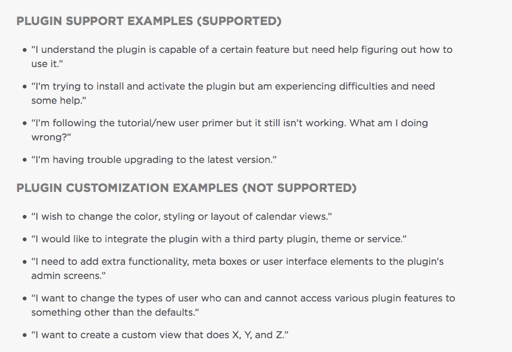
We’re not trying to be rude or make things harder for you! We are just trying to apply our policy uniformly and fairly to all of our customers.
We offer no support for customizations whatsoever.
Thank you for your cooperation with our support policies and procedures.
— George
ParticipantHey Deanna,
We have no official relationships with any theme that is redistributing our software, so getting a theme that includes our software does not give you access to premium license-only features like our premium support forums.
To help address your issues though, I would recommend first going to Settings > Permalinks in your admin area, and just click “Save Changes” without actually making any changes. This may seem like an odd thing to do but is a little “trick” within WordPress to get the permalinks across your site to refresh, which might help here.
If that does not help, then what you wrote here is indeed relevant:
I’m assuming something happened during the update of the theme, but I have no way of knowing, nor do I know how to fix it.
If the “save permalinks” trick doesn’t help, then I’d recommend doing the troubleshooting steps here → https://theeventscalendar.com/knowledgebase/testing-for-conflicts/
If you find, in those steps, that activating a default theme resolves your issues, then it is your custom theme that is the culprit and so your best course of action would be to contact the theme developer for support.
I will close up this thread since we do not field technical support questions in our Pre-Sales forum; if you have further followups, please post in our free forums on wordpress.org at http://wordpress.org/support/plugin/the-events-calendar
Cheers!
GeorgeParticipantHey @atldreamcenter,
All of that eventbrite account information is indeed on eventbrite.com – the video in the top-right of that admin page should cover these details in some sense, but we also have a more thorough Knowledgebase article with some more helpful links and such here → https://theeventscalendar.com/knowledgebase/configuring-eb-tickets/
Apologies for not sharing that article sooner! I hope it’s helpful.
Cheers,
GeorgeParticipant😀
ParticipantHi Craig,
Screenshots can be shared by simply uploading the images to a site like Imgur.com, Flickr.com, or CloudUp.com, and then you can share links to those screenshots here.
As for the plugin testing, I appreciate you doing this. If you activate a default theme like Twenty Twelve, deactivate that “The Events Calendar Shortcode” plugin, and then add the mini calendar widget somewhere in the Twenty Twelve theme, does it work correclty?
If you don’t have Twenty Twelve specifically, you can use any other default theme – they all use the “Twenty Something” naming convention, so Twenty Thirteen, Fourteen, or Fifteen would work fine for this step as well.
Thank you!
GeorgeOctober 15, 2015 at 8:21 am in reply to: Previously entered event name displayed in lists My Venue, My Organizer #1014938ParticipantI appreciate this information, @Jim! There is nothing here that stands out as problematic, so I unfortunately think that doing the full set of troubleshooting steps here will be the best step → https://theeventscalendar.com/knowledgebase/testing-for-conflicts/
Let us know what you find if you do these steps!
Thank you,
GeorgeParticipantAh, great idea! Thanks for sharing that update – and apologies for not suggesting it myself 🙂
Best of luck with your site,
GeorgeParticipantNo worries @Stephen! And I’m really sorry that I misunderstood your mention of our showcase item – I didn’t realize you referring to http://bakesplacebellevue.com/!
As for the scope of the customization, it all comes down to how skilled you are with code. Let’s look at just the events calendar specifically here for example → http://bakesplacebellevue.com/events/
On that page, their customizations are relatively minimal and would be fairly simple to implement. The customizations are almost all just CSS style tweaks; so for a quick example, to make their event links that nice golden-orange-ish color, that can be achieved by simply adding CSS like this to the bottom of the theme’s style.css file:
#tribe-events-content a {

    color: #c90 !important;

}
The other style changes like font color, background colors, border colors, and so on all follow that similar pattern.
If you want to write custom CSS on your site, definitely check out a [free!] tool like Firebug if you use FireFox, or the Developer Tools for either Safari or Chrome. They have “Inspector” tools that let you zoom right over the element you want to customize, and so you can then see the selectors you’d need to customize. In my code example above, “#tribe-events-content a” is a selector. So you could use these tools to see that “oh, the selector for this is #tribe-events-content a”, then you just add your styles for that selector in your style.css file like in the example above where “color” is added to the selector…
Apologies for the long winded overview, just wanted to try and at least help a little bit with helping you determine if you can embark on these customizations yourself or if another developer is truly needed…
Now despite all of this, let’s go to the site’s home page instead of just the calendar page: http://bakesplacebellevue.com/
If you’re trying to build something more like this, that will unfortunately require a bit of both PHP and CSS stuff, and is therefore another few layers of complexity thicker than some simple CSS changes like mentioned above..
I hope this all helps paint a clearer picture of what’s required for the customizations you have in mind. I wish you the best of luck with them regardless!
Sincerely,
George -
AuthorPosts
