
Home › Forums › Calendar Products › Events Calendar PRO › Problem with Summer / Wintertime – how to fix?
- This topic has 7 replies, 3 voices, and was last updated 10 years, 11 months ago by
Support Droid.
-
AuthorPosts
-
October 16, 2015 at 2:19 am #1015178
Bernd
ParticipantHI there,
on october the 25 we switch in germany from summer to wintertime.
Our returning evetns ignores the this fact.Example:
Course one: Mo, Oct, 19th at 9:00
the same course on Mo, Oct 26th, is at 10.00How can we fix this probem?
-
This topic was modified 11 years ago by
October 16, 2015 at 7:14 am #1015273George
ParticipantI’m sorry to hear about this @bernd! What timezone are you using on your site – is it a straightforward “numeric” timezone like e.g. “UTC + 1” or something, or are you using a “named” timezone like “Berlin”?
Also, can you share your “System information” with us? Here’s how to do that → https://theeventscalendar.com/knowledgebase/sharing-sys-info/
— George
October 16, 2015 at 7:40 am #1015290ParticipantHi George,
we try both versions of timezones: berlin and utc+1 – no difference.
What should we do next?thx for helping us.
October 16, 2015 at 7:57 am #1015299ParticipantThis reply is private.
October 16, 2015 at 8:13 am #1015304ParticipantThanks you @Bernd!
I don’t mean to dwell on one detail, but I noticed in your system information that it looks like there isn’t even a timezone set on your site:
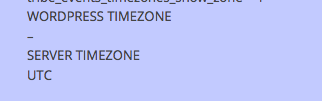
Just to be 100% certain of things, when you say you have tried those different timezones, do you mean in “Settings > General” in your WordPress admin?
If not, then make sure to try the timezone setting there specifically.
One thing I’m curious about is this – what if you set your WordPress timezone to “UTC +1”, but then the event’s local timezone to UTC +0. That might help!
(For more information on local event timezones, check out our knowledgebase article on the subject here: https://theeventscalendar.com/knowledgebase/working-with-timezones/)
— George
October 19, 2015 at 12:16 am #1015722ParticipantHey George,
thx for giving tipps! I´m afraid that your latest does not have the positive effect, that we want.
You can get the rights of an admin and try it by yourselves. We would find that way pretty good, cause it would save yours & our time.Here some screens that explain the problems we have…

 October 20, 2015 at 9:10 am #1016271Participant
Hey @Bernd,
I unfortunately believe this is a bug with our code and we will have to issue a bug fix for this in the coming weeks. Just to be 100% clear, does this issue happen with any event view on your site, or does it only happen in the Week View grid like in your screenshots?
Also, thank you for offering to give us an admin account; however, please do not do this. We agree that it can speed things up in some ways, but it’s too great a security risk with too a potential for small mistakes to have big impacts. We are not allowed to log into customer sites for any reason.
Just wanted to let you know so that you don’t post any login information for security purposes 🙂
Cheers!
GeorgeNovember 4, 2015 at 6:05 am #1021646KeymasterThis topic has not been active for quite some time and will now be closed.
If you still need assistance please simply open a new topic (linking to this one if necessary)
and one of the team will be only too happy to help. -
This topic was modified 11 years ago by
-
AuthorPosts
- The topic ‘Problem with Summer / Wintertime – how to fix?’ is closed to new replies.