

Forum Replies Created
-
AuthorPosts
-
George
ParticipantHey @Edwin,
To help with troubleshooting that error I would recommend first going to Settings > Permalinks in your admin area, and just clicking “Save Changes” without actually making any changes. This may seem like an odd thing to do but is a little “trick” within WordPress to get the permalinks across your site to refresh, which might help here.
If this does not help, then I would recommend heeding the advice of that error message and contacting your web hosting provider/server administrator to take a deeper look into this as it could be an issue at the level of your server’s .htaccess file or something.
If they’re unable to help, and/or just don’t see any server-level problems, then I would recommend two things:
1. First, share your system information with us as described here → https://theeventscalendar.com/knowledgebase/sharing-sys-info/
2. Next, run through the complete set of troubleshooting steps outlined here → https://theeventscalendar.com/knowledgebase/testing-for-conflicts/
Thank you for your patience @Edwin!
— George
ParticipantI’m sorry that progress has been difficult to make with the template; please do stay tuned to both The Events Calendar’s updates and Avada’s updates, because compatibility is always improving!
— George
October 27, 2015 at 8:26 am in reply to: How to add a delimiter between thousands in the price of an event #1018908ParticipantThanks for clarifying this @Radek! And for your patience here 🙂
WordPress’ filtering of text values for security purposes unfortunately limits the easy with which spaces can be used here, so I had to write some custom code for you to enable this. I will explain how to go about getting this to work on your site – I hope it helps! Here goes:
Admin cost field
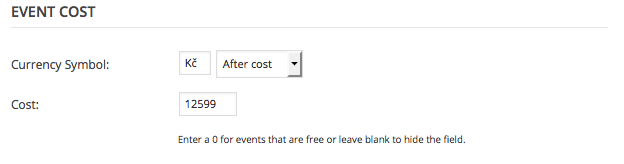
In the admin-facing cost field for events, just leave your prices without spaces in them. So, to use your example of 12 599 Kč, you would enter this in your edit-event screen as 12599. Here’s a screenshot of this:
Custom code
Now, to get that to display properly on the front-end, add this bit of code that I wrote for you to your theme’s functions.php file:
add_filter( 'tribe_get_cost', 'tribe_support_1016785', 10, 2 );function tribe_support_1016785( $cost, $post_id ) {
$czech_format = number_format( absint( $cost ), 0, '.', ' ' );
return tribe_format_currency( $czech_format, $post_id );
}
How it looks
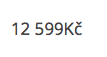
Once I added this custom code, here’s how things looked on the front-end of my site:
I hope you find similar success and that this helps!
Cheers,
GeorgeParticipantUnfortunately there is not a way to do that @atldreamcenter, I am sorry!
Fortunately creating “new applications” and such in eventbrite.com is very easy – it should only take a few minutes at most to go through that whole process.
If anything about this seems tedious please keep in mind that these are often policies from Eventbrite directly with security in mind, since sensitive information and sometimes even money/payment information is being handled for a given event. So yes, a new application is required. I shared this article before, but just one more time for reference → https://theeventscalendar.com/knowledgebase/configuring-eb-tickets/
Thanks,
GeorgeOctober 27, 2015 at 7:53 am in reply to: Rich Snippets and Duplicate Links In Google Search Results #3 #1018893ParticipantHey @Bark,
I’m not Brook, but hope you don’t mind me jumping in to answer! 😀
It seems like the core of your question is this:
My question to you, what is your experience with the duplicate events visible on one page? Do you recommend to delete one Event List Pro widget to avoid duplicate links? Or do you think Google is smart enough to recognize there are events alike, thus not displaying them separately?
Having the extra widgets and footer links to events and such should not be a problem. Google’s indeed smart enough to only serve up the links that are appropriate; and also, one thing to keep in mind is that the tools like the “Structured Data Testing Tool” and stuff are not hard-and-fast perfect things – they just do a basic pass over the data supplied, and offer up suggestions.
So if every page on your site is not 100% perfectly cleared in the Structured Data Testing Tool, do not worry.
Does this address all of your concerns? If not, let me know!
— George
October 27, 2015 at 7:47 am in reply to: Community Events – German Translation – Frontend/Backend #1018889ParticipantHey @Petermeyer!
While we unfortunately do not have a demo of Community Events in German, the translation files should be available on our translation site here → http://translations.theeventscalendar.com/projects
If you’re not familiar with using translations in WordPress, and/or are not familiar with our translation site specifically, I would recommend reading through these articles here:
• Translating The Events Calendar: http://theeventscalendar.com/knowledgebase/translating-the-events-calendar/
• Translating our premium add-ons: https://theeventscalendar.com/knowledgebase/adding-or-updating-a-translation/
• Changing the language on your site: https://theeventscalendar.com/knowledgebase/changing-the-language-on-your-calendar/
I hope this helps!
Cheers,
GeorgeParticipantHey @konpaevents,
I’m sorry to hear that things aren’t working right now. I have two suggestions:
1. Go to Settings > Permalinks in your admin area, and just click “Save Changes” without actually making any changes. This may seem like an odd thing to do but is a little “trick” within WordPress to get the permalinks across your site to refresh, which might help here. After doing this, go to http://www.konpaevents.com/events/community/add – does it work?
2. If step #1 does not help, can you share your system information with us? Here’s how → https://theeventscalendar.com/knowledgebase/sharing-sys-info/
I hope this helps; cheers!
— George
ParticipantHey @Mad Dog,
Unfortunately it is a bit tricky to change subject lines – it’s not impossible though.
While you cannot do it from within our template system, which is safe and persists across updates, you can customize subject lines if you really need to. Please note that this will require editing core plugin code, which means that ever plugin update will overwrite these changes so that you have to re-add the customizations after each update.
But essentially, head into your Community Events plugin files and head to this file:
src/Tribe/Main.php
Once here, head to line 1220 or so. You should be looking for code like this:
if ( is_array( $this->emailAlertsList ) ) {

    foreach ( $this->emailAlertsList as $email ) {

        wp_mail( trim( $email ), $subject, $message, $h );

    }

}
That $subject variable is what you’d need to change to change the subject line of emails. You’ll see it defined a few lines up above the code I highlighted above; alter this to your needs an it should work well.
I hope this helps! Sorry that this is what’s required to make this change at this time 🙁 In the future we can hopefully make this filterable or otherwise easier to change.
Cheers,
GeorgeOctober 27, 2015 at 7:35 am in reply to: Missing Organizer & Venue Columns from admin screen #1018873ParticipantHey @ellsworthamerican,
I’m sorry for your and your client’s frustrations around this – we moved a lot of the filtering/sorting column functionality out of The Events Calendar into its own free plugin now, called Advanced Post Manger. Download and install this on your site here → https://wordpress.org/plugins/advanced-post-manager/
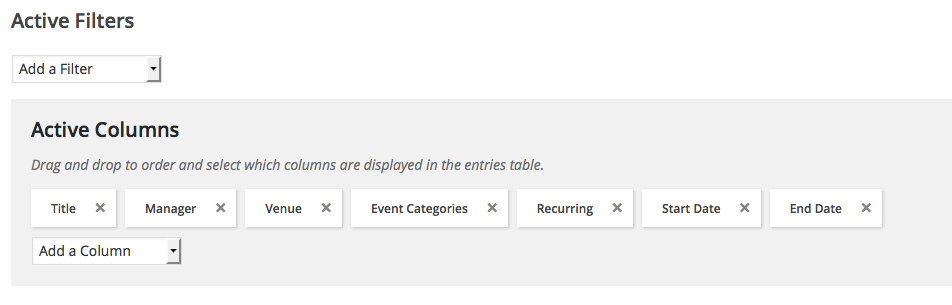
That should give you a “filters and columns” control panel that will enable the manual re-activation of the Organizer and Venue columns, like in this screenshot for example:
While the decision to split this into a separate plugin may seem odd, we did it because the post type filtering we built for all of this is, if I can say myself, rather quite powerful. And so keeping it locked up within just our own Events calendar plugins felt a little underwhelming; we released this as a separate thing now so that people can use it with all of their own custom post types, too, and not just events.
Apologies for the length of this reply; just wanted to fill in some back story about the decision and about how things currently are.
If you install and activate APM on your site, the functionality should be restored 🙂
Cheers!
GeorgeParticipantHey @waldon!
If by “header” you are just talking about the “Tribe Events” text there, then you can remove that by adding CSS code like the following to the very bottom of your theme’s style.css file:
body.post-type-archive-tribe_events .page_top_wrap .page_title {

    display: none;

}
If you want to display the gray Tribe filters bar too, you’d just add one more bit of code right below the code above:
#tribe-events-bar {

    display: none;

}
I hope this helps!
— George
ParticipantHey @Jacob,
Unfortunately, if by “front-end editable events” you mean anything different from the “edit my events” solution in Community Events, there is no solution at this time. You would have to custom-code the solution for that, which would be extensive customizations 🙁
I’m sorry to disappoint! Let me know what you think here, along with any other questions you might have.
Thank you!
GeorgeOctober 27, 2015 at 7:22 am in reply to: Community Events Start Date Not Syncing to Events Calendar #1018854ParticipantHey @Earl,
Really sorry to hear about these issues – I’m not able to reproduce these issues on my own testing site, so am curious about your site and what about it might be leading to these issues.
With that in mind, then, can you start by sharing your “System Information” with us? Here’s how → https://theeventscalendar.com/knowledgebase/sharing-sys-info/
Next, can you clarify when this issue started happening to the best of your knowledge? E.g. was all working well, then one day you just woke up and found things suddenly broken? Or have there been issues consistently for a long period of time?
Just trying to learn more about the situation as a whole here – thanks in advance for your System Information to help with the troubleshooting process!
Sincerely,
GeorgeParticipantHey Brendan,
You can do this, but it would require custom coding to achieve. We cannot offer help with custom code, so your best bet is to read through our Themer’s Guide to learn about customizing the plugin first; then use those principles to build out a front-end submission form → https://theeventscalendar.com/knowledgebase/themers-guide/
If you don’t know how to code, then unfortunately you would either have to hire someone to build that for you or purchase our “Community Events” add-on which adds a front-end “Add event” form → https://theeventscalendar.com/product/wordpress-community-events/
I’m sorry to disappoint Brendan! The options here are basically the only ones 🙁 Let me know if you have any further questions or anything else I can help with!
ParticipantHey Luke,
At this time you cannot pull in private or unlisted Eventbrite events. This is because Eventbrite itself keeps these events from being accessible via its APIs, which third-party software like our own Eventbrite Tickets plugin use to find events. So we cannot access private EB events at all from within our code, and you cannot import them with the plugin 🙁
As for payments, I admit to not knowing with 100% certainty what you’re referring to. If it’s something about Eventbrite’s payments systems specifically, your best option is to contact Eventbrite support directly about these questions. From what you wrote here, though, it sounds like you’re curious about whether Eventbrite offers only one of the payment options you listed, or if it offers both; in which case, in my understanding of things, PayPal is offered as the universal default. I believe that some accounts from there are then allowed to use Google payments, and/or that you can activate Google payments yourself with verification.
— George
ParticipantHey @landon,
I’m not sure why the importing stopped working; that file should still work. But putting aside those issues for now just to address your first questions about formatting:
The .ics file format itself is actually super restrictive about what sort of characters and content are “valid” for the format. This is something that we find just as frustrating as our customers, because it severely limits the type of content that can be exported/imported in the format – line breaks and HTML link tags are just two examples of things not really permitted within the .ics file format.
So there are inherent limitations dictated by the format itself.
—
To come back to your newfound problems with getting importing to even work, I’m curious about the “malformed JS” error you receive – if you are getting this upon trying to import a URL that begins with webcal://, does anything improve if you simply remove the webcal:// characters from the front of the URL?
Thank you,
George -
AuthorPosts