How to add a delimiter between thousands in the price of an event

Home Forums Calendar Products Events Calendar PRO How to add a delimiter between thousands in the price of an event

Viewing 6 posts - 1 through 6 (of 6 total)
  • Author
    Posts
  • #1016785
    Radek
    Participant

    Hi, could you help me how to add a delimiter between thousands in the price of an event? I need to put space there.
    Thanks a lot
    Karolina

    #1016988
    George
    Participant

    Hey Karolina,

    Do you mean that you want to replace the currently-available delimiters like the comma or the period with a space?

    Just want to make sure I understand your question! 🙂

    Thanks,
    George

    #1017791
    Radek
    Participant

    Where I can set it up? However, in Czech we use space as delimiter between thousands, like if the price is:

    12599 Kč it should be written as “12 599 Kč”

    #1018908
    George
    Participant

    Thanks for clarifying this @Radek! And for your patience here 🙂

    WordPress’ filtering of text values for security purposes unfortunately limits the easy with which spaces can be used here, so I had to write some custom code for you to enable this. I will explain how to go about getting this to work on your site – I hope it helps! Here goes:

    Admin cost field

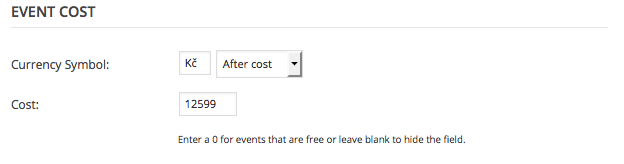
    In the admin-facing cost field for events, just leave your prices without spaces in them. So, to use your example of 12 599 Kč, you would enter this in your edit-event screen as 12599. Here’s a screenshot of this:
    Custom code

    Now, to get that to display properly on the front-end, add this bit of code that I wrote for you to your theme’s functions.php file:


    add_filter( 'tribe_get_cost', 'tribe_support_1016785', 10, 2 );

    function tribe_support_1016785( $cost, $post_id ) {

    $czech_format = number_format( absint( $cost ), 0, '.', ' ' );

    return tribe_format_currency( $czech_format, $post_id );
    }

    How it looks

    Once I added this custom code, here’s how things looked on the front-end of my site:
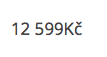
    I hope you find similar success and that this helps!

    Cheers,
    George

    #1019675
    Radek
    Participant

    Works fine, thanks a lot.
    Karolina

    #1019792
    George
    Participant

    Great! 😀

    Best of luck with your site,
    George

Viewing 6 posts - 1 through 6 (of 6 total)
  • The topic ‘How to add a delimiter between thousands in the price of an event’ is closed to new replies.