Forum Replies Created
-
AuthorPosts
-
George
ParticipantHey Ronald,
Thanks for reaching out.
I am sorry to hear about the change in compatibility with our plugins and with the Divi theme.
It’s unfortunately the case that we can only guarantee compatibility with, and provide support for, WordPress themes that adhere to the WordPress Theme Development standards. Divi and other themes like it tend to deviate from these standards, and so unfortunately we cannot guarantee support for them.
The best course of action is to contact the Divi folks for further insight into what might be the issue.
Now, with all this being generally true, we do love the Divi theme! And we certainly want our plugins to be compatible with it. So I am happy to take a bit of a closer look on this to try and identify a problem.
To help me do that, can you please first post a copy of your Divi theme — and any child themes that go with it! — to a site like Google Drive, Dropbox, CloudUp, etc., and then share a link to the download link with me? I will download the files and try taking a closer look myself, firsthand. Just be sure to mark the “Set as private reply” option for your reply with the download link so that only you and us on the support team can access the links 😀
It will take me some to investigate this because I will have to install the files and do some manual tinkering, but share the files with me and I’ll get started on that process promptly!
Cheers,
GeorgeParticipantHi Joe! Thanks for reaching out. I’ll address each of your questions in turn as follows.
With the Community Events add-on, would a user have the ability to add a recurring event through the front end?
YES — If Events Calendar Pro is activated on your site alongside Community Events, then folks can create recurring events.
Also with Community Events, does a user have the ability to add a predefined category to the event?
YES — Folks can choose from existing or add new ones. If you only want them to be able to choose from existing ones, then there is an option in the Community Events settings you can use so that they will be restricted from creating new ones of their own.
Can Venues & Organizers be disabled or hidden if unneeded or unwanted?
SORT OF — You or other administrator-level users on your site can delete Venues and Organizers from your site. There is no method other than this, but this method does exist and would hide unneeded/unwanted Venues or Organizers. (Those same administrator-level users could also just set those unneeded/unwanted Venues or Organizers to “Draft” status so that they still exist in the wp-admin, but not on the front-end).
For the Day view, through CSS, can this be modified to look more like an agenda? I am guessing yes to this but figured I would ask.
SURE — This would indeed be technically possible. To be clear, though, even for folks with premium licenses for our products we cannot help with any modifications to the appearance or functionality of our plugins. This is elaborated upon here, please read this for more information: https://theeventscalendar.com/knowledgebase/what-support-is-provided-for-license-holders/
But yes, you could do this and any number of other CSS customizations on your site.
One more question, Can a user using the Community Events also delete an event?
YES, but only if you specify in your Community Events options panel that folks have to be logged-in to submit events. In other words: If you allow anonymous submissions, and somebody submits an event on your site without logging first, then they will not be able to edit or delete their submitted events. But if the person is logged in first, and submit events while logged in (which you can require to be the case with a simple checkbox option in the Community Events settings panel), then they will be able to view, edit, and delete the events they submit.
I hope this all helps!
— George
ParticipantHey @Ronald,
Sure thing. The post type for venues is tribe_venue, the post type for organizers is tribe_organizer.
I hope this helps! 😀
George
ParticipantThanks for reaching out, Brian!
If there is more than one selection of the meal, can they make that selection in a dropdown for each ticket? So that they can choose whichever meal they like for each ticket.
Keep in mind, the meals might be different for every event as well!
☝️ This is totally possible. You can do this with Event Tickets Plus’ “Attendee Information” feature. You can read more about this feature and get a better sense of how it works here: https://theeventscalendar.com/knowledgebase/collecting-attendee-information/
Cheers!
GeorgeFebruary 14, 2017 at 3:54 pm in reply to: Events Calendar Pro won't detect my custom template – need to add sidebar #1234859ParticipantSorry to hear this @web3!
Can you share a link to your events page? I went to look at your site but it required authentication to view it — if you would like to share credentials, please ensure you check the “private reply” option on the site here before submitting your reply! 😀
— George
ParticipantHey Diane,
Thanks for reaching out.
Are you using Event Aggregator to import from Google Calendar?
If not, how specifically are you linking the two calendars?
Thank you!
GeorgeFebruary 14, 2017 at 3:37 pm in reply to: Custom Fields for community/add page, Organizer Section #1234850ParticipantHey Garrett,
Thanks for reaching out.
I totally understand why you might want to customize our plugins in this way, but unfortunately that sort of customization is not something we can help with.
Please read more about this here: https://theeventscalendar.com/knowledgebase/what-support-is-provided-for-license-holders/
The Knowledgebase article is supposed to be a starting place for adding custom specifications for what fields are required and whatnot, but ultimately to get things working exactly how you hope, you would have to write that custom code yourself or hire a professional developer to do it for you. We have a list of great developers here → http://m.tri.be/18k1 (and have no affiliation with any of these folks—they’re simply some well-respected names in the community that we’ve compiled to share in situations like this one).
I am sorry to disappoint.
While these things are true, what I can do here is at least try and figure out how to make a featured image required. This may take me some time but I will work on this and will post any news about my progress here.
Please let me know if there are any other issues or questions I can try to help with in the meantime!
Sincerely,
GeorgeParticipantWhile what I wrote above is true, and you will have to take the reins on getting your instances of our calendar to look or behave differently than how it does so out-of-the-box, I’m happy to at least try and shed some light on these topics to help you get started in the right direction with these topics. 😀
1. Add a side bar to my main Calendar page
There just isn’t an option that I can find to turn side bars on/off for the Events Calendar main page
Here is my main events page http://www.itsgreektomemn.com/events
And here is roughly want I want it to look like in a live page http://www.ponycorral.ca/featured-events/ or this mock up http://www.itsgreektomemn.com/testThis is true; there is no option.
However, what might help is to go to Events → Settings → Display in your site’s wp-admin. There should be an option there called “Events template:”.
Try out every single available template here — does any available template work better with the sidebars as you hope?
2. Add a side bar to Single Events pages
Same issues as #1 but with the single events pages
Here is what I have http://www.itsgreektomemn.com/events/valentines-day-dinner/
and here is what I want with the side bar on the side and the event info/map below http://www.ponycorral.ca/featured-event/valentines-day/Single events pages are a bit trickier, and will unfortunately require custom coding.
Are you familiar with our Themer’s Guide, which covers some of the basics for modifying events template files? Check it out here for now and let me know if you have any follow-up questions about it ? https://theeventscalendar.com/knowledgebase/themers-guide/
3. Want my featured images to show Full Sized in Photo View
Need this in both my Calendar page & Single Events pages as it drastically cuts off the top and bottomCan you share a link to some single events on your site whose featured images are drastically cut-off in the way you describe? I’ll take a look at these events firsthand and see if I can help with the CSS.
4. Want a Learn More or More Info link/button in Photo View
This is on the List View but in Photo View there is no dedicated link to push people to the single events pages.
Seem like a simple thing but I cant figure it out.I will see if I can come up with a simple way to do this and share my findings. For now, let know about the questions I’ve posed above and we can continue from there! 😀
Thanks,
GeorgeParticipantHi Jon,
Thank you for reaching out. We unfortunately cannot help with modifying how our plugins look or function.
⚠️ Please read this page about this fact before proceeding in this thread: https://theeventscalendar.com/knowledgebase/what-support-is-provided-for-license-holders/
I am sorry to bear this news, but it’s a rule we have to apply fairly to all customers and so I wanted to make it clear and set your expectations nice and early.
— George
ParticipantHey @Mark,
Thanks for reaching out!
I’m sorry to disappoint about this, but there’s unfortunately no way to do either thing you mention with our plugins at this time. 🙁
It may be technically possible, but only with some extensive code customizations. So to implement the features you describe, you would have to write that custom code yourself or hire a professional developer to do it for you. We have a list of great developers here → http://m.tri.be/18k1 (and have no affiliation with any of these folks—they’re simply some well-respected names in the community that we’ve compiled to share in situations like this one).
Please let me know if there are any other issues or questions I can try to help with!
George
ParticipantHi Noelle!
To be clear, when you say “events manager”, is this the one you are referring to? https://wordpress.org/plugins/events-manager/
If not, can you share a link to the one you are referring to? I will look at the specific alternative you mention and try to provide some specific insights from there. 😀
— George
ParticipantHi there,
Thank you for reaching out. These forums here are our “Pre-sales Questions” forums, so we unfortunately cannot field technical support questions here.
It doesn’t currently appear that you have a premium license with us. If this is wrong, and you do have a premium license with us, then apologies for my misunderstanding!
However, in that case please log into the account on this site that has your premium license, and then post this question in a premium support forum.
If you indeed do not have a premium license, then please post your question in our free support forums here → http://wordpress.org/plugins/the-events-calendar
We check those forums a bit more than once per week, so hopefully we will be able to get to your question there.
Thank you,
GeorgeParticipantSorry to see this, Jon!
Thanks for your patience over the weekend.
It looks like you’re trying to update Events Calendar Pro while on a sub-site, but The Events Calendar is itself Network Activated.
What I would recommend is the following:
• Either make Events Calendar Pro Network Activated, or leave it sub-site activated but make The Events Calendar sub-site activated too.
• Then try again. Does anything improve?
— George
February 14, 2017 at 10:34 am in reply to: “The URL provided did not have events in the proper format.” error #1234727ParticipantI tried the URL you shared and was met the same result. Sorry for the trouble here!
To help me investigate—and, hopefully, resolve—this issue, there are few key pieces of information I need to ask about. Please provide each of the following pieces of information so that we can help you resolve these issues! 😀
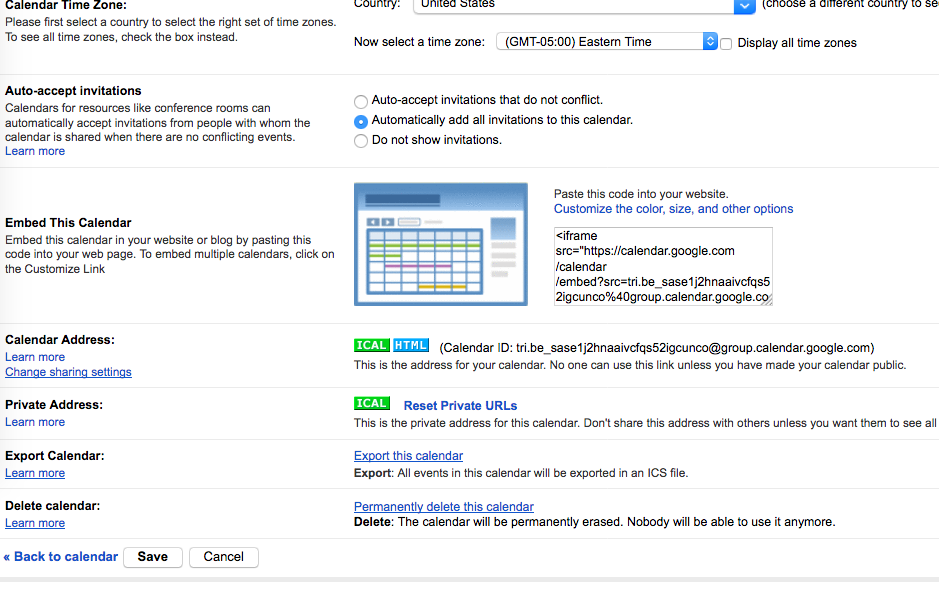
1. First, please head to the calendar settings for this Google Calendar. It’s a page that should look like this (click for a larger-sized image):
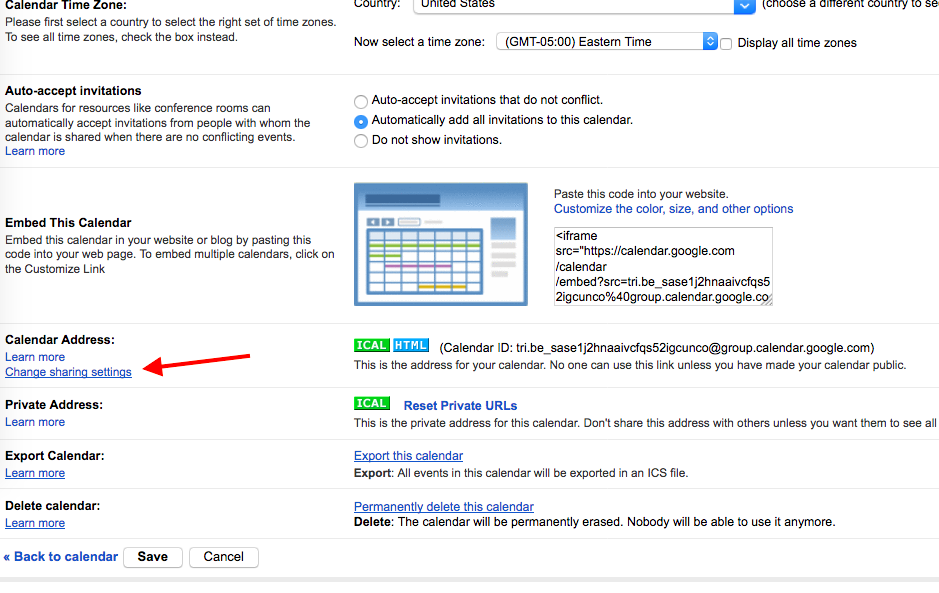
2. Once there, click the “Change sharing settings” link, which you can see in this screenshot (click for a larger-sized image):
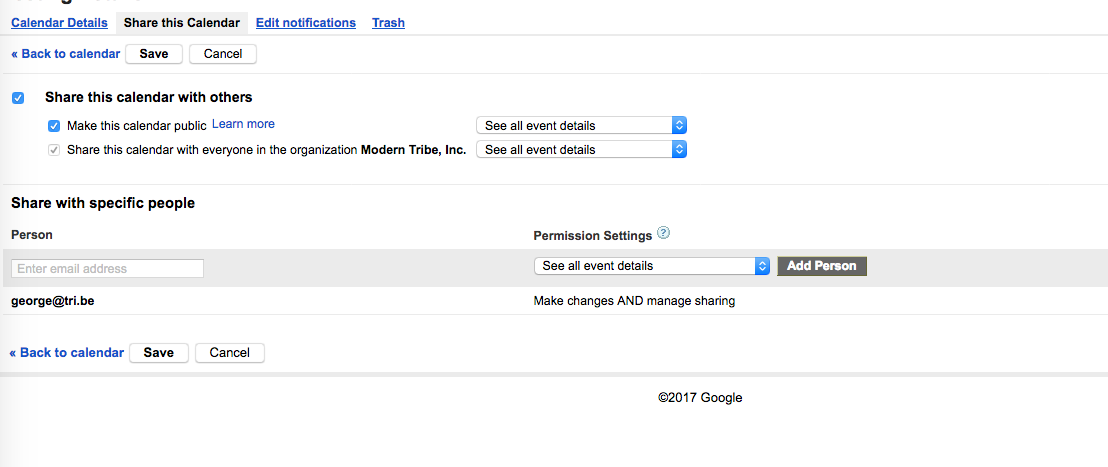
3. Once you click that, you’ll be brought to a page with calendar sharing settings. Please share a screenshot of as much of this page as possible. You can do so by uploading the screenshots to this thread. If you have issues with that, or are replying by email, you can upload to Imgur.com, Flickr.com, CloudUp.com, or any similar image-hosting site; then just share the links to those images here and I’ll take a look. The screenshot should look something like this (click for a larger-sized image):
4. Finally, you mention trying the calendar’s iCal and HTML URLs — can you please share the iCal URL for the calendar? Here is a screenshot that shows where to find the URL; just copy and paste the URL attached to the button highlighted in this screenshot → https://cldup.com/LEogky19Ce.png
I apologize for asking for so much information, but I wanted to get all of my main questions out there in one go to save time in back-and-forth replies. And all of this information should be extremely helpful! 😀
Thanks,
GeorgeFebruary 14, 2017 at 7:14 am in reply to: Blank settings screen tabs (have tried one suggestion I found) #1234501ParticipantSorry to hear this @brenda!
I cannot recreate these issues, so here is what I would recommend doing:
• Remove that custom CSS you tried using.
• Then do the complete set of troubleshooting steps on this page → https://theeventscalendar.com/knowledgebase/testing-for-conflicts/ After EACH STEP in that process, check back on your events settings page and see if anything shows up.
What do you find when you do those steps? Do the settings tabs show up anywhere along the way? If so, when?
Let us know! 😀
— George
-
AuthorPosts