

Forum Replies Created
-
AuthorPosts
-
February 15, 2016 at 6:02 am in reply to: Issues w/ getting WP_Query() to return only first instance of recurring events #1073000
George
ParticipantHey @integrity,
We unfortunately cannot help with questions like this because it relates to your own custom coding endeavors 🙁
I’m sorry to bear that news! Please see the “Product Support” section of this page for more information → http://theeventscalendar.com/terms
I will unfortunately have to close up this thread.
Thank you,
GeorgeFebruary 15, 2016 at 6:00 am in reply to: Woocommerce ticket error. Tickets won't save on the event page #1072998ParticipantHey Joanna,
I’m really sorry to hear about this; we don’t have other bug reports of this sort of behavior, and I cannot reproduce this behavior on my own testing site, so I’m wondering if there’s code conflict with another plugin on your site here….
To investigate this and see if that’s the case, I would recommend deactivating EVERY plugin on your site except for only the following four plugins:
• WooCommerce
• The Events Calendar
• Event Tickets
• Event Tickets PlusDeactivate literally every other plugin except for those four above.
When your site is in this state, try saving WooCommerce tickets on an event again.
Do you get the same issue? Or do the tickets seem to save properly?
Let us know what you find!
Thank you,
GeorgeParticipantHey Jessica,
I’m sorry to have perhaps gotten your hopes up about this when I mentioned that I would try to write a solution myself; I’ve indeed been trying to do this, and have spent a good amount of time trying to make something work, but it’s unfortunately a more challenging thing to pull off than I originally thought.
I’m sorry, Jessica!
The best thing I can do from here is make the feature ticket for our developers that I mentioned. Now, unfortunately, even if I do this I do not have a specific ETA on when that feature will arrive in the plugin, and it could take several months before it ends up in our code. But I will submit this idea.
Sorry to disappoint with the lack of immediate solutions here, Jessica. Please let me know if there’s anything else I can try to help with!
Sincerely,
GeorgeFebruary 15, 2016 at 5:53 am in reply to: Please fix the license problem with domains that contain a hyphen #1072993ParticipantHey @Ralph,
I’m sorry to hear that you’re having license activation issues. Can you share your “System Information” with us so that I can review some details about the makeup of your site? Here’s how to share this information → https://theeventscalendar.com/knowledgebase/sharing-sys-info/
I only request this information because we have fixed the issue with hyphenated domain names, so I’m curious if there’s a theme or plugin conflict at play with your site specifically.
Thank you!
GeorgeParticipantHey Jessica,
Thanks for reaching out. This is not currently a feature that is included in our plugins 🙁 I’m sorry to disappoint!
This may be possible with custom coding, but I’ve been trying to think of how so, and I’ve been unable to come up with a reliable solution for this….
In my opinion, this is a great feature idea, so I will tinker with custom code a bit more today and regardless of whether I can build it myself, I will make a feature ticket for our developers so that hopefully over time this becomes a feature of the plugin!
I’m sorry that there’s no immediate action here, and this is not possible at this time, but stay tuned on this thread; I might have some code I can share with you!
Thanks,
GeorgeParticipantHey Shay,
Thanks for reaching out!
This is unfortunately not possible with an extensive amount of custom coding; it’s a substantial enough amount of coding to fall outside the scope of support we can provide. I’m sorry about this!
Please see the “Product Support” section of this page for more information about this → http://theeventscalendar.com/terms
If there’s anything else I can try to help with, let me know!
Sincerely,
GeorgeParticipantHey Casey!
While this is a use-case we would eventually love to provide better support for, at this time you cannot do this in the exact way you describe 🙁
Now, if the customer adds a Ticket to their cart (presumably a “free” ticket if it’s just for RSVPing), and then they select a piece of pottery elsewhere to purchase, then both the ticket and pottery product can be in the same “cart” for the user; and they can pay once at checkout for both things and this will work fine.
But getting these things to work together on the same event is not something our plugins currently provide. Sorry to disappoint!
Let me know if this information is helpful and if there are any other questions, comments, or concerns I might be able to address.
Thank you!
GeorgeParticipantHey @Philly00,
Sorry to hear about this! I went to the link you provided, though, and found that the Events do show up without issue:
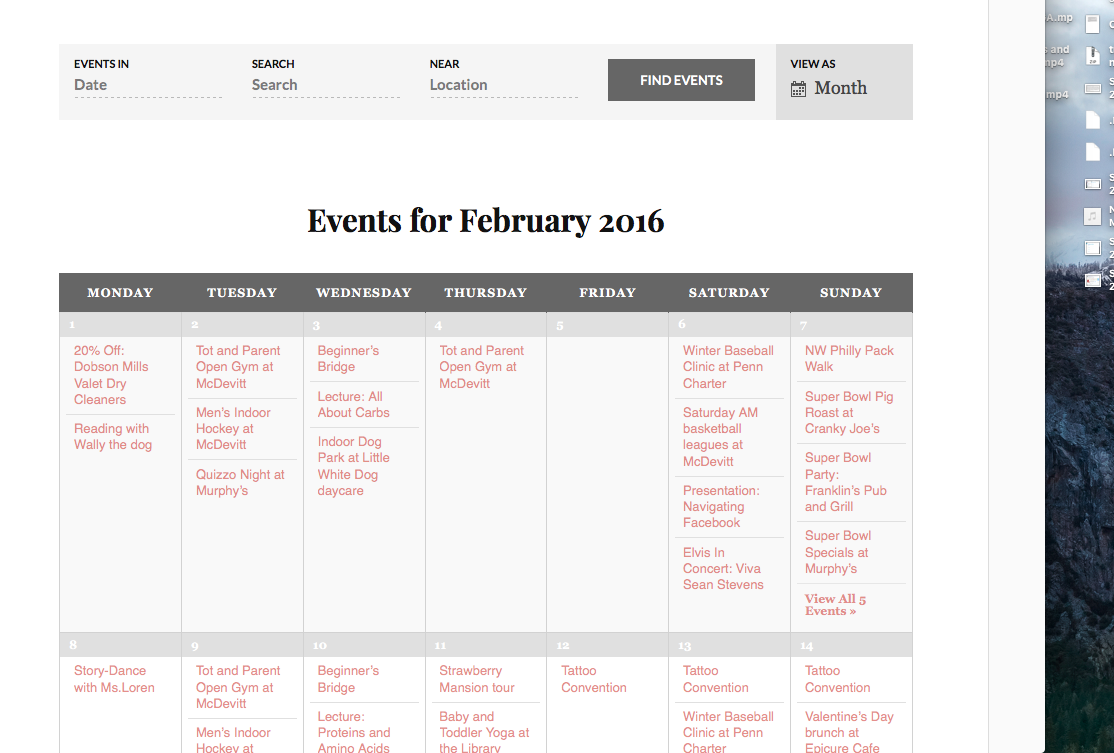
Are your issues persisting in some other way? Let me know about the state of things and I’ll be happy to help! 🙂
— George
February 15, 2016 at 4:56 am in reply to: Integrating Woocommerce product with Events Calendar PRO #1072975ParticipantHey James,
Our WooCommerce Tickets plugin is indeed being retired, but in its stead is our all-new replacement plugins, “Event Tickets” and “Event Tickets Plus.” These plugins REPLACE all of the legacy ticket plugins like WooCommerce Tickets, EDD Tickets, and so on.
• Event Tickets: https://theeventscalendar.com/product/wordpress-event-tickets/
• Event Tickets Plus: https://theeventscalendar.com/product/wordpress-event-tickets-plus/To replace WooCommerce Tickets you would install and activate both of the above plugins. More information about moving to these new plugins from WooCommerce Tickets can be found on this knowledgebase article: https://theeventscalendar.com/knowledgebase/moving-to-event-tickets-plus/
If you are trying to make “events” work with WooCommerce “products” in some way other than what our plugins provide, then unfortunately this is not something our plugins can provide on their own and would require custom coding 🙁
I hope this information is helpful, James. Let me know!
Thank you,
GeorgeParticipantHey @miconexrsgs,
I’m sorry to hear about these issues! I investigated your licenses and found that the Events Calendar Pro license for your account actually expired on November 25, 2015. The only license currently active still is the Eventbrite Tickets license, which is active until February 18 of this year, 2016.
What’s interesting is that the Eventbrite license is being used on rsgs.org, but the Events Calendar Pro license is registered to http://www.pixielee.co.uk
I tried to go to this http://www.pixielee.co.uk website, as at first glance the domain name doesn’t seem like one belonging to non-profit’s site, but I went to the domain name and nothing loads.
1. Can you explain what’s going on here, with the licenses on different domain names?
2. Can you clarify which plugin you need renewed?
Thank you!
GeorgeParticipantHey Chris!
Thanks for reaching out. This is an interesting idea and something that could be technically possible, but is not easily achievable. You are correct when you write the following:
“It sounds like I can do this with Event Tickets Plus but would I have to manually create a separate event and ticket for every day of the year as this would be a very time consuming process.”
That is true; the limitations of our plugins at this time would mean manually creating separate events and one-stock tickets for each “slot” of bookable time for each day.
It would be good to quickly create a ticket for every day of the year and then just remove any days when I am not available for work.
This is an interesting solution to the above-mentioned problems, but unfortunately is not something our plugins can do on their own. You would have to write some custom code to auto-generate these events and then selectively remove them on days/times when you’re not available.
You would then also still be left with the problem of having a one-stock ticket on each event. So you would need either more custom code to do that, or would have to manually add the tickets again anyways.
So, unfortunately, it’s quite a challenging thing to try and morph The Events Calendar and Event Tickets into a “bookings” system. These plugins are simply not built for that 🙁 To add on to this, it sounds like you want this calendar and your Outlook calendar to remain “in sync” as bookings are made and such; this, too, is not a default feature and would require a very large amount of custom coding.
I’m sorry to disappoint! Apologies for the long answer here but I hope it is clear and helps you move forward with your project.
Please let me know if there’s anything else I can help with.
Sincerely,
GeorgeParticipantHey Kathy,
Thanks for reaching out! Unfortunately there is no official support for “sub-events” at this time 🙁
When it comes to WooCommerce product add-ons, can you clarify if you are inquiring about compatibility with WooCommerce extension plugins? Or are you asking about support for collection “additional information” from users when they buy tickets?
Apologies for my confusion on this question! Just not 100% sure what you mean and wanted to ask for more detail so that I could best help out.
Thank you!
GeorgeParticipantHey @Edward,
I’m sorry to bear this news but unfortunately we do not have development/preview license option at this time. 🙁
The best thing we have in terms of license “trials” at this time is our 30-day refund policy. If you try out the licenses, and the products don’t meet your or your client’s needs, you can get a refund any time within 30 days of purchase by following the steps on this page: https://theeventscalendar.com/knowledgebase/refund-policy/.
Let me know what you think and if there’s anything else I can help with!
– George
ParticipantHey Paul,
WordPress itself is what allows and handles all of the logging-in features, user accounts, etc. We do not have any plugins that specifically facilitate this sort of thing. 🙁
The only user-related thing we have is our “Community Events” plugin which allows people to submit events from the front-end and does have a “My Events” list of the events they submitted – but this is not a “favorite events” feature and so this plugin might not be of use to you. Just wanted to mention it in case it was! You can learn more about it here → https://theeventscalendar.com/product/community-events/
I hope this information helps; let me know if there’s anything else I can try to help with!
— George
February 14, 2016 at 3:19 pm in reply to: Feature which makes it possible for someone to enter own event on our MT calenda #1072904ParticipantHey Neil,
Thanks for reaching out! It sounds like you’re looking for our add-on to The Events Calendar called “Community Events.”
Community Events allows for front-end submission of events. You can see an overview video, some screenshots, and more detailed descriptions of its features over on its product page here → https://theeventscalendar.com/product/community-events/.
To use this plugin, you do NOT need Events Calendar Pro or any other premium plugins of ours. You only need The Events Calendar, which is free, and then this plugin.
I hope this information helps!
— George
-
AuthorPosts