

Forum Replies Created
-
AuthorPosts
-
George
ParticipantHey @Anna,
Thanks for reaching out! I’m sorry to bear this news, but unfortunately our plugins are not compatible with Polylang at this time.
I’m sorry about this, @Anna – if you are interested in a refund, we’re happy to do that (in which case you can get a refund by following the steps here: https://theeventscalendar.com/knowledgebase/refund-policy/).
Sorry to disappoint!
Sincerely,
GeorgeFebruary 14, 2016 at 3:11 pm in reply to: I just renewed an 2014 expired license for WooCommerce Tickets. #1072901ParticipantSure thing, @elledinho, if you head to http://theeventscalendar.com/license-keys you should see a new license there for Event Tickets Plus 🙂
Let me know if you have any further questions about this transition or anything else; one resource that might be particularly helpful is this knowledgebase article here about moving to Event Tickets Plus from our “legacy” ticketing plugins → https://theeventscalendar.com/knowledgebase/moving-to-event-tickets-plus/.
In closing, just to be clear in case you don’t know already, to use Event Tickets Plus you will also need to install and activate Event Tickets which is free and available here: http://wordpress.org/plugins/event-tickets
Cheers!
GeorgeParticipantHey @Alan,
Thanks for reaching out. If the shortcode is just staying as the text of the shortcode, and not rendering as it’s supposed to, then unfortunately your theme or another plugin is breaking the shortcode functionality on your site. If you’re interested in finding out the source of that problem, you can run through the complete set of troubleshooting steps on this page and check on the shortcode issue after EACH step in the process → https://theeventscalendar.com/knowledgebase/testing-for-conflicts/
Now, as for the general question of how to show upcoming events on a mobile view, by default The Events Calendar and its add-ons are fully responsive. They have their own mobile display.
You can see these various mobile styles in action on our demo site here → http://wpshindig.com/events. Check out this page on a mobile device and navigate around to see the various styles.
If you want any other mobile styles than what you see on that site, then unfortunately you would have to custom-build those styles on your own (or hire a professional developer to make those customizations for you).
I hope this information helps! Let me know the result of your troubleshooting step testing and if there are any other questions I might be able to help with here.
Cheers,
GeorgeParticipantHey @audrey,
We don’t have any default features for this in our plugins, but this is such an oft-requested feature that one of the coolest folks in our community, Andy Fragen, made a separate plugin that enables simple category-based coloring of events.
This plugin is free and available here → https://wordpress.org/plugins/the-events-calendar-category-colors/
You can reach out on that own plugin’s support forums for any questions related to it, since it is not a plugin we make ourselves, but if there’s anything else I can help with here let me know!
Thanks,
GeorgeParticipantHey Niné,
Sorry to hear about this! This sounds like a theme or plugin conflict, so there are two specific steps I would recommend for now:
1. Share a link to your events page where this issue is happening.
2. Share your “system information” in your reply–this article shows how to do that if you’re not familiar: https://theeventscalendar.com/knowledgebase/sharing-sys-info/.
This information will help me investigate this a bit more closely and see what the exact problem is.
Thank you!
GeorgeParticipantFebruary 14, 2016 at 11:13 am in reply to: Recurring Event "(See All)" pagination (page 1 -> page 2) off by one error #1072873ParticipantHey @integrity,
Really sorry to hear about this! The detail you mention here is a bit strange, and we do not have a known bug like this at this time:
This only seems to occur when you go from page 1 -> page 2. It does not happen on any page after that.
I appreciate your sharing your System Information with us; I’ve been looking through it but have not been able to identify anything readily problematic there.
I’m sorry to request this so early in the process, but since we don’t have other reports of this issue and I cannot recreate it on my own site, can you run through the complete set of troubleshooting steps outlined in this article? → https://theeventscalendar.com/knowledgebase/testing-for-conflicts/
After EACH step in that process, go back to a “see all” link that has this problem, and check to see if the same problem persists.
This process sounds tedious but, fortunately, it tends to be much faster to do than it sounds. And the results of this test are extremely valuable. They either reveal or a source of the problem, or definitely rule out a theme/plugin conflict as the source which allows us to proceed with other testing and investigating.
Let us know what you find!
Thank you,
GeorgeParticipantThanks for the update, Gaelen; I’m sorry about doing this can indeed be a bit of a pain, but am glad you were able to achieve some measure of success here.
Be sure to make backups of any custom code or modified code on your site!
Cheers,
GeorgeParticipantHey @Arto,
Can you clarify what you mean when you say “the German Version”?
In most cases of what that phrase might mean, the answer is “yes”, but I’m curious what exactly you mean. Are you using WPML or a similar plugin to offer two different versions of your site, for example? In this case, you may unfortunately encounter some bugs because we do not fully support WPML at this time.
Any extra information here would be helpful.
Thank you!
GeorgeParticipantHey Allee,
I’m sorry for the trouble here! I’ve search through our entire Non Profits history and do not see any applications for that website, so unfortunately it seems like your applications are not even arriving to our email 🙁
I don’t know why that’s happening.
Really sorry for the trouble here; can you try sending an email directly from your own email address to [email protected] with all of the same information on the Non Profit Application form, and a link back to this forum thread for reference?
Thank you!
GeorgeFebruary 12, 2016 at 8:59 am in reply to: Events Calendar PRO – Widget Mini Calendar not working correctly. #1072207ParticipantHey @schimpanz,
I’m sorry to hear about these issues! Before getting too far into troubleshooting, the first order of business is to ensure that your site is using the most up-to-date versions of our plugins possible. You write this:
Using The Events Calendar PRO Version 3.9.1
Unfortunately 3.9.1 is very, very outdated.
So, first update The Events Calendar on your site to its most recent version – 4.0.5 at the time of my writing this. You can get that version here: https://wordpress.org/plugins/the-events-calendar/.
Then, update your site’s version of Events Calendar Pro to its most recent version – also 4.0.5 at this time. You can access the most recent versions of any plugins you’ve bought from us here: http://theeventscalendar.com/my-account/downloads.
If issues persist even after you update these plugins, then in your reply can you include your “System Information”? Here’s how to do that: https://theeventscalendar.com/knowledgebase/sharing-sys-info/.
Thank you!
GeorgeFebruary 12, 2016 at 8:34 am in reply to: Adding Custom Fields to collect more info from customer? #1072198ParticipantHey @Sean,
Thanks for reaching out. This is actually one of our all-time most-requested features, and I’m happy to say that we’re almost done with these features and will be shipping them in our plugins soon.
When I say these features will arrive “soon,” I mean that they should roughly arrive before the end of March if all goes to plan. This is, of course, subject to change and not a very specific ETA; I’m sorry about this!
But these features are coming.
If the ETA I’ve provided here is too ambiguous, or simply too far ahead for your project needs, then unfortunately the features you are trying to implement are possible, but would unfortunately require many code customizations to implement 🙁
So, to implement the features you describe with custom code, you would have to write that custom code or hire a professional developer to write the code for you. We have a list of great developers here → http://m.tri.be/18k1 (and have no affiliation with any of these folks–they’re simple some well-respected names in the community that we’ve compiled to share in situations like this one).
I hope this information is clear and helps you make a decision for how to move forward. Let me know what you think and if there’s anything else I can help with!
Sincerely,
GeorgeFebruary 12, 2016 at 8:24 am in reply to: Previous/ Next Links on Calendar view page don't work in Woo Canvas #1072195ParticipantHey @Christine,
I’m really sorry to hear about this! We don’t have other reports of this at this time, and Canvas is quite a popular theme, so I’m wondering if there site-specific issues at play here….
To help determine that, can you first share your “System Information” with us as described in this article? → https://theeventscalendar.com/knowledgebase/sharing-sys-info/
Next, I’m wondering if you find the same issues with those links if you temporarily activate a “default theme” on your site? A default theme is something like Twenty Sixteen or Twenty Fifteen, etc.
Let me know what you find if you do this theme test–do the same issues persist? With this information and then your site’s “System Information” we’ll have a lot of helpful details about the nature of this problem.
Thank you!
GeorgeFebruary 12, 2016 at 8:17 am in reply to: Took over site – do not have license key – need to update Pro #1072190ParticipantHello from the Fenway/Longwood area! 🙂
The site you linked to has some footer “credit” text that says it was created by the talented folks at http://spin350.com/ – have you tried reaching out to these folks to see if they have the license key and can share it with you?
I looked up that domain name and have indeed found one license that unfortunately expired over a year ago. This would mean that to get more updates and more support at this point, a new license would need to be purchased.
I can offer a 30% discount for that new license if you send an email requesting as much to [email protected] – with a link back to this thread for reference!
However, a new license is fundamentally required here for more updates and more support.
Sorry to bear that less-than-ideal news.
One last thing I would note here is that it would probably be best for the site owner themselves to just buy and hold onto the license; they can then give you their account credentials here on this site so that you can seek support and such, but it might be easiest going forward for them to be the owners of their own license. More information on this can be found here: https://theeventscalendar.com/knowledgebase/client-or-dev/.
Let me know what you think and if I can help with anything else!
Sincerely,
GeorgeParticipantHey @tjkelly,
Thanks for reaching out! Unfortunately, the screenshot you shared does not show a feature of The Events Calendar. I do not where that modal window is coming from, but it is not from a default version of The Events Calendar.
Can you elaborate a bit on where exactly the modal window in your screenshot appears? If possible, for example, can you share a screenshot of the whole page on which you see this modal window?
The Events Calendar itself does default to five-minute increments, as shown in this screenshot:
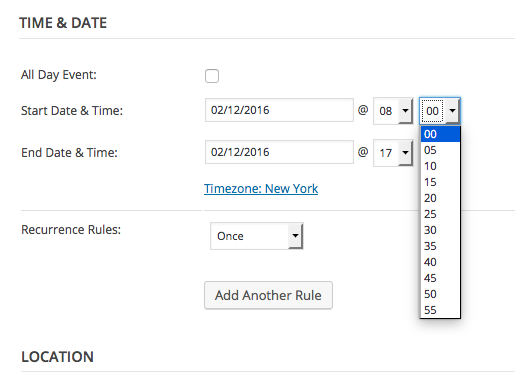
Also, it is a very bad practice for themes to bundle plugins with them. If possible, I would recommend leaving a support thread with the ThemeFuse folks just to advocate for a better design/coding choice in their themes.
You should delete any theme-included versions of plugins and replace them with the real, official version of the plugins. So, for The Events Calendar for example, you can get the real official version here: http://wordpress.org/plugins/the-events-calendar.
Let me know about the modal window and share a larger-scope screenshot if possible–thank you in advance if you can do this!
Sincerely,
George -
AuthorPosts