
Home › Forums › Calendar Products › Events Calendar PRO › Events Calendar PRO – Widget Mini Calendar not working correctly.
- This topic has 5 replies, 2 voices, and was last updated 10 years, 7 months ago by
George.
-
AuthorPosts
-
February 12, 2016 at 6:58 am #1072126
Hoy Multimedia
ParticipantSo we’re using the Mini Calendar, using the shortcode([tribe_mini_calendar]).
You can find it about half-way down this page here.The first problem is that it shows an event, without actually selecting a date in the calendar, and that it displays the “mini-calendar-list-nav” but that’s not a problem if the first one is fixed.
The next problem is when you select a date that has more than one event on that day(February 18th 2016 has two events) . The “list-nav”-element shows up, as it should, but the “prev” and “next” buttons does not seem to work at all.
Using The Events Calendar PRO Version 3.9.1
February 12, 2016 at 8:59 am #1072207ParticipantHey @schimpanz,
I’m sorry to hear about these issues! Before getting too far into troubleshooting, the first order of business is to ensure that your site is using the most up-to-date versions of our plugins possible. You write this:
Using The Events Calendar PRO Version 3.9.1
Unfortunately 3.9.1 is very, very outdated.
So, first update The Events Calendar on your site to its most recent version – 4.0.5 at the time of my writing this. You can get that version here: https://wordpress.org/plugins/the-events-calendar/.
Then, update your site’s version of Events Calendar Pro to its most recent version – also 4.0.5 at this time. You can access the most recent versions of any plugins you’ve bought from us here: http://theeventscalendar.com/my-account/downloads.
If issues persist even after you update these plugins, then in your reply can you include your “System Information”? Here’s how to do that: https://theeventscalendar.com/knowledgebase/sharing-sys-info/.
Thank you!
GeorgeFebruary 14, 2016 at 11:38 pm #1072946ParticipantThis reply is private.
February 15, 2016 at 11:40 am #1073384ParticipantThanks for all of this information!
To be clear, are you referring to the calendar here shown in this screenshot:
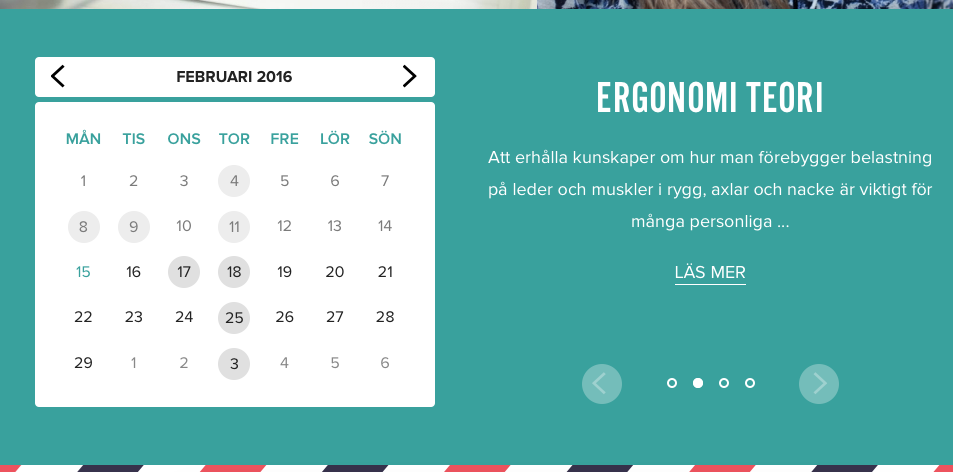
If so, then there are two things worth pointing out:
1. For me the “prev” and “next” month links work fine, and do indeed make the calendar go to the previous or next month when clicked.
2. This calendar view is heavily customized. The HTML and markup of this calendar is entirely custom. So if you are referring to the left and right buttons on the right half in the screenshot above, then these are heavily customized, custom buttons. These are custom buttons and so we unfortunately cannot help much with troubleshooting these. You would need to contact whomever developed those buttons for troubleshooting issues with them.
I’m sorry to disappoint if these buttons are the only problematic things left on your page!
Sincerely,
GeorgeFebruary 15, 2016 at 11:40 pm #1073538ParticipantThanks, I’ll will take a deeper look at it! 🙂
February 16, 2016 at 10:44 am #1073918ParticipantThank you @schimpanz! I’m sorry that our support for customizations is limited but if there are other issues that arise that you are confident are not related to customizations, open a new thread and we’ll take a look 🙂
Cheers,
George -
AuthorPosts
- The topic ‘Events Calendar PRO – Widget Mini Calendar not working correctly.’ is closed to new replies.