

Forum Replies Created
-
AuthorPosts
-
March 25, 2016 at 8:22 am in reply to: Tickets not updating coreectly after changing the stock amount #1094013
George
ParticipantHey folks,
I wanted to update this thread with some information from our developers, who’ve been taking a close look at some stock-related issues and found something interesting.
The essential takeaway from this review of stock features is this, to quote one of our developers:
We reduce the stock for pending payments to avoid the chance for over-selling a ticket product.
We take this directly from WooCommerce itself. So, at this time there is not a bug here, to the best of our knowledge and after investigating.
Want to ensure proper stock counting when placing manual orders and such? Well, as long as you mark the order “Complete” and ensure that there are NO pending payments or anything, the stock should be updated fine. Otherwise, the stock will be reduced to prevent the over-selling of ticket products.
I hope this information is helpful; if you find that even when orders ARE marked complete, and all payments are complete, stock issues persist, then open a new thread on these forums with a link back to this thread for reference.
We can continue a conversation and investigation from there.
Thank you for your patience with this!
GeorgeParticipantHey Kelsey,
Thanks for reaching out!
To hide certain details from the default events views, you unfortunately can only do that with some custom CSS. We cannot help with writing custom CSS, but you can check out a [free!] tool like Firebug if you use FireFox, or the Developer Tools for either Safari or Chrome. They have “Inspector” tools that let you zoom right over the element that you’d like to hide, and then you just add the CSS to hide that element to the bottom of your theme’s style.css file.
This is true regardless of whether you have Events Calendar Pro on your site or not.
Does this information help? Let me know!
— George
March 25, 2016 at 8:01 am in reply to: can't upload media, can't edit widgets, can't edit menus #1094000ParticipantI’m sorry to hear about all of this, @Barrybradford! I do not have any of this behavior so it sounds like there are some specific conflicts on your site.
To help investigate this, can you share your “System Information” with us? Here’s how → https://theeventscalendar.com/knowledgebase/sharing-sys-info/
I’ll take a closer look with this information and see what I can learn.
Thank you!
GeorgeParticipantI’m sorry to hear about this, Alison!
Can you share your system information with us? Here’s how → https://theeventscalendar.com/knowledgebase/sharing-sys-info/
I’ll use that information to take a closer look at things here.
Sincerely,
GeorgeParticipantHey there,
I’m really sorry to hear this!
Can you share your system information and share a link to your events page? Here’s how to share your system information → https://theeventscalendar.com/knowledgebase/sharing-sys-info/
I’ll take a closer look and see what I can find!
Thank you,
GeorgeParticipantHey Wolfgang,
Thanks for reaching out!
Fixing this will unfortunately require a tiny bit of custom coding at this time—head to your theme’s functions.php file and try adding this snippet of code there:
add_filter( 'tribe_events_this_week_date_format', 'tribe_remove_suffix_from_this_week_date' );function tribe_remove_suffix_from_this_week_date( $date ) {
return 'j';
}
Let me know if this helps! 🙂
— George
ParticipantHey Hermine,
Thanks for reaching out!
The features you describe, where users click on a category to filter by that category, are NOT provided by Events Calendar Pro. Filter Bar is the best plugin of ours for this; you can install it on your site alongside The Events Calendar—you do not need Events Calendar Pro to use it!—and then once installed, it will offer the sort of category filtering you describe.
To see these filters in action, I would recommend exploring our demo site a bit: http://wpshindig.com/events
While things on that events page like the Map View and Photo View are only possible within Events Calendar Pro, the basic filters that I highlighted in this screenshot with an arrow are what come “out of the box” with Filter Bar:
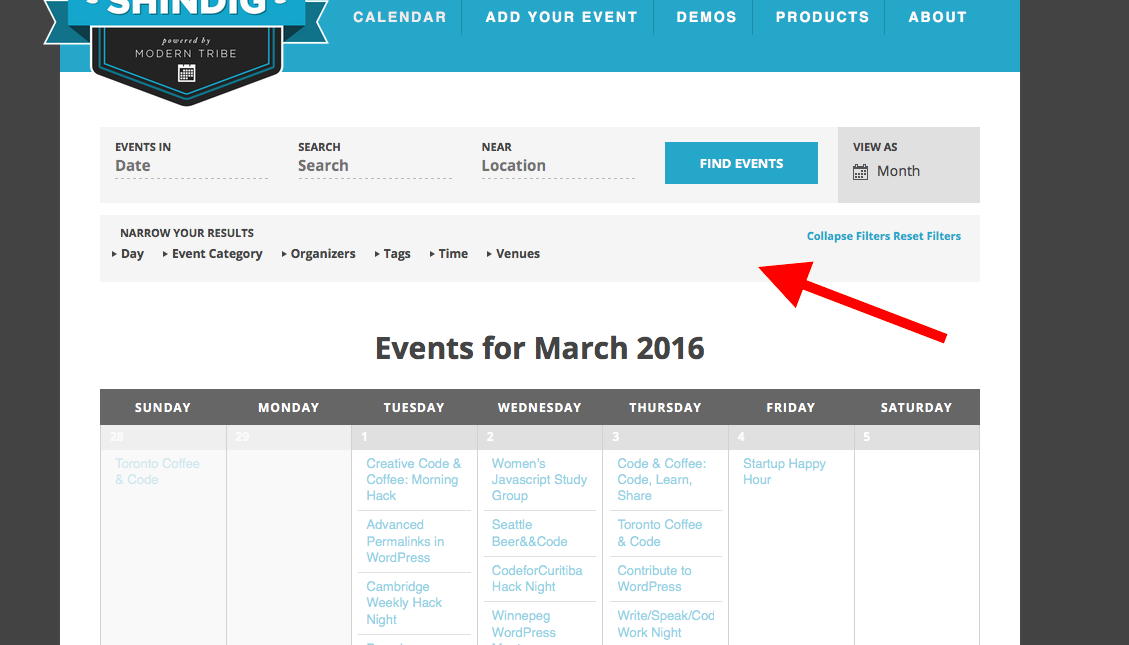
So, check out the demo page and play around with those filters, and let me know if there’s anything else I can help with!
Sincerely,
GeorgeParticipantThanks so much for all of this testing and for these screenshots, @Roberta—I’m so sorry about the nature of this bug and about the back-and-forth here!
It’s a confusing issue because I cannot create the problem no matter what I try.
This leaves us in a weird spot, because from here the only further troubleshooting steps I can recommend would be to contact your web host support team to see if they notice anything on your server’s .htaccess file that could be preventing proper functionality here.
I doubt there is such an issue at play here, and you do not have to to do this step by any means—I’m just saying that this is about the only other step I can think of that you can actively do.
In the meantime, I am going to escalate the level of investigation we do on this. I know there are some bugs related to calendar links in our most recent updates, and we’re working hard on fixing these, but there aren’t any bugs reported thus far related specifically to the main calendar link. Perhaps this is just a deeper part of the other bugs that we’ve yet to find—but I will rope in some other, more skilled developers and see what we can find.
I’m sorry that we’re at such an inconclusive point with these issues right now! I appreciate your patience and will keep this thread updated with information as soon as I learn anything more here.
Thank you,
GeorgeParticipantHey Cary,
Thanks for reaching out!
There’s unfortunately no such view included in our plugins. 🙁
A custom view would indeed have to be developed for this to exist; so, you would have to write that custom code or hire a professional developer to write the code for you. We have a list of great developers here → http://m.tri.be/18k1 (and have no affiliation with any of these folks—they’re simply some well-respected names in the community that we’ve compiled to share in situations like this one).
Sorry to disappoint! Please let me know if there’s anything else I can try to help with.
Sincerely,
GeorgeParticipantSorry to hear this Sylvain!
It seems like your problem is this:
• If you have just the Upcoming Events widget on your page, the CSS doesn’t load.
• If you have both the Upcoming Events widget on your page and the Mini Calendar widget on your page, the CSS loads.
1. Is this accurate? Are these your exact issues?
2. If so, then what specific “CSS” are you referring to?
3. Can you share your system information please? Here’s how to do that → https://theeventscalendar.com/knowledgebase/sharing-sys-info/
4. Can you also link directly to a page on your site where these widgets are located?
Thank you!
GeorgeParticipantHey there,
I’m sorry to hear this!
I’d love to help out, but can you post this question in one of our Premium Forums instead? This forum here is our “Pre-sales questions” forums; but you already have an Events Calendar Pro license and are seeking some assistance with it.
To post in a premium forum, log in to your account on this site that has the premium license. Then, post in a premium forum about these issues. We’ll help out as soon as possible!
Also, when posting your new thread, can you post your “System Information” in full along with the post? Here’s how to do that → https://theeventscalendar.com/knowledgebase/sharing-sys-info/
I will close this thread for now and hope to see you in the premium forums!
Cheers,
GeorgeMarch 24, 2016 at 4:44 pm in reply to: Calendar View AJAX Paginate & WordPress functions.php – not loading my functions #1093756ParticipantHey Robert,
I’m sorry, but that code is from 2013 and is no longer valid code at all. It cannot be used with the current versions of our plugins, and since we cannot support non-current versions of our plugins, that code cannot be used successfully.
I’m surprised it worked at all, and only failed in AJAX requests!
If you want to keep events of a specific category hidden from your calendar, your best bet is just to write some custom CSS. Add code like this to the bottom of your theme’s style.css file:
.type-tribe_events.tribe-events-category-barbecue {

    display: none !important;

}
That’s for events in the category “Barbecue.” You can tweak that name to whichever category you need to add, and if there are multiple categories, just add multiple blocks of code like that above; one for each category.
Best of luck with your customizations!
GeorgeParticipantHey Derek,
While having many authors creating posts, pages, or events, or any other post type is a default feature of WordPress itself—so, yes, it’s possible with our “events” post types—this feature is not something any of our plugins would do:
They also want to capture volunteers to work with them (so I could in theory set up a dateless event called “volunteer for this org”) and track/manage those volunteers.
That sounds like something you’d need a Forms plugin to pull off, like Ninja Forms or Gravity Forms.
I hope this helps!
GeorgeParticipantThank you Alpay!
Is there any chance you can leave the broken slideshow on your homepage temporarily?
I know that this is not an ideal thing to do—but it is just temporary, and there is unfortunately no other way I can investigate this bug than to see the broken slideshow firsthand.
Let me know if you can do this—reactivate The Events Calendar and Events Calendar Pro on your site, and leave the BROKEN FlexSlider up on your home page. I will work quickly and inspect it and try to spot the specific problem.
I’m sorry for the trouble, @Alpay!
— George
ParticipantI’m sorry about all of these issues folks! The only way to rollback the plugin is to manually remove the current version from your site, then add files from an older version.
You can get those files from your account pages → http://theeventscalendar.com/my-account/downloads
We’ve got this logged as a high-priority bug and are working hard on a solution. I will update this thread with more information as we learn more about it.
Thank you all for your patience here!
George -
AuthorPosts