

Forum Replies Created
-
AuthorPosts
-
George
ParticipantThis reply is private.
March 28, 2016 at 5:48 pm in reply to: Arrow Size for Ticket QTY + Customizing Event Confirm Email + Mobile Check-In #1095094ParticipantHey Corey,
Thanks for reaching out!
We unfortunately cannot help with customizing things—please read this page for more information → https://theeventscalendar.com/knowledgebase/what-support-is-provided-for-license-holders/.
So, for question #1, yes, you can change anything on your site but you would have to write custom CSS to achieve the desired design on your site (or hire someone to write the code for you). If you know a bit of CSS yourself and/or like to tinker, check out a [free!] tool like Firebug if you use FireFox, or the Developer Tools for either Safari or Chrome. They have “Inspector” tools that let you zoom right over the element whose styles you want to change, which is extremely handy.
For question #2, unfortunately you can only customize the emails using the principles outlined in our themer’s guide → https://theeventscalendar.com/knowledgebase/themers-guide/. So, more custom coding required. 🙁 Get a code editor like Sublime Text, check out the themer’s guide to learn how to customize emails and other templates, and tinker away.
Finally, in regards to question #3, our ticketing plugins have the check-in features available on the Attendees List screens in your admin for the events. These offer a click-button checkin and the QR Code scanning features. These are the only non-PDF/non-print check-in tools.
Check out this page to learn more → https://theeventscalendar.com/knowledgebase/managing-your-orders-and-attendees/
Cheers!
GeorgeParticipantHey Francois—I forgot to ask, but how specifically are you hosting your website? Who is the web host you are using? Share a link to the company’s main website if you don’t mind. Just curious—it might be quite helpful! 🙂
Thank you,
GeorgeParticipantI’m sorry to hear this Francois!
I cannot recreate this behavior and am surprised to hear that happens only on the Facebook tab specifically.
To help investigate, can you share your system information with us? Here’s how → https://theeventscalendar.com/knowledgebase/sharing-sys-info/
Thank you!
GeorgeParticipantHey there,
I unfortunately must admit that I’m not 100% certain what your specific goal is. What do you mean specifically by “getting the taxonomy into the widget”?
Also, I’m sorry to bear this news, but we cannot help with customization projects like this. Learn more about this here → https://theeventscalendar.com/knowledgebase/what-support-is-provided-for-license-holders/
If you elaborate on your specific goals a bit, I will do my best to help, but I just wanted to mention the above policy because I cannot guarantee a meaningful/helpful outcome from our exchange here. 🙁
Thank you,
GeorgeParticipantHey @Torey,
This is unfortunately not really possible. It would only be possible with writing custom CSS, which we cannot help—but if you can share a link to your site’s Community Events submission page, I’ll be happy to take a look and see what I can recommend!
Thank you,
GeorgeMarch 28, 2016 at 5:36 pm in reply to: Is there a way to enter a season ticket and use it for multiple events? #1095085ParticipantHey Julie,
What you describe here is unfortunately not possible:
Is there a way to set up the ticket to be valid for the whole season, and then go back in after each event and allow them to come to the next one?
Sorry to disappoint! 🙁
As for your question here:
Also is there a way to list the events and not use the calendar from the menu, just have a list of the events?
I’m not quite sure what you mean here, so is there any way you could elaborate a bit? Sorry for my lack of understanding on this!
If you are trying to change the way the list view and/or calendar features display, then unfortunately what you are aiming to do will likely not be possible without writing custom CSS. We cannot help with customizations like that, but in the meantime I would recommend checking out a [free!] tool like Firebug if you use FireFox, or the Developer Tools for either Safari or Chrome. They have “Inspector” tools that let you zoom right over the element whose styles you want to change, which might come in handy…
…but let me know a bit more about what you’re trying to do here and I’ll try offer a more specific answer! 🙂
Thank you,
GeorgeMarch 28, 2016 at 5:32 pm in reply to: Does Events Calendar PRO Integrate with OptimizePress Themes? #1095080ParticipantHey Chris,
When you say “pulling from my WordPress theme,” can you elaborate on what that means, exactly?
Thanks!
GeorgeParticipantI’m sorry to hear this, Susan!
I don’t have any such behavior on my own site, and so I’m wondering if you can test something on your site to reveal—or rule out—the presence of conflicts on your site.
Basically, deactivate ALL plugins on your site other than JUST these two plugins:
• The Events Calendar
• Events Calendar Pro(So, even deactivate other The Events Calendar add-ons you have. ONLY The Events Calendar and Events Calendar Pro should be active).
Then, activate a default theme like the Twenty Sixteen theme on your site.
1. When your site is in this specific state, do your issues persist?
2. If issues persist in this state, then can you head to Settings → Permalinks in your site’s wp-admin and confirm what the setting is here? If it /%postname%/, for example?
3. If your site’s permalinks settings are NOT something like /%postname%/, then what if you set them to /%postname%/ and click “Save Changes”—if you then test your list view “jumping” issue, does any of the behavior change?
These three steps are a comprehensive test that will reveal much about the nature of these issues.
Let me know what you find!
Thank you,
GeorgeParticipantI’m sorry to hear about these issues, Gary. We have no other reports of this problem but I will alert one of our developers to investigate.
As for email contact, I looked for any emails from your email address and found no emails from it to us; I also looked for the name “Gary” alone and found no email conversations that we had not actively responded to and closed.
— George
ParticipantI’m really sorry to see this @Jessica, and while I was able to see the same problems you described, I was not able to identify a specific JavaScript error or something like that on the page.
I unfortunately only have one recommendation I could make in regards to these issues: testing for conflicts.
What that entails is doing each of the steps outlined here → https://theeventscalendar.com/knowledgebase/testing-for-conflicts/
Then after EACH STEP there, do the exact “Steps to reproduce” you wrote in your last reply.
What do you find when you do this? Does the behavior change anywhere along the way?
Thank you!
GeorgeMarch 28, 2016 at 5:12 pm in reply to: Previous/Next Feature not working – how do I figure this out? #1095066ParticipantHey there @tapestryfolkdancecenter,
Deleting that page will cause no problems and is essential for things to work.
To add the link to /events to your menu, just use the “Custom Links” section in your menu-builder:
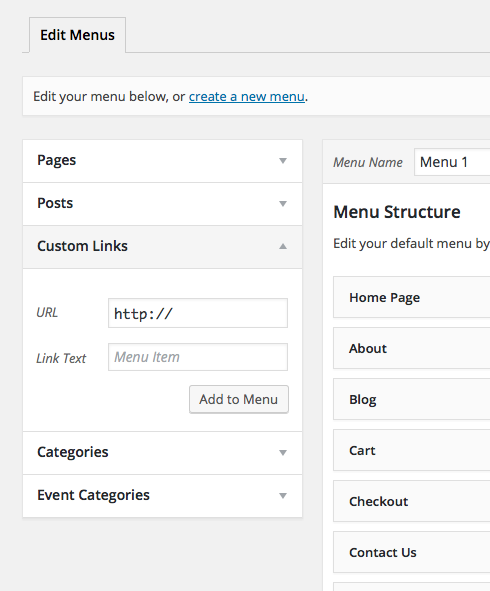
Make the label “Events” or “Calendar” or whichever label is most appropriate for your needs, then make the URL example.com/events, where example.com is replaced with your real domain name of course. 🙂
Cheers!
GeorgeParticipantOkay, so after some investigation of your opened-up submission page (thank you for opening access to that!), I’ve found no evidence of issues arising from our own plugin and much evidence of these CSS and JavaScript issues arising from two locations:
1. Your theme.
2. The W3 Total Cache plugin, possibly.
While we cannot help with theme issues because we do not make the themes, the W3 Total Cache plugin might actually be doing the most “damage” here regardless.
To test if this is the case, I would recommend temporarily deactivating the W3 Total Cache plugin.
How do things look when this plugin is deactivated?
Thank you!
GeorgeParticipantHi Matt,
Our support response timelines are one reply per 24 hours during the workweek. I got to this over the weekend to try and help out so thank you for being patient with our normal processes here. I have a reply relevant to your issues after some investigation.
— George
ParticipantBest of luck with your site!
And if you find that our ticketing plugins aren’t right for the job, please be sure to request a refund within thirty days of purchasing the license so that we can refund it in full! More information about that here → https://theeventscalendar.com/knowledgebase/refund-policy/
Thank you,
George -
AuthorPosts