

Forum Replies Created
-
AuthorPosts
-
February 24, 2017 at 6:20 am in reply to: Ticket amount not counting down after tickets sold #1245153
George
ParticipantThis reply is private.
February 24, 2017 at 6:15 am in reply to: Ticket amount not counting down after tickets sold #1245147ParticipantThis reply is private.
ParticipantThanks for your update, Dan. It seems like you have resolved the issue:
1. Can you confirm if you have resolved issue?
2. If so, can you elaborate on how, exactly, you resolved it?
Thank you,
GeorgeFebruary 23, 2017 at 4:31 pm in reply to: Ticket amount not counting down after tickets sold #1244916ParticipantThis reply is private.
ParticipantThat’s totally fine Diane.
There is just one thing not possible: If you want it so that when you delete an event from Google Calendar, it’s automatically also deleted from WordPress, this is not possible at all. The event would have to be manually deleted from both locations.
— George
ParticipantHey John,
Sorry to hear things aren’t working yet.
Many other customers are reporting that the new release fixes the problem for them, and indeed upon testing these myself I had no issues. As proof of that, here are two screenshots of the “Counterclockwise at the Blue Note Grill” event on my own local testing site, showing the featured image imported fine:
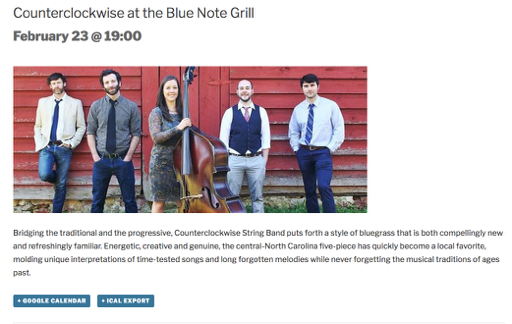
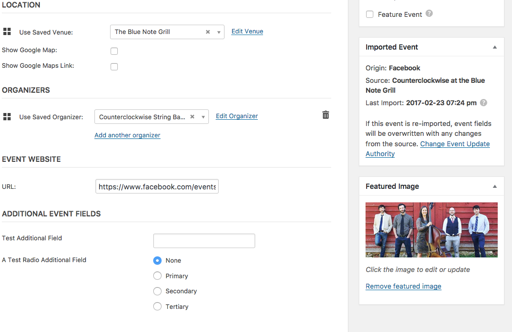
To help me investigate why things are still not working for you, can you please share your site’s complete, un-edited system information using the “Sharing information manually” steps outlined in this article: https://theeventscalendar.com/knowledgebase/sharing-sys-info/
Thanks!
GeorgeParticipantThe grumpiness is completely understood and something we don’t take personally. Having buggy plugins is something that makes you unhappy, but it really makes us unhappy too — every bug is something we cringe at and hope to squash as quickly as possible.
Thank you, in fact, for your patience and persistence here.
Open a new thread any time if other issues or questions arise!
George
February 23, 2017 at 4:18 pm in reply to: Custom Event Attendee collecting fields not showing up #1244910ParticipantThere are no JavaScript errors page, but I am able to see the necessary markup for the Attendee fields on your page.
They are just not showing up.
• Have you made any changes to any aspect of the plugin code for The Events Calendar, Event Tickets, Event Tickets Plus, or Events Calendar Pro in any way?
• If so, please undo those changes so that the plugins are the same as they are when freshly downloaded and unedited. In this state, does anything improve?
— George
ParticipantThis reply is private.
February 23, 2017 at 3:59 pm in reply to: Paid Orders not returning as ‘Processing’ staying in ‘Pending’ #1244902ParticipantSure thing JO, stay tuned to this thread for updates about the fix.
If there are no updates on this thread, then there is no news — but we will update when there is news.
Stay tuned!
GeorgeFebruary 23, 2017 at 3:57 pm in reply to: Permalink Not Editable for Recurring Events After Most Recent Update #1244900ParticipantGreat, thanks for confirming Hans. Keep working with the support technician in your other thread, about the view-all link — that issue is one we’re actively working on.
I will close this thread for now. Feel free to open a new thread any time if other issues or questions arise.
Cheers!
GeorgeParticipantThanks Dan.
1. The “min” is not coming from our plugins, full stop. It must be coming from your translations, other plugins, or your theme code or something. To help find the source of the problem, I would recommend the complete set of troubleshooting steps on this page → https://theeventscalendar.com/knowledgebase/testing-for-conflicts/ After EACH STEP in that process, check back on the text and see if that weird “min” text goes away anywhere along the way.
2. As for your other issues, if you have other threads open with them, please continue to work with the support technicians in those specific threads. If you do not have threads for them, please open threads for them and a response will arrive promptly.
We only tackle one issue per thread — this may seem slower, but is actually the opposite, and lets our team address your problems more efficiently.
Let us know what you find by doing the steps I mention in #1 here above.
Thanks!
GeorgeFebruary 23, 2017 at 3:49 pm in reply to: Ticket amount not counting down after tickets sold #1244896ParticipantThis reply is private.
February 23, 2017 at 3:47 pm in reply to: Ticket amount not counting down after tickets sold #1244895ParticipantThis reply is private.
ParticipantHello!
I wanted to post a quick note here that we have published a new Maintenance Release today that should address some of the problems reported in this thread.
You can read about the details of this release here → https://theeventscalendar.com/maintenance-release-events-calendar-4-4-3-event-tickets-4-4-3-premium-add-ons/
I hope this update helps!
Cheers,
George -
AuthorPosts