

Forum Replies Created
-
AuthorPosts
-
George
ParticipantHey @mmntm,
There’s unfortunately no default way to go about doing this—i.e., no way of doing this from within the plugin admin directly and such.
You would have to get clever and use some custom coding at this time. We can only provide very, very limited support for custom coding (read more here), but I wrote up a snippet for you that does the things you listed above.
Check out that snippet here → https://git.io/vViMM
Copy and paste the contents of that snippet into your theme’s functions.php file and you should be good to go! The quantity will be set to 1 and will not be changeable by the user.
Now, if you want to further customize the appearance of that field from here, you would have to take the reins on that—but I hope this helps get the quantity-limiting functions you describe!
Sincerely,
GeorgeParticipantHey Jonathan,
Thanks for reaching out, and for your interest in our plugins!
1. How do I scan QR codes on tickets for redemption? Do you have an app?
We do not make an app for QR code scanning on our own—there is a litany of free QR code-scanning applications for any mobile platform out there, including iOS and Android of course, and so if you search for “QR Code Scanner” in these platforms’ app stores, you’ll have lots of great options to scroll through! The vast majority of them will work fine with our plugins.
If you’re concerned about a specific application’s compatibility with our check-ins, feel free to do some test events and check-ins on your site first to ensure that it works as you hope. To learn more about QR Codes and attendees management in general, check out this knowledgebase article on our site → https://theeventscalendar.com/knowledgebase/managing-your-orders-and-attendees/#qr-code-checkins
2. What carts do you integrate with? Do you integrate with Tribulant?
Our plugins support WooCommerce and Easy Digital Downloads. When you mention Tribulant, if you are referring to this piece of software then it is unfortunately not supported → https://tribulant.com/plugins/view/10/wordpress-shopping-cart-plugin
Thank you,
GeorgeParticipantHey Anna!
Thank you for reaching out and for your interest in our plugins. I’m sorry to disappoint, but our plugins unfortunately do not support Polylang at this time, nor do they support WPML. 🙁
Sorry to bear that bad news! Let me know if there’s anything else I can try to help with.
Sincerely,
GeorgeParticipantHey John,
Thanks for reaching out!
There are unfortunately no such features in our plugins at this time—there is no auto-import, you have to import manually.
Sorry to disappoint!
GeorgeParticipant😀
ParticipantI’m sorry to hear this! Thank you for updating.
I noticed that you have BOTH Event Tickets Plus and Eventbrite Tickets on your site—does the issue of ticket stock being set to zero only happen with one or the other? Both?
Thank you!
GeorgeParticipantHey @Birgit,
I’m sorry about that—do you have any better luck with this snippet instead of the one I originally recommended? It’s slightly different but might do the job:
add_action( 'init', 'tribe_dont_send_tickets_email' );function tribe_dont_send_tickets_email() {
remove_all_actions( 'wootickets-send-tickets-email' );
}Thank you,
GeorgeParticipantHi Sean,
By reaching out to the web host, I just mean literally establishing the same facts you have done here on this thread—that when you click the “find out more” links, they don’t link to where they’re supposed to link. 🙁
You can share a link to this thread outright, in fact—just to establish that we’ve tried many things from the plugin perspective to no avail, and that this is NOT a bug that our plugin is known to have.
Thank you for clarifying this:
– The first one has a time from 8am to 11pm and it works fine.
– The second has a time from 8pm to 11pm and it does not work.I am a bit stumped by this issue and am continuing to investigate.
There is unfortunately no way to globally remove the “read more” links. Are you asking to simply remove these from the page so that there are no “broken” links to click in the first place? If so, I can recommend some CSS to do this, but there is no way to do this other than writing out the custom CSS code.
— George
April 6, 2016 at 11:07 pm in reply to: Where is the documentation on Ticket Fieldsets in Event Tickets Pro? #1099384ParticipantHey Rob,
You posted information again, but with no comments about it—to be clear, are you implying that issues are still persisting? I.e. updating did not help?
Just want to be certain about the nature of things!
— George
ParticipantHey Roberta,
Thank you for sharing that!
I still do not produce any such problems here, but am glad that there was a bit of progress originally with your developer’s exploring. The fact that the problem reappeared after simply changing the view type is an extra layer of oddity here….
I’m sorry about the continued nature of this bug!
The only thing I could recommend at this point would be to ensure that you try updating all of your plugin versions to 4.1.1, which is our most recent update—version 4.1.1 is available for all plugins, so update The Events Calendar and Events Calendar Pro to 4.1.1 and let me know if it makes any impact here!
— George
April 6, 2016 at 10:26 pm in reply to: Display full event Content rather than Excerpt in List View #1099380ParticipantHey Kelly!
The 2014 trip was before my time here at Tribe, but I don’t doubt it was a blast—thanks for the kind words about the trip this year, too. Hope all is well!
In regards to your question, at this time the only solid way to go about replacing excerpts with full content is still manually edit the template files.
To find any location where the excerpt is being used, I would recommend getting a text editor like Sublime Text—just any editor that has the common “Find in Folder” feature, which is shown in this screenshot:
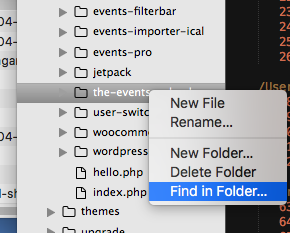
If you then search for tribe_events_get_the_excerpt(), you’ll find all of the places where this function is used—which generates the excerpts.
You could then replace any instance of this:
echo tribe_events_get_the_excerpt();
with this:
echo apply_filters( 'the_content', get_the_content( get_the_ID() ) );
Here’s an example of the current version of list/single-event.php with that above modification made: https://git.io/vVKmz
Cheers,
GeorgeApril 6, 2016 at 8:26 pm in reply to: How can I replace the 'Shop' page with the main 'Events' list #1099363ParticipantHey Valorie,
Thanks for reaching out!
I’m sorry to disappoint, but there’s unfortunately no way to do this because The Events Calendar doesn’t generate an actual “page,” and if you were to add a page titled “Events” to try and make this work, it would not do the job and could actually cause issues with calendar functionality….
The best recommendation I have is to reach out to the WooCommerce theme support folks and ask if the “shop page” features you describe can point to a custom link on your site, not just a Page. If so, then use those methods to point to the calendar page on your site, which is most often /events.
I hope this information helps!
GeorgeParticipantHey @Melynda,
Thanks for reaching out!
1. There are a few different reasons this could be happening…to help us investigate, can you first update your WordPress version to 4.4.2? You’re on 4.2.2 which is a bit behind, and that could be factor here. (Being out-of-date is also just less secure, so updating is a great first measure here regardless!)
2. Once you’ve updated, can you then post your system information here so we can take a look through and see if anything stands out as problematic?
3. Head into your site’s wp-admin and look in the “Pages” to see if you have an actual page in your page with the title “Events”. If you have such a page, delete it—this page, if titled “Events”, will try to use the /events slug on your site. But The Events Calendar is also trying to use that slug, so issues can arise….
Thank you!
GeorgeParticipantHey Lindsay,
Thanks for reaching out!
This is an interesting dilemma, but, I’m sorry to admit, we unfortunately don’t have anything in our wheelhouse that would facilitate this sort of functionality. 🙁 You mention and link to a WooCommerce extension—something like this might be your best bet here.
We can’t speak for the quality or effectiveness of any WooCommerce Extensions, because we admittedly don’t test all of them. In general, though, if you find a WooCommerce extension whose features work with WooCommerce “Products” and “Simple Products”, then that extension should, in theory, work with our ticketing plugins without issue.
I don’t of an extension that would do the things you mention, so I’m sorry to disappoint again, but I hope this information is helpful. I just wanted to be frank and clear about the nature of things—let me know if this helps and if there are any other questions I can try to help with.
Sincerely,
GeorgeParticipantHey George,
Thanks for reaching out!
We unfortunately have no such special integration with Outlook at this time.
The best solutions we have are to install the free core plugin, The Events Calendar, and then add the iCal Importer add-on. If you can generate the Outlook events as .ics file exports, then you can import those export files into The Events Calendar.
With the iCal Importer, you can set up some scheduled imports, so that it will check for events from an .ics events feed and pull in events that have been added since the last check.
I hope this information is helpful! The Events Calendar is free and we have a great thirty-day refund policy for premium add-ons like iCal Importer, so you might find it easiest here to just try the software out firsthand.
Let me know if I can try to help with anything else!
George -
AuthorPosts