

Forum Replies Created
-
AuthorPosts
-
George
ParticipantHi Nadz,
Thank you for reaching out. These forums here are our “Pre-sales Questions” forums, so we unfortunately cannot field technical support questions here.
It doesn’t currently appear that you have a premium license with us. If this is wrong, and you do have a premium license with us, then apologies for my misunderstanding!
However, in that case please log into the account on this site that has your premium license, and then post this question in a premium support forum.
If you indeed do not have a premium license, then please post your question in our free support forums here → http://wordpress.org/plugins/the-events-calendar. We check those forums a bit more than once per week, so hopefully we will be able to get to your question there.
I will close this thread to facilitate the above actions. Before doing so, just to address your question: yes, you can change the “From” email address in the emails that your website sends out.
You will have to add some custom code to your theme’s functions.php file to make such changes. The function you want to filter is called wp_mail which you can read about here.
You’ll want to use a filter like one of these to change the “from” name and “from” email addresses:
• https://codex.wordpress.org/Plugin_API/Filter_Reference/wp_mail_from
• https://codex.wordpress.org/Plugin_API/Filter_Reference/wp_mail_from_nameBest of luck with your customizations,
GeorgeParticipantHi Andre,
Our support response times are one reply every 24 hours. Thank you for your patience.
I have taken the IDs you provided and have set up some automatic imports on my own site to test. I will let you know how things go after I let some imports run.
In the meantime, I was wondering what you find when you click the “Facebook” tab in the Events → Import page in your wp-admin? On this page, there should be a list of event titles from the pages you supplied, like in this screenshot:
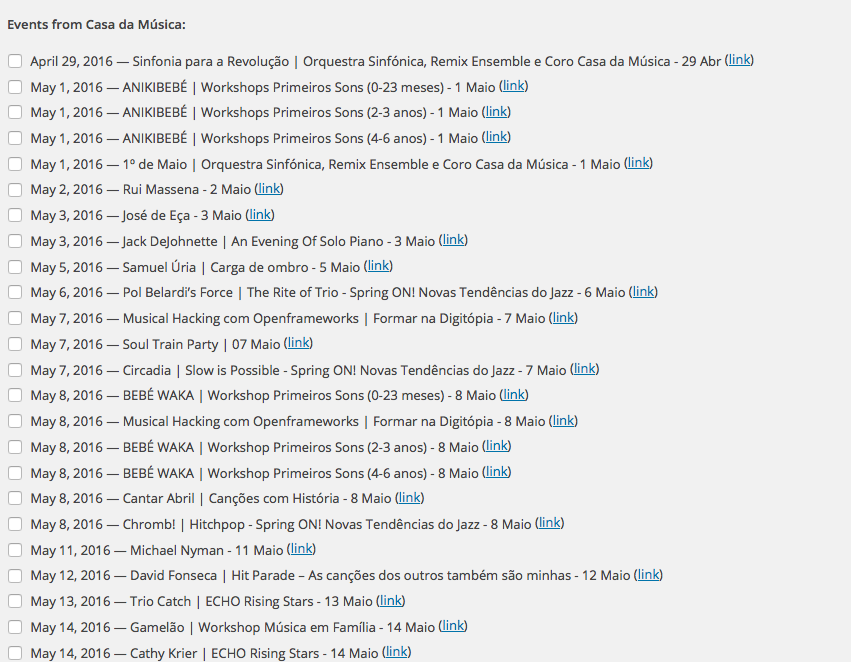
Do you find that your page looks something like that?
Thank you,
GeorgeParticipantHi Toni,
It seems that there are simply too many columns in the admin view—if you open the “Screen Options” tab in the top-right corner of the wp-admin screen, you should see a set of checkboxes that correspond to column names. Try un-checking some checkboxes to make more room for the columns by removing unnecessary ones.
Does this help?
Thank you,
GeorgeParticipantHey Benjamin,
In that article I linked to, there’s a big disclaimer to not post screenshots:
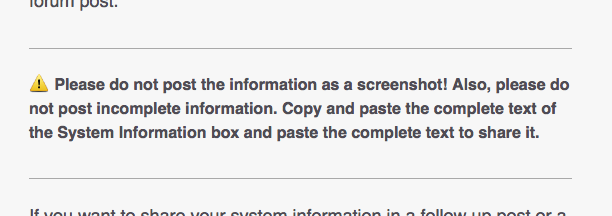
Can you copy and paste the text of System Information box in its entirety here and share that? There could be crucial information relevant to this issue there.
Thank you,
GeorgeParticipantNice! 😀
ParticipantGlad to hear it, @Michael! Cheers!
— George
ParticipantHey Andreas,
Sure thing! We have a 30 day refund policy that you can read about here → https://theeventscalendar.com/knowledgebase/refund-policy/
That page also will detail at how to get a refund should you want one.
Cheers!
GeorgeParticipantHey Mike,
Thanks for reaching out!
Unfortunately, even if you were to buy multiple Events Calendar Pro licenses, you would only be able to have the calendar at one location.
Sorry to disappoint!
GeorgeApril 28, 2016 at 12:39 pm in reply to: Pre-Sales – Printer-friendly and Ability to Hide / Show content based on user #1108414ParticipantHey Erin,
It’s indeed possible to create a print stylesheet for your site—this stylesheet can specify rules for when you are on the month view, and you can indeed get quite specific and clever with how things are laid out in this print view.
This page on the WordPress Codex has some great information on the basics of a print stylesheet and how to make one → https://codex.wordpress.org/Styling_for_Print
Cheers!
GeorgeParticipantHey @Zeina,
Thanks for reaching out!
This is not possible at this time, unfortunately:
so actually I’d like them to be able to add as many tickets as they want but the attendee information once
I’m sorry to disappoint!
Next, you ask this:
Also, can I add the attendee information fields to front-end for organizers to use as I’m using community tickets.
This is not a supported feature at this time but we are working on building this into the plugins eventually. I don’t have a specific date at this time—but we are working on this feature!
Next, you asked this:
finally, how can I hide the event date from the ticket email the customer receives as again I’m using some events as activities that don’t have dates.
This is a bit tricky—it sounds like you want to hide the date for some events/tickets that are for activities, but keep it in place for other types of events/tickets that do have a need for the end date?
You can modify the email HTML by looking for the “ticket.php” file in your Event Tickets and Event Tickets Plus plugin files. You can consult this guide for modifying that template: https://theeventscalendar.com/knowledgebase/themers-guide/
But only hiding the end date in certain contexts is admittedly a bit tricky. 🙁
Let me know what you think!
GeorgeApril 28, 2016 at 10:29 am in reply to: Pre-Sales – Printer-friendly and Ability to Hide / Show content based on user #1108340ParticipantHey Erin,
Thanks for reaching out!
Our plugins unfortunately do not provide a fully-robust Print stylesheet. It’s hard to do that from our code because our code is just a plugin, and ultimately your theme is what dictates most of the front-end styling (which ends up including the Print stylesheet). 🙁 Sorry to disappoint!
When it comes to having public and private events, you CAN do this to some degree. There is only ever one calendar—you cannot have an actual separate calendar, where one is public-facing and one is in the admin or something—but you can set the privacy of an event when creating it. You can use the default WordPress privacy controls in the “Publish” meta box as shown in this screenshot:
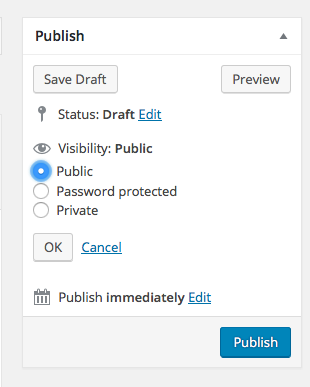
I hope that helps!
GeorgeParticipantHey Becca,
Thanks for reaching out!
At this time, manually copying/pasting the event information into an email is the only way to do this. 🙁 Our plugins don’t offer some alternative functionality.
Sorry to disappoint!
GeorgeParticipantHey Lindsay,
I’m sorry to hear about the ultimate outcome of this issue. I’ll close up this thread given the content of your last reply, but please open a new thread any time if there’s something we can help with.
If you’re ever trying to implement that WooCommerce hook somewhere inside our plugins, be sure to check out this hand guide to template modifications which should help make the process as easy as possible → https://theeventscalendar.com/knowledgebase/themers-guide/
Cheers,
GeoregParticipantHey Juan,
Thanks for reaching out!
I couldn’t find your post from yesterday, but I do want to confirm that there is a bug here and we are working hard on getting a fix out the door for it—we have heard from several folks and are trying to fix this bug ASAP.
Stay tuned!
Sincerely,
GeorgeParticipantHey @Benjamin,
I’m sorry to hear about this!
This is not normal behavior, and I cannot recreate it, so to help me investigate, can you post your site’s complete “System information?”? Here’s how → https://theeventscalendar.com/knowledgebase/sharing-sys-info/
Thank you!
George -
AuthorPosts