

Forum Replies Created
-
AuthorPosts
-
May 17, 2016 at 11:10 am in reply to: Question around tickets delivery in a lost/undelivered email #1115500
George
ParticipantHey @Tac,
Our plugins unfortunately do not have a feature to allow for the manual re-sending of tickets to attendees. 🙁
To help mitigate the possibility of delivery failures, you might find a plugin that enhances the WordPress Core wp_mail() function (which our plugins use to send emails) helpful. This plugin, for example, helps use SMTP instead of your server defaults for sending emails: https://wordpress.org/plugins/easy-wp-smtp/
This is not a way to manually send failed emails, to be clear; it’s just a way to hopefully reduce the amount of such failed emails, and is an example of the type of plugin that might help with this. Explore similar options in case it’s helpful.
I hope this helps! 🙂
Cheers,
GeorgeMay 17, 2016 at 11:06 am in reply to: Dynamic link to the next upcoming event in a series of recurring events? #1115498ParticipantHey Seth,
There is unfortunately no way to do this at this time, where the link “intelligently” knows what next event to go to.
You could manually add a link to the next event in each single other event instance, but otherwise there is no out-of-the-box feature for this. 🙁
Cheers,
GeorgeParticipantHey @Michael,
Thanks for reaching out! While we cannot help with customizations and modifications, and adding things like costs, venues, etc. is a complicated customization to make, I would be happy to take a look at your site firsthand and recommend some CSS that might help.
To that end, can you share a link to your site where the widget in your screenshot is visible?
I will take a look.
For those other customizations, these would unfortunately require many code customizations to implement. 🙁
So to implement those features you describe, you would have to write that custom code or hire a professional developer to do it for you. We have a list of great developers here → http://m.tri.be/18k1 (and have no affiliation with any of these folks—they’re simply some well-respected names in the community that we’ve compiled to share in situations like this one).
Cheers!
GeorgeMay 17, 2016 at 10:19 am in reply to: Changing sender's email address on confirmation email #1115481ParticipantHey @TEME,
Thanks for reaching out!
Changing the “sender” email address requires writing custom code. Our plugins simply use the built-in WordPress mail function, so you will have to read about the WordPress mailing function here ? https://developer.wordpress.org/reference/functions/wp_mail/
From that page, for example:
Optional filters ‘wp_mail_from‘ and ‘wp_mail_from_name‘ are run on the sender email address and name.
So you will need to use that wp_mail_from filter, which you can read about here ? https://developer.wordpress.org/reference/hooks/wp_mail_from/
⚠️ We cannot help with modifying code, so you will have to take the reins from here. But as a quick example, adding something like this to your theme’s functions.php file should generally do the trick:
add_filter( 'wp_mail_from', 'tribe_change_wp_mail_from' );function tribe_change_wp_mail_from( $from ) {
return '[email protected]';
}
Cheers,
GeorgeParticipantHey Tate,
Thanks for reaching out!
We unfortunately can’t help with this process of creating new templates and all of that—it’s indeed an involved process that requires knowledge of code, of WordPress, and of how to navigate plugin files to find out how to recreate features and functions for your own needs.
I’m sorry to disappoint! ⚠️ Please read this page to learn more about plugin support → https://theeventscalendar.com/knowledgebase/what-support-is-provided-for-license-holders/
If you need custom views and templates and other modifications, but aren’t able to implement such things entirely on your own, then I would encourage seeking the assistance of a professional developer. We have a list of great developers here, if it’s handy → http://m.tri.be/18k1 (and we have no affiliation with any of these folks–they’re simply some well-respected names in the community that we’ve compiled).
While I cannot assist with your question here, just as a quick suggestion to try and help at least a little bit: if you are trying to have a four-column option that is totally separate from the existing three-column option, then perhaps a simple way to do this would be to make a custom page template and then write custom CSS from scratch and custom events queries from scratch.
While creating these components from scratch is indeed more work on the surface, it might be less of a headache than trying to re-work existing components from The Events Calendar and Events Calendar Pro.
It’s just a loose suggestion—no worries. One other thing I would like to share is a set of resources that might help. Here are some such resources:
• Writing custom events queries ? https://theeventscalendar.com/knowledgebase/using-tribe_get_events/
• Custom plugin templates ? https://theeventscalendar.com/knowledgebase/themers-guide/
• Child themes, for adding custom CSS ? https://codex.wordpress.org/Child_ThemesI hope these resources and my input stimulate some ideas here, and if you reach out to a developer for assistance I hope that goes well.
Best of luck with your project, Tate! If you have any other questions that we are able to help with, please let me know.
Sincerely,
GeorgeMay 17, 2016 at 9:44 am in reply to: Community Events – Stop overlapping events from being submitted per category? #1115455ParticipantHey Jeff,
Thanks for reaching out! This is not easily possible:
If an event at Venue A existed for January 14 from 4pm – 6pm, is there a way I could stop other submissions from being submitted that would overlap that time in that venue?
If you’re comfortable with coding, then you might be able to dive under the hood and tinker to fix this; but it would indeed be a rather involved customization. There is no support for this with the plugin as it stands “out of the box.”
Though it’s of course not nearly as robust, a useful feature that is included out of the box here might be the fact that you can set the default status for events upon submission; this way, submissions can be set to come into the site as “Draft” items, or as “Pending Review” items, instead of “Published” items. This would mean a manual review and approval before they are published, which may or may not suit your project’s needs well but I just wanted to mention it.
Let me know if this helps and if you have any other questions I can try to help with.
Sincerely,
GeorgeParticipant😀
ParticipantHi, I notice in your “System Information” that you have a plugin listed as this:
Events Calendar Pro – Events List version 1.0.0 by Nabil Kadimi
Since this has “Events List” in the plugin title, I’m wondering if this plugin is adding its own version of the [tribe_events_list] shortcode or otherwise messing with the “default”/real shortcode that our plugins provide?
To test this, try deactivating that plugin and see if anything helps.
If that does not help, then while you mention not being able to deactivate the theme, the only other step I can recommend is to try proceeding with every other step you can do on this page ? https://theeventscalendar.com/knowledgebase/testing-for-conflicts/
I cannot reproduce your issues and so, as things currently stand, this still could be a plugin/theme code conflict and the steps above are the only means of revealing this—or ruling it out.
Do whatever steps on that page you are able to do; after EACH step, each plugin deactivation for example, check on the page with the shortcode and see if the behavior there is the same.
Thank you for your patience here; let us know what you find!
Sincerely,
GeorgeParticipantThank you for your patience with the delayed response over the weekend!
In addition to the code from that knowledgebase article, I would recommend adding code like this to your theme’s functions.php file:
add_action( 'init', 'tribe_relocate_attendees_list' );function tribe_relocate_attendees_list() {
$attendees_list = Tribe__Tickets_Plus__Attendees_List::instance();
remove_action( 'tribe_events_single_event_after_the_meta', array( $attendees_list, 'render' ), 4 );
add_action( 'tribe_events_single_event_before_the_meta', array( $attendees_list, 'render' ), 4 );
}I tinkered a bit and it’s this code that finally let me achieve what you describe:
So I would like to move this between the content and event details.
Try it out and let me know if it helps!
— George
ParticipantThanks for clarifying this! I’m sorry to bear the news again that the functionality you describe wanting here is not possible with our plugins at this time:
In a perfect world, I’d like it to show up.
url.com/event/%category%/facilitySorry to disappoint. 🙁 Please let me know if there’s anything else I can try to help with.
Sincerely,
GeorgeParticipantExcellent! 😀
I hope that option worked—your reply seems to imply that it did work, so I will close this thread for now. If this is a mistake and/or if you have any other questions, open a new thread any time.
Cheers!
GeorgeParticipantSounds good, Stephen—I’m glad to have helped. Do keep in mind our awesome refund policy, in which you can get a refund immediately any time within the first thirty days of purchase. I only mention this because many folks use this policy as a sort of “trial period” to test things out firsthand and see if our software is the right fit.
Learn more about this policy here ? https://theeventscalendar.com/knowledgebase/refund-policy/
I’ll otherwise close this thread for now. If you have any other questions, open a new thread any time.
Best of luck with your project,
GeorgeParticipantHi! I took a look at that page and indeed found many extra Paragraph tags that our plugin itself would not be generating.
So, to truly resolve this issue and get things looking fine, you will likely need to make further code customizations to get the design right, and/or contact your theme developer for assistance regarding the addition of these empty paragraph tags. We cannot help with code customizations or with software we do not make, so please do reach out to the theme author for more support and—hopefully—a true resolution to these problems.
With all of this being said, however, try adding the following bit of CSS code to the bottom of your theme’s style.css file:
article #tribe-events p {

    display: none !important;

}
This code should help remove the paragraph tags from inside events content.
I hope this helps!
GeorgeParticipantHey @worldgolfskills,
Thank you for reaching out!
What you describe here is unfortunately not possible at this time:
If I select the category for one event, I would like that to also automate into the URL for the event.
However, just to be clear, by default there is support for category-filtered views. What I mean, for example, is that if you click the “Category” link on a single event it will take you to a page where only events in that selected category show up.
This screenshot shows the type of Event Category link that I am referring to:
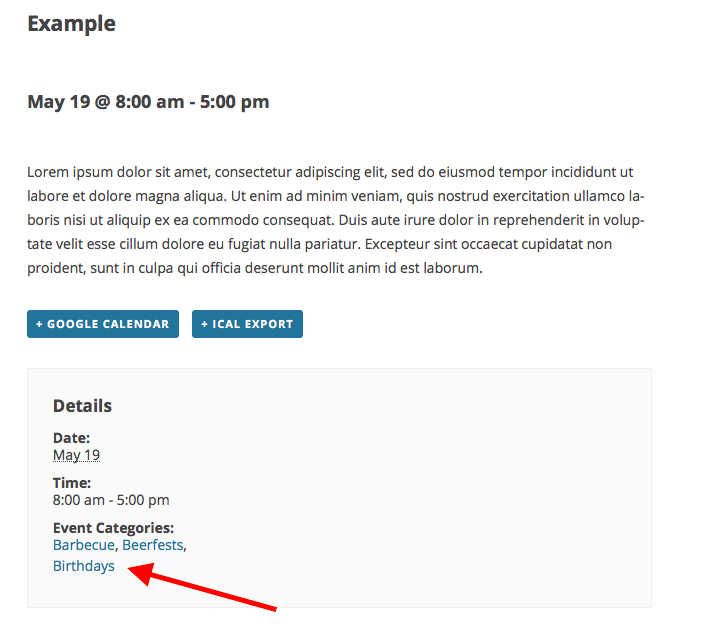
My website for the testing site where this exists is http://support.dev, so when I click that link, I am brought to http://support.dev/events/catgeory/barbecue
Can you confirm that this basic functionality exists for you and works fine? If not, can you:
1. link to an event where the category links do not work as described?
2. post your site’s system information? Here’s how ? https://theeventscalendar.com/knowledgebase/sharing-sys-info/
3. Post your site’s “Permalinks” settings? These are found in Settings → Permalinks in your wp-admin. Are they /%postname%/, for example?Thanks,
GeorgeMay 16, 2016 at 8:14 am in reply to: using conditional statements for custom / additional fields? #1114932ParticipantHi Pete,
Thanks for reaching out.
⚠️ We unfortunately cannot help with custom coding at all, so I will not be able to help see you through this custom coding question. Please read more about this here ? https://theeventscalendar.com/knowledgebase/what-support-is-provided-for-license-holders/
With that being said, I would like to at least offer a bit of advice before having to close up this thread.
First, tribe_get_custom_field() is a deprecated function. Do not use this any more. Use tribe_get_custom_fields() instead. This version of the function does NOT let you pass a specific field name, like ‘Company’. It returns the array of all custom fields for the given event.
Next, to make it easier to check if the output of tribe_get_custom_fields(); is empty or not, I would recommend storing the output in a variable and then checking the value of that variable.
So, something like this:
$event_fields = tribe_get_custom_fields();
That will make $event_fields have the value of the event custom fields. You can then check for the existence of a “Company” field in a number of ways.
To learn how to do that, I would recommend first seeing what the output of $event_fields is for you. You can use the PHP debugging function var_dump() for that, or print_r(), like as follows:
var_dump( $event_fields );
print_r( $event_fields );
Check out the output and tinker from there.
You will have to take the reins from here, and we cannot help with further questions about this custom coding, but I hope this information helps you get started.
You can learn more about var_dump() here, and can learn more about print_r() here. If you would like more assistance with the custom coding, you can hire a professional developer to assist you. We have a list of great developers here ? http://m.tri.be/18k1 (and we have no affiliation with any of these folks–they’re simply some well-respected names in the community that we’ve compiled).
Best of luck with your customizing!
George -
AuthorPosts